EasyManua.ls Logo

Sony EV-C100 - Chapter 6 Additional Information; Technical Information; General Setup Information; Setting the AF UNIT Selector

Sony EV-C100
28 pages
Print Icon
To Previous Page IconTo Previous Page
Loading...
Technical
Information
FILED
(High
Eight)
Video
System
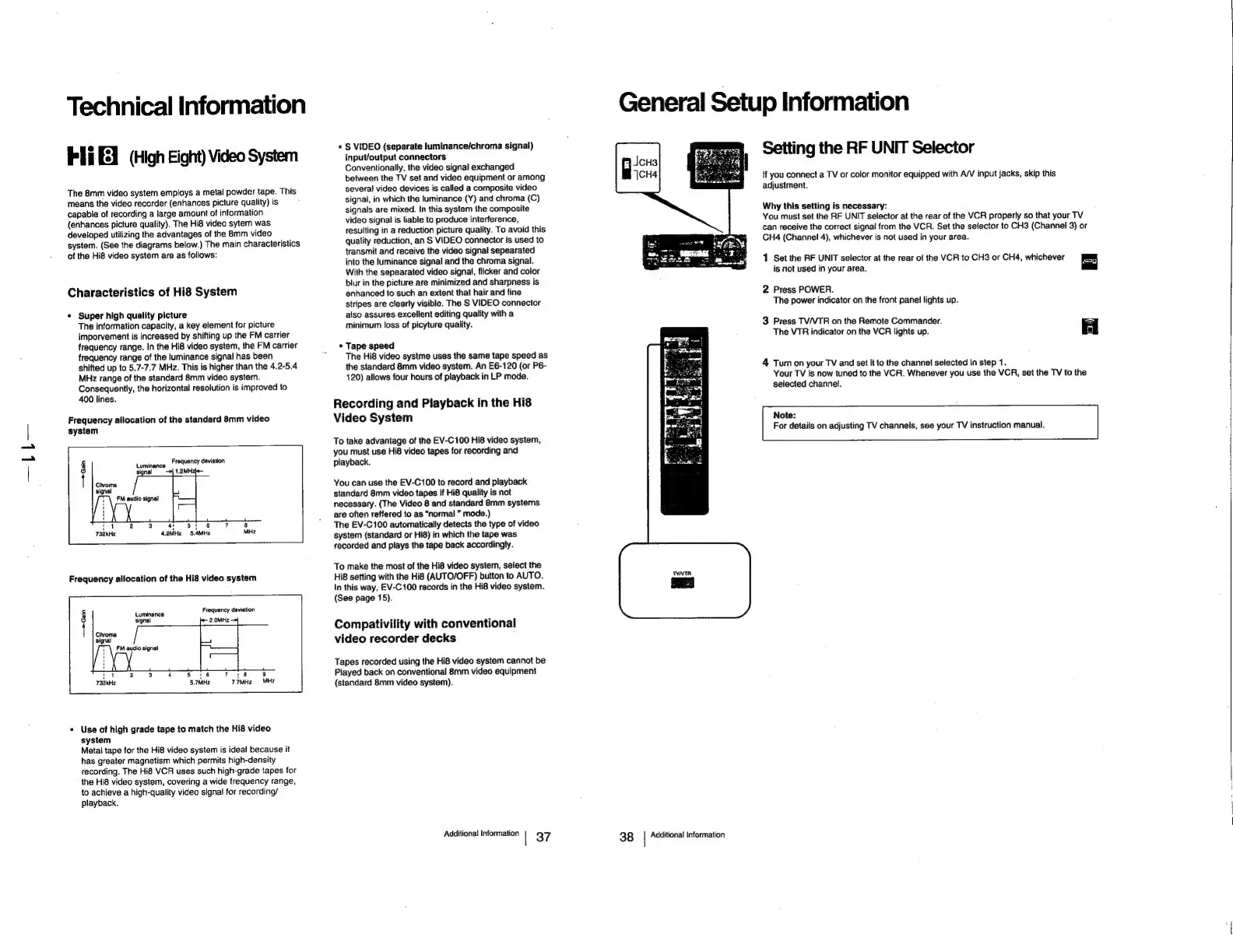
The
8mm
video
system
employs
a
metal
powder
tape.
This
means
the
video
recorder
(enhances
picture
quality)
is
capable
of
recording
a
large
amount
of
information
(enhances
picture
quality).
The
Hi8
video
sytem
was
developed
utilizing
the
advantages
of
the
8mm
video
system.
(See
the
diagrams
below.)
The
main
characteristics
of
the
Hi8
video
system
are
as
follows:
Characteristics
of
Hi8
System
*
Super
high
quality
picture
The
information
capacity,
a
key
element
for
picture
imporvement
is
increased
by
shifting
up
the
FM
carrier
frequency
range.
In
the
Hi8
video
system,
the
FM
carrier
frequency
range
of
the
luminance
signal
has
been
shifted
up
to
5.7-7.7
MHz.
This
is
higher
than
the
4.2-5.4
MHz
range
of
the
standard
8mm
video
system.
Consequently,
the
horizontal
resolution
is
improved
to
400
lines.
Frequency
allocation
of
the
standard
8mm
video
system
Luminance
Frequency
deviation
Chroma
signal
Frequency
allocation
of
the
Hi8
video
system
tuniance
Frequency
deviation
signal
2.0MHz
|
—>Gain
tt
n
ni
a
4
5S
'6
7
:8
9
§.7MHz
77MHz
MHz
*
Use
of
high
grade
tape
to
match
the
Hi8
video
system
Metal
tape
for
the
Hi8
video
system
is
ideal
because
it
has
greater
magnetism
which
permits
high-density
recording.
The
Hi8
VCR
uses
such
high-grade
tapes
for
the
Hi8
video
system,
covering
a
wide
frequency
range,
to
achieve
a
high-quality
video
signal
for
recording/
playback.
«
S
VIDEO
(separate
luminance/chroma
signal)
input/output
connectors
Conventionally,
the
video
signal
exchanged
between
the
TV
set
and
video
equipment
or
among
several
video
devices
is
called
a
composite
video
signal,
in
which
the
luminance
(Y)
and
chroma
(C)
signals
are
mixed.
In
this
system
the
composite
video
signal
is
liable
to
produce
interference,
resulting
in
a
reduction
picture
quality.
To
avoid
this
quality
reduction,
an
S
VIDEO
connector
is
used
to
transmit
and
receive
the
video
signal
sepearated
into
the
luminance
signal
and
the
chroma
signal.
With
the
sepearated
video
signal,
flicker
and
color
blur
in
the
picture
are
minimized
and
sharpness
is
enhanced
to
such
an
extent
that hair
and
fine
stripes
are
clearly
visible.
The
S
VIDEO
connector
also
assures
excellent
editing
quatity
with
a
minimum
loss
of
picyture
quality.
Tape
speed
The
Hi8
video
systme
uses
the
same
tape
speed
as
the
standard
8mm
video
system.
An
E6-120
(or
P6-
120)
allows
four
hours
of
playback
in
LP
mode.
Recording
and
Playback
in
the
Hi8
Video
System
To
take
advantage
of
the
EV-C100
Hi8
video
system,
you
must
use
Hi8
video
tapes
for
recording
and
playback.
You
can
use
the
EV-C100
to
record
and
playback
standard
8mm
video
tapes
if
Hi8
quality
is
not
necessary.
(The
Video
8
and
standard
8mm
systems
are
often
reffered
to
as
“normal
mode.)
The
EV-C100
automatically
detects
the
type
of
video
system
(standard
or
Hi8)
in
which
the
tape
was
recorded
and
plays
the
tape
back
accordingly.
To
make
the
most
of
the
Hi8
video
system,
select
the
Hi8
setting
with
the
Hig
(AUTO/OFF)
button
to
AUTO.
In
this
way,
EV-C100
records
in
the Hi8
video
system.
(See
page
15).
Compativility
with
conventional
video
recorder
decks
Tapes
recorded
using
the
Hi8
video
system
cannot
be
Played
back
on
conventional
8mm
video
equipment
(standard
8mm
video
system).
Additional
information
|
37
General
Setup
Information
Setting
the
RF
UNIT
Selector
if
you
connect
a
TV
or
color
monitor
equipped
with
A/V
input
jacks,
skip
this
adjustment.
Why
this
setting
is
necessary:
You
must
set
the
RF
UNIT
selector
at
the
rear
of
the
VCR
properly
so
that
your
TV
can
receive
the
correct
signa!
from
the
VCR.
Set
the
selector
to
CH3
(Channel
3)
or
CH4
(Channel
4),
whichever
is
not
used
in
your
area.
1
Set
the
RF
UNIT
selector
at
the
rear
of
the
VCR
to
CH3
or
CH4,
whichever
=a
is
not
used
in
your
area.
2
Press
POWER.
The
power
indicator
on
the
front
panel
lights
up.
3
Press
TV/VTR
on
the
Remote
Commander.
The
VTR
indicator
on
the
VCR
fights
up.
a
|
4
Turn
on
your
TV
and
set
it
to
the
channel
selected
in
step
1.
Your
TV
is
now
tuned
to
the
VCR.
Whenever
you
use
the
VCR,
set
the
TV
to
the
selected
channel,
Note:
For
details
on
adjusting
TV
channels,
see
your
TV
instruction
manual.
38
|
Additional
Information

Related product manuals