EasyManua.ls Logo

Sony EV-C100 - Preparing the Remote Commander; Inserting Batteries

Sony EV-C100
28 pages
Print Icon
To Next Page IconTo Next Page
To Previous Page IconTo Previous Page
Loading...
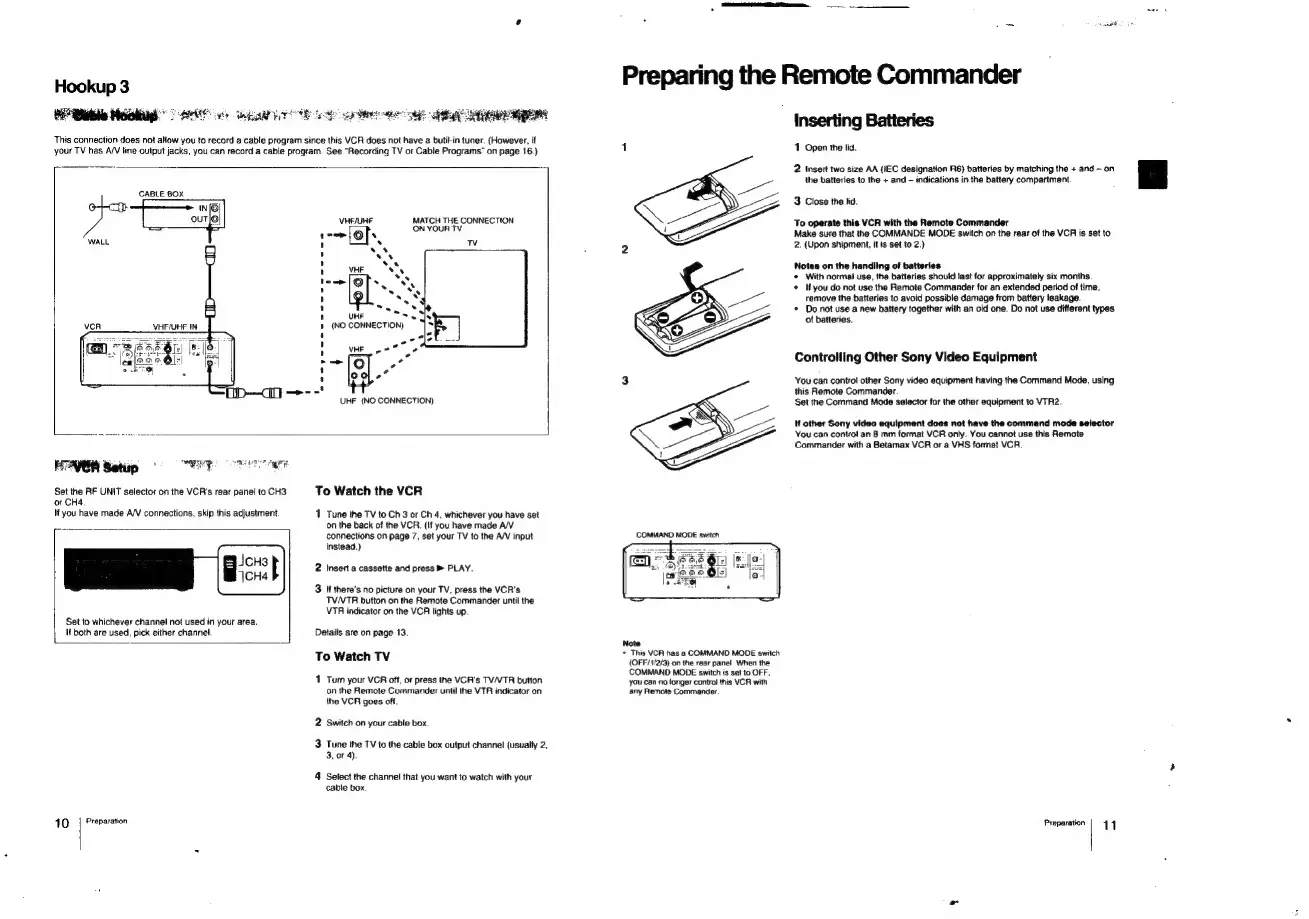
This
connection
does
not
allow
you
to
record
a
cable
program
since
this
VCR
does
not
have
a
butit-in
tuner.
(However,
if
your
TV
has
A/V
line
output
jacks,
you
can
record
a
cable
program.
See
“Recording
TV
or
Cable
Programs”
on
page
16.)
CABLE
BOX
VHF/UHF
IN,
VHF/UHF
MATCH
THE
CONNECTION
ON
YOUR
TV
HAVO
Seti
,
ropesneg.
LRT
agate
Set
the
RF
UNIT
selector
on
the
VCR's
rear
panel
to
CH3
or
CH4.
W
you
have
made
A/V
connections,
skip
this
adjustment.
|
Bab
Set
to
whichever
channel
not
used
in
your
area.
\f
both
are
used,
pick
either
channel,
10
|
Preparation
To
Watch
the
VCR
1
Tune
the
TV
to
Ch
3
or
Ch
4,
whichever
you
have
set
on
the
back
of
the
VCR.
(If
you
have
made
A/V
connections
on
page
7,
set
your
TV
to
the
A/V
input
instead.)
2
Insert
a
cassette
and
press
®
PLAY.
3
If
there's
no
picture
on
your
TV,
press
the
VCR's
TVNTR
button
on
the
Remote
Commander
until
the
VTR
indicator
on
the
VCR
lights
up.
Details
are
on
page
13.
To
Watch
TV
1
Turn
your
VCR
off,
or
press
the
VCR's
TV/VTR
button
on
the
Remote
Commander
until
the
VTR
indicator
on
the
VCR
goes
off.
2
Switch
on
your
cable
box
3
Tune
the
TV
to
the
cable
box
output
channel
(usually
2,
3,
or
4).
4
Select
the
channel
that
you
want
to
watch
with
your
cable
box
Preparing
the
Remote
Commander
Note
+
This
VCR
has
a
COMMAND
MODE
switch
(OFF/$/2/3)
on
the
rear
panel
When
the
COMMAND
MODE
switch
is
set
to
OFF.
you
can
no
fonger
control
this
VCR
with
any
Remote
Commander.
Inserting
Batteries
1
Open
the
lid.
2
Insert
two
size
AA
(IEC
designation
R6)
batteries
by
matching
the
+
and
-
on
the
batteries
to
the
+
and
indications
in
the
battery
compartment.
3
Close
the
lid.
To
operate
this
VCR
with
the
Remote
Commander
Make
sure
that
the
COMMANDE
MODE
switch
on
the
rear
of
the
VCR
is
set
to
2.
(Upon
shipment,
it
is
set
to
2.)
Notes
on
the
handling
of
batteries.
*
With
normal
use,
the
batteries
should
last
for
approximately
six
months.
*
Ifyou
do
not
use
the
Remote
Commander
for
an
extended
period
of
time,
remove
the
batteries
to
avoid
possible
damage
from
battery
leakage.
*
Do
not
use
a
new
battery
together
with
an
old
one.
Do
not
use
different
types
of
batteries.
Controlling
Other
Sony
Video
Equipment
You
can
control
other
Sony
video
equipment
having
the
Command
Mode,
using
this
Remote
Commander.
Set
the
Command
Mode
selector
for
the
other
equipment
to
VTR2.
lf
other
Sony
video
equipment
does
not
have
the
command
mode
selector
You
can
control
an
8
mm
format
VCR
only.
You
cannot
use
this
Remote
Commander
with
a
Betamax
VCR
or
a
VHS
format
VCR
Preparation
11

Related product manuals