EasyManua.ls Logo

Sony EV-C100 - Recording TV or Cable Programs Cece

Sony EV-C100
28 pages
Print Icon
To Next Page IconTo Next Page
To Previous Page IconTo Previous Page
Loading...
@
AEC
Note
When
you
use
the
LINE
IN
VIOEO
jack
and
LINE
IN
5
VIDEO
connector
at
the
same
time,
the
LINE
IN
S
VIDEO
connector
has
priority
16
Basic
Operations
Recording
TV
or
Cable
Programs
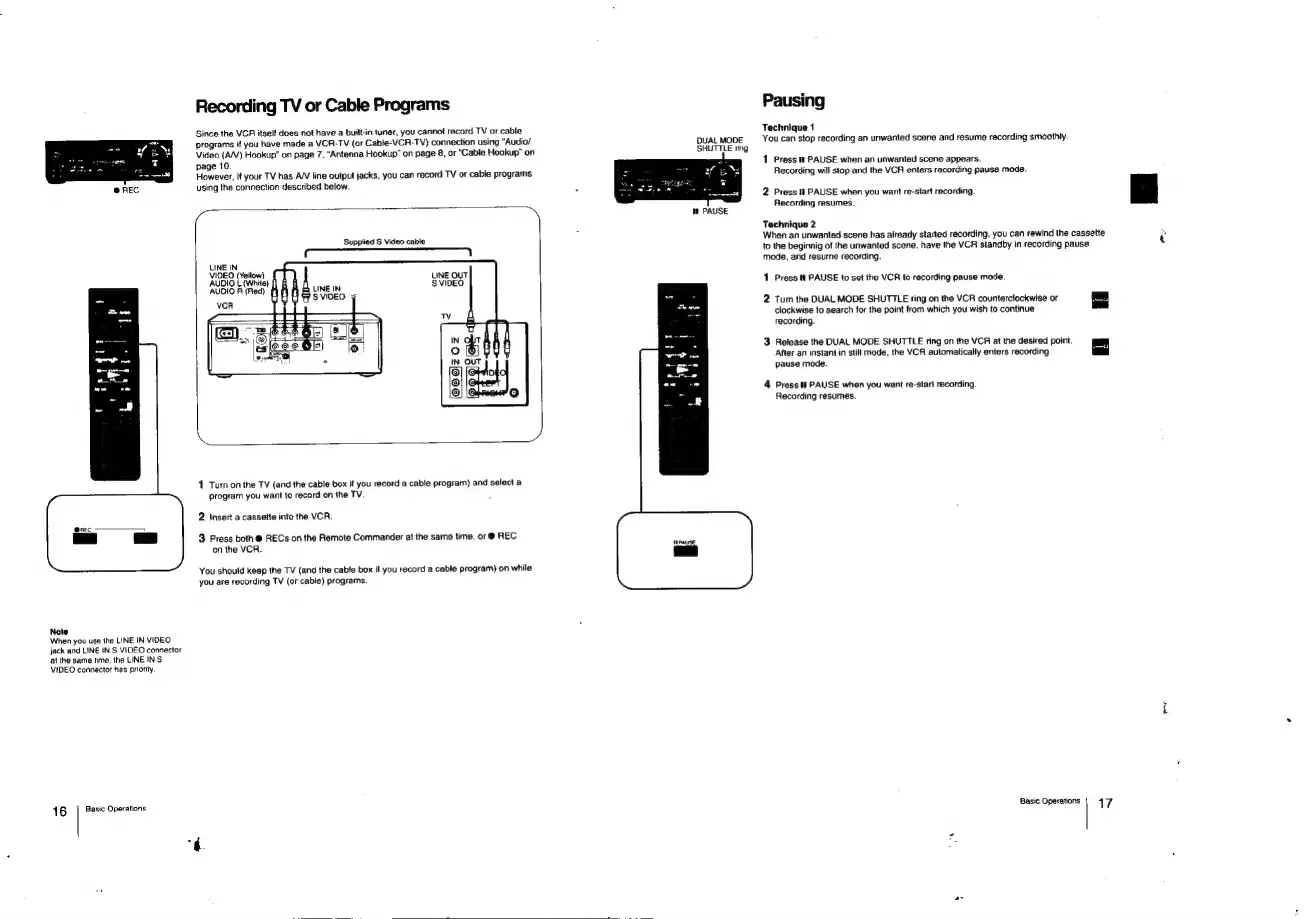
Since
the
VCR
itself
does
not
have
a
built-in
tuner,
you
cannot
record
TV
or
cable
programs
if
you
have
made
a
VCA-TV
(or
Cable-VCR-TV)
connection
using
“Audio/
Video
(A/V)
Hookup"
on
page
7,
“Antenna
Hookup”
on
page
8,
or
“Cable
Hookup”
on
page
10.
However,
if
your
TV
has
A/V
line
output
jacks,
you
can
record
TV
or
cable
programs
using
the
connection
described
below.
Supplied
S
Video
cable
LINE
IN
VIDEO
(Yellow)
AUDIO
L
(White)
f}
AUDIO
R
(Red)
LINE
OUT
$
VIDEO
1
Turn
on
the
TV
(and
the
cable
box
if
you
record
a
cable
program)
and
select
a
program
you
want
to
record
on
the
TV.
2
Insert
a
cassette
into
the
VCR.
3
Press
both
@
RECs
on
the
Remote
Commander
at
the
same
time,
or
@
REC
on
the
VCR.
You
should
keep
the
TV
(and
the
cable
box
if
you
record
a
cable
program)
on
while
you
are
recording
TV
(or
cable)
programs.
DUAL
MODE
SHUTTLE
ring
mW
PAUSE
Pausing
Technique
1
You
can
stop
recording
an
unwanted
scene
and
resume
recording
smoothly.
1
Press
PAUSE
when
an
unwanted
scene
appears.
Recording
will
stop
and
the
VCR
enters
recording
pause
mode.
2
Press
It
PAUSE
when
you
want
re-start
recording.
Recording
resumes.
Technique
2
When
an
unwanted
scene
has
already
started
recording,
you
can
rewind
the
cassette
to
the
beginnig
of
the
unwanted
scene.
have
the
VCR
standby
in
recording
pause
mode,
and
resume
recording.
1
Press
ft
PAUSE
to
set
the
VCR
to
recording
pause
mode.
2
Tur
the
DUAL
MODE
SHUTTLE
ring
on
the
VCR
counterclockwise
or
clockwise
to
search
for
the
point
from
which
you
wish
to
continue
recording.
3
Release
the
DUAL
MODE
SHUTTLE
ring
on
the
VCR
at
the
desired
point.
After
an
instant
in
still
mode,
the
VCR
automatically
enters
recording
=
pause
mode.
4
Press
i!
PAUSE
when
you
want
re-start
recording.
Recording
resumes.
Basic
Operations
17
coe

Related product manuals