HCD-CP101
12
SECTION 4
TEST MODE
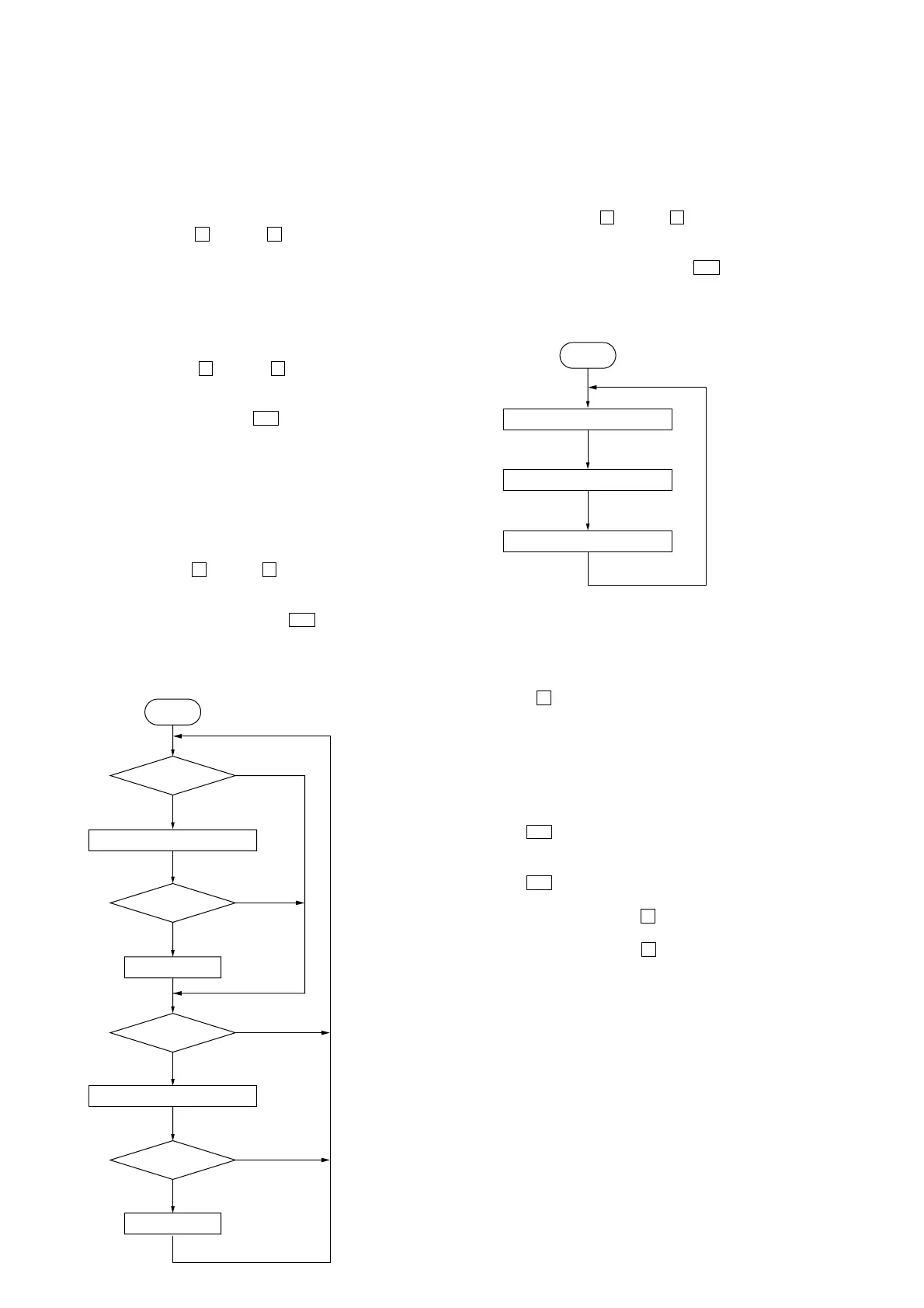
Start
REC pause for 3 seconds
FWD REC
Fast forward
REV Play
REC pause for 3 seconds
REV REC
Rewind
FWD Play
Shut off
Shut off
Shut off
Shut off
1 minute
3 minutes
1 minute
3 minutes
Start
Open the disc tray
Close the disc tray
Play the last track
[COLD RESET]
• The cold reset clears all data including preset data stored in the
RAM to initial conditions. Execute this mode when returning
the set to the customer.
Procedure:
1. Turn ON the power.
2. Press three buttons of x (TAPE), x (CD), and [BAND] si-
multaneously.
3. The set is reset.
[LIQUID CRYSTAL DISPLAY ALL LIT CHECK MODE]
Procedure:
1. Set to standby state.
2. Press three buttons of x (TAPE), x (CD), and
[TUNING MODE] simultaneously.
3. Liquid crystal display are all turned on.
4. To exit from this mode, press the I/1 button to turn the power
OFF.
[TAPE DECK AGING MODE]
This mode can be used for operation check of tape deck section.
Procedure:
1. Set a tape in the tape deck.
2. Set to standby state.
3. Press three buttons of x (TAPE), x (CD), and [TUNING +]
simultaneously.
4. The aging is executed in bellow sequence.
5. To exit from the aging mode, press the I/1 button to turn the
power OFF.
Aging mode sequence:
[CD AGING MODE]
This mode can be used for operation check of CD section.
Procedure:
1. Load a CD disc.
2. Set to standby state.
3. Press three buttons of x (TAPE), x (CD), and [TUNING --]
simultaneously.
4. The aging is executed in bellow sequence.
5. To exit from the aging mode, press the I/1 button to turn the
power OFF.
Aging mode sequence:
[CHANGE-OVER MD/VIDEO]
Procedure:
1. Set to standby state.
2. Press the x (CD) and the [FUNCTION] buttons simul-
taneously.
The function changes over to MD or VIDEO by turns.
[CHANGE-OVER THE AM TUNING INTERVAL]
(EXCEPT AEP and UK models)
•The AM tuning interval can be changed over 9 kHz or 10 kHz.
Procedure:
1. Press the I/1 button to turn the power ON.
2. Select the function “TUNER”, and press the [BAND] button
to select the BAND “AM”.
3. Press the I/1 button to turn the power OFF.
4. Change over to 9 kHz:
Press the [TUNING --] and the x (CD) buttons simultaneously.
Change over to 10 kHz:
Press the [TUNING +] and the x (CD) buttons simultaneously.


 To Next Page