HCD-DZ280/DZ680/HDZ284/HDZ485
28
9. DEMO PLAY MODE OUT
It is a mode to release the demonstration reproduct by the dedicated
demonstration disc.
1. During playback the DEMO Disc, press the [
x
] and [
N
]
buttons for fi ve seconds simultaneously.
2. The message “DEMO OFF” is displayed, a mode to reproduct
the demonstration is released.
10. DMPORT (DIGITAL MEDIA PORT) TEST
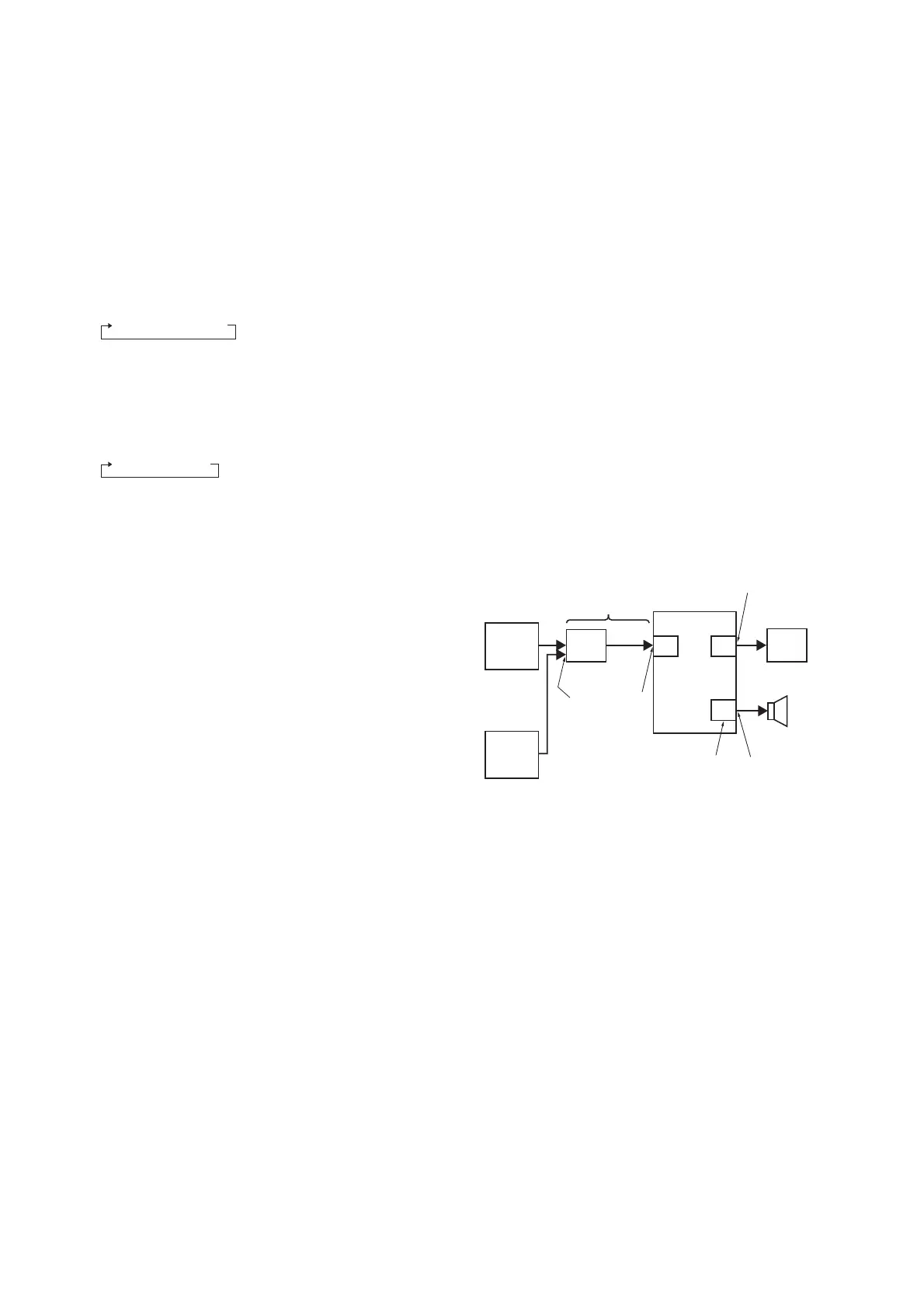
1. Connect the DMPORT CHECK JIG (P/N: J-2501-309-A) with
the terminal DMPORT.
2. Press the [
?/1
] button to turn the power on.
3. Confi rm that both LEDs of the DMPORT confi rmation JIG
lights. (Confi rmation the power supply line.)
4. Set the [FUNCTION] button with “DMPORT” on this model.
5. Press three buttons [
x
], [
N
] and [FUNCTION] simultane-
ously, the DMPORT test mode is activated.
6. It is confi rmed that “DMPORT OK” is displayed on this set
display. (Confi rmation of communication line)
7. To a pin jack of the DMPORT confi rmation JIG input informa-
tion relevant to audio signal (sine-wave 1.0Vrms) and compos-
ite video signal (white 100% 1.0Vp-p, color bar, etc.)
8. Confi rm the output of speakers and monitor TV. (Confi rmation
of analog signal)
9. To exit from this mode, press three buttons [
x
], [
N
] and
[FUNCTION] simultaneously.
color pattern
generator
DMPORT
CHECK JIG
(P/N: J-2501-309-A)
MAIN
board
TV
SET
CN451
CN4000 (DZ280/DZ680),
J4001 (HDZ284/HDZ485)
J001 7
AF oscillator
FL speaker,
FR speaker
IO-SCART or
IO-COMPONENT
board
SPEAKER
board
TB5301
VIDEO
AUDIO
8. AMP TEST MODE
• This mode is used to measurement and test of the AMP con-
nection.
Procedure:
1. Press the [
?/1
] button to turn the power on.
2. Press three buttons [
x
], [
N
] and [
Z
] simultaneously. When
the this mode, blink to segments (“SA-CD” and “CAT”) on FL
display.
3. Press [DISPLAY] button of the remote commander. When the
this mode is displayed as “MEASURE” on FL display.
Whenever the [DISPLAY] button is pressed, the AMP test
mode changes in the following order.
MEASURE USAFETY
MEASURE: AMP measurement mode
SAFETY: AMP regulations, temperature, character mode
4. Press [MUTING] button on the remote commander. When the
this mode is displayed as “VOL N” on FL display.
Whenever the [MUTING] button is pressed, the VOL test
mode changes in the following order.
VOL N UVOL M/M
VOL N: Turn the [VOLUME] control, the display is
change in succession (MIN y MAX)
VOL M/M: Turn the [VOLUME] control in the direction of
(+) is change to “MIN”, turn the direction of (–)
is change to “MAX”.
5. To exit from this mode, press the [
?/1
] button to “COLD
RESET” and turn the power off.


 To Next Page