– 18 –
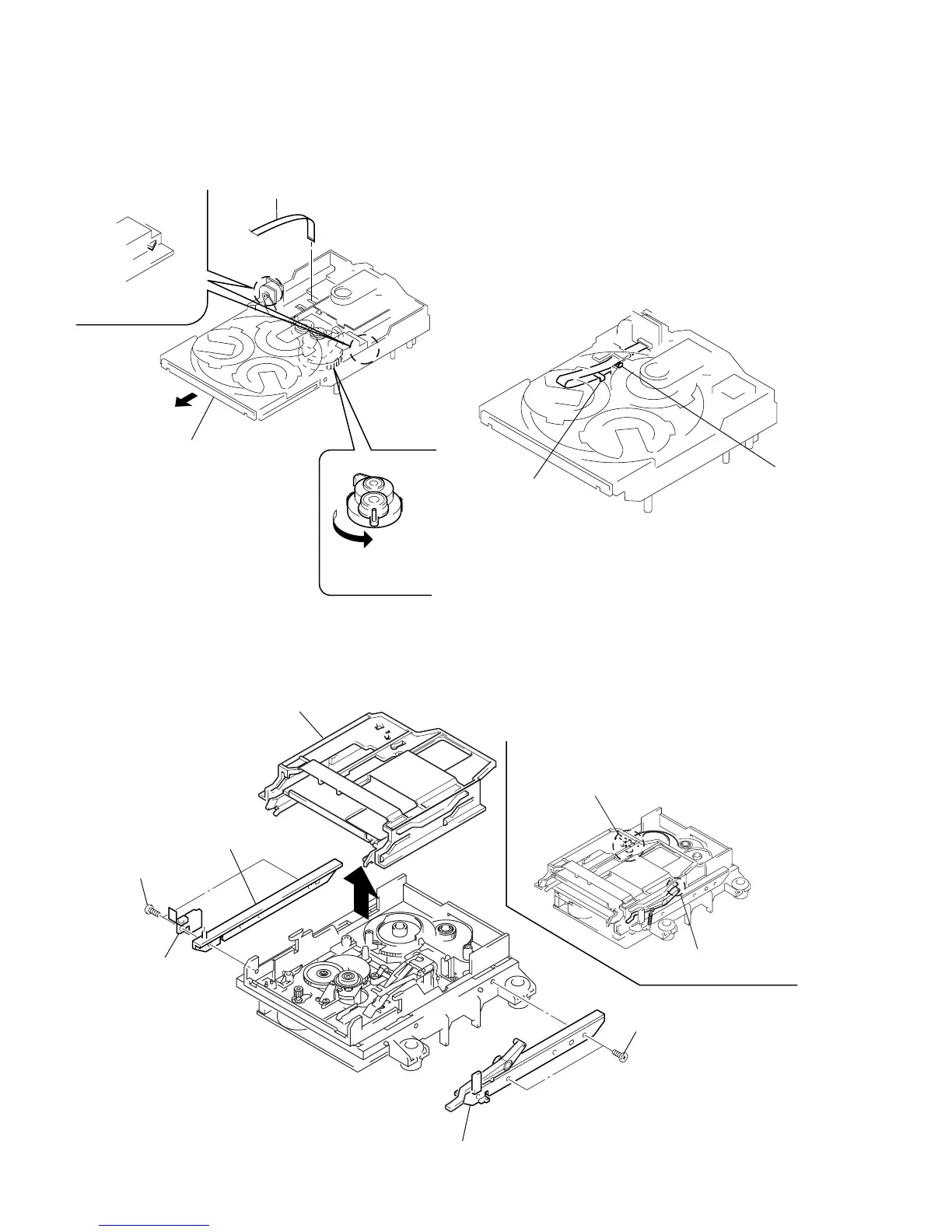
3-5. DISC TRAY
3-6. SLIDER (CAM)
(Perform after removing the front panel.) Note:When installing the Disc tray, pull around the flat type wire to
pass through the claw
A
and claw
B
, as shown in the figure.
Claw
B
Claw
A
1
Turn the cam the
direction of arrow.
2
Pull-out the disc tray.
5
Remove the disc tray.
4
Two claws
3
Flat type wire (8 core)
1
Two screws (BTP2.6x6)
2
Bracket (Guide L)
3
Leaf spring
5
Bracket (Guide R)
6
Slider (Cam)
4
Two screws (BTP2.6x6)
Set the shaft of Lever (O/C) to
be at the position in the figure.
Set the shaft of Cam gear to
be at the position in the figure.




 To Next Page