1-11 (E)
HDVF-C950W
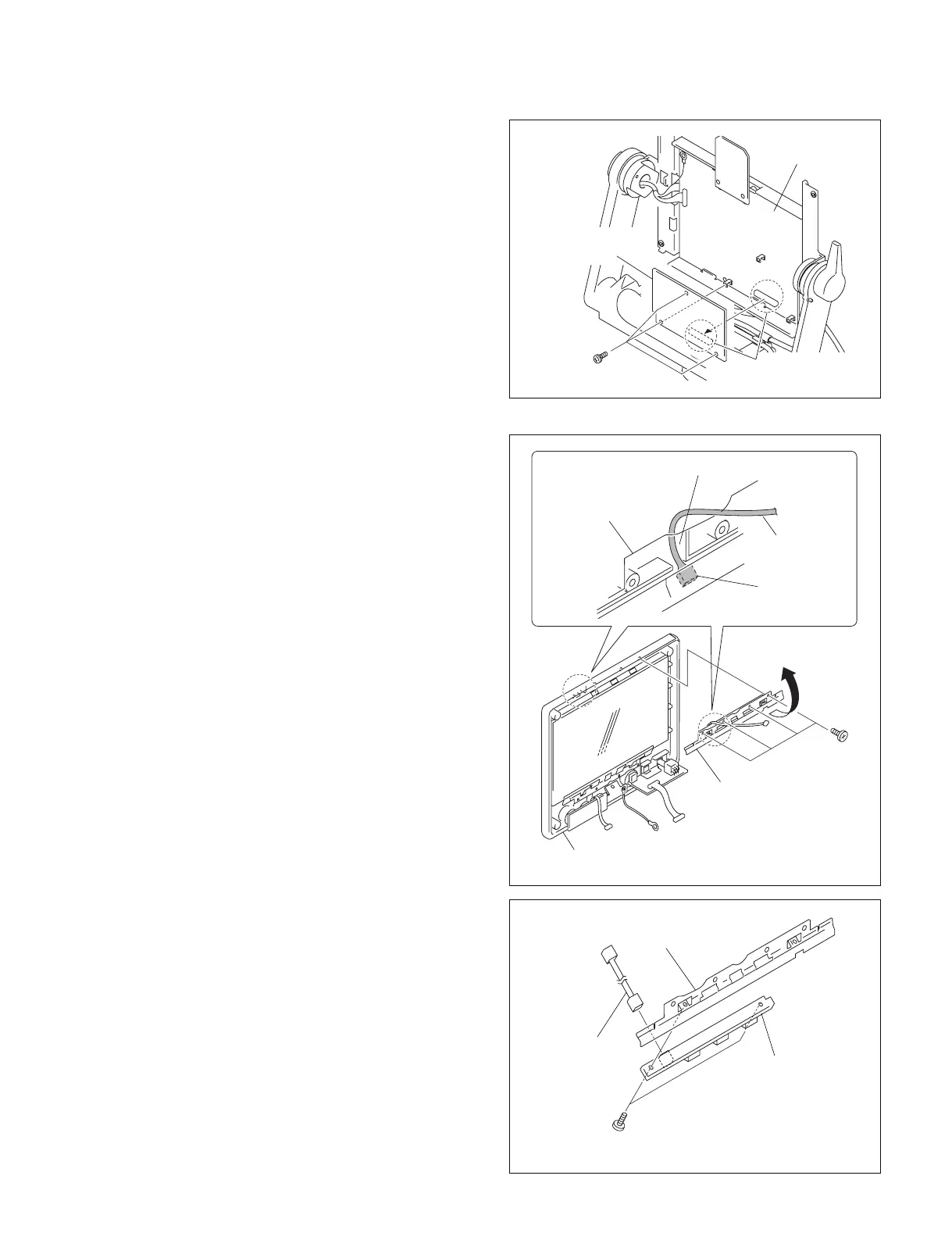
Board-to-board
PR-292 board
RE-237 board
PS2.5 x 5
1-7-4. Removing the RE-237 Board
1. Remove the rear cover assembly.
(Refer to Section 1-7-1 step 1.)
2. Remove the bezel assembly.
(Refer to Section 1-7-1 steps 2 to 5.)
3. Remove the three screws and remove the RE-237
board.
n
When installing the RE-237 board, apply the screw
locking compound to the screws.
4. Reinstall it by reversing the steps 1 to 3 of disassem-
bling.
1-7-5. Removing the LE-315 Board
1. Remove the rear cover assembly.
(Refer to Section 1-7-1 step 1.)
2. Remove the LCD unit.
(Refer to Section 1-7-1 steps 2 to 7.)
3. Remove the four screws and remove the LED bracket
and the LE-315 board from the bezel assembly in the
direction of arrow.
m
. To install the LED bracket and the LE-315 board to
the bezel assembly, pass the harness (LE) through
the cut-out for the harness (LE).
Be careful not to pinch the harness (LE) with the
LED bracket.
. Do not scar the protection panel.
n
Standard tightening torque :
25 x 10
_2
N.m (2.5 kg.cm)
4. Disconnect the harness from the connector (CN1) of
the LE-315 board.
5. Remove the two screws and remove the LED bracket
from the LE-315 board.
6. Reinstall it by reversing the steps 1 to 5 of disassem-
bling.
B2.6 x 5
LE-315 board
Harness (LE)
LED bracket
BTP2.6 x 6
LED bracket,
LE-315 board
Bezel assembly
Cut-out for the harness (LE)
Harness (LE)
LE-315 board
(CN1)
LED bracket



 To Next Page