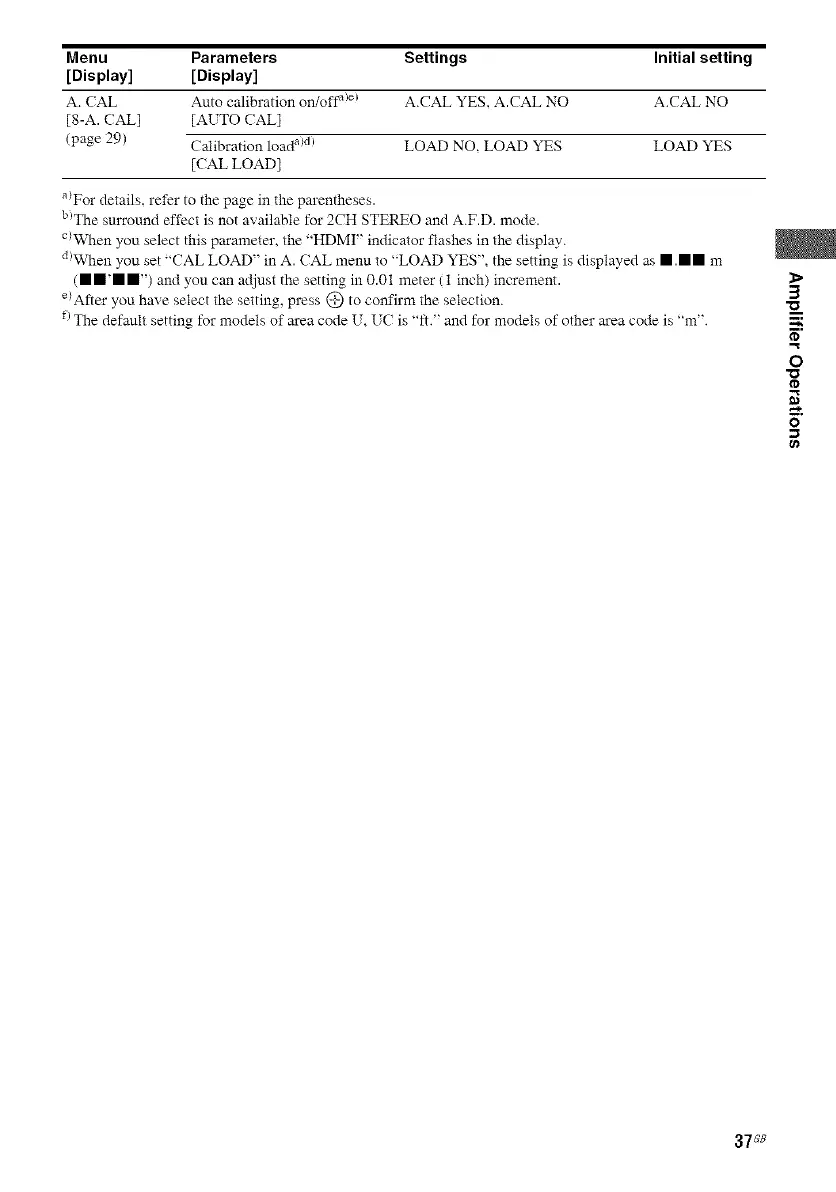
Menu Parameters Settings Initial setting
[Display] [Display]
A. (AL Auto calibration on/off a>e) A.CAL YES, A.CAL NO A.CAL NO
[8-A. CAR] [AUTO CALl
(page 29) Calibration load a)d) LOAD NO, LOAD YES LOAD YES
[CAL LOAD]
a_For details, refer to the page in the parentheses.
b)The surround effect is not available for 2CH STEREO and A.F.D. mode.
c)When you select this parameter, the "HDMI" indicator flashes in the display.
diWhen you set "CAL LOAD" in A. (AL menu to "LOAD YES", the setting is displayed as • .mm m
(• m'm m') and you can adjust the setting in 0.01 meter (1 inch) increment.
e)After you have select the setting, press @ to confirm the selection.
f)The default setting for models of area code U, U( is "ft." and for models of other area code is "m".
1>
3
m,
O
I'D
g}
37_8



 To Next Page