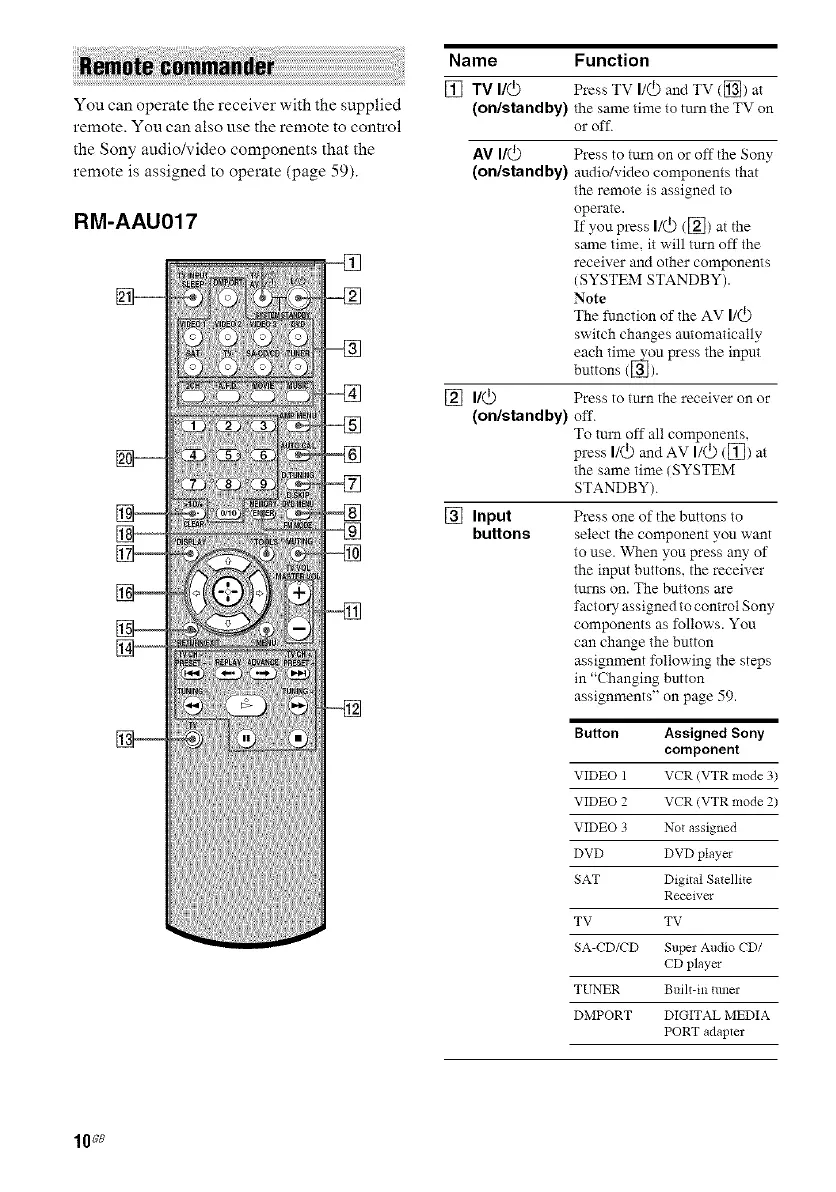
You can operate the receiver with the supplied
remote. You can also use the remote to control
the Sony audio/video components that the
remote is assigned to operate {page 59).
RM-AAU017
Name Function
[] TV I/(_) Press TV I/(_)and TV ([]) at
(on/standby) the same time to tuxn the TV on
or off.
AV I/@ Press to tm'n on or off the Sony
(on/standby) audio/video components that
the remote is assigned to
operate.
If you press I/@ {[2]) at the
same time, it will tm'n off the
receiver and other components
iSYSTEM STANDBY).
Note
The function of the AV I/(_)
switch changes automatically
each time vou press the input
buttons {_).
[] I/(_) Press to tm'n the receiver on or
(on/standby) off.
To turn off all components,
press I/(_) andAV I/(_) ([]) at
the same time iSYSTEM
STANDBY).
[] Input
buttons
Press one of the buttons to
select the component you want
to use. When you press any of
the input buttons, the receiver
tm'ns on. The buttons are
factorT assigned to control Sony
components as follows. You
can change the button
assignment following the steps
in "(hanging button
assignments" on page 59.
Button Assigned Sony
component
VIDEO 1 VCR (VTR mode 3)
VIDEO 2 VCR (VTR mode 2)
VIDEO 3 Not assigned
DVD DVD player
SAT Digital Satellite
Receiver
TV TV
SA-CD/CD Super Audio CD/
CD player
TUNER Built-in ttmer
DMPORT DIGITAL MEDIA
PORT adapter
10s8



 To Next Page