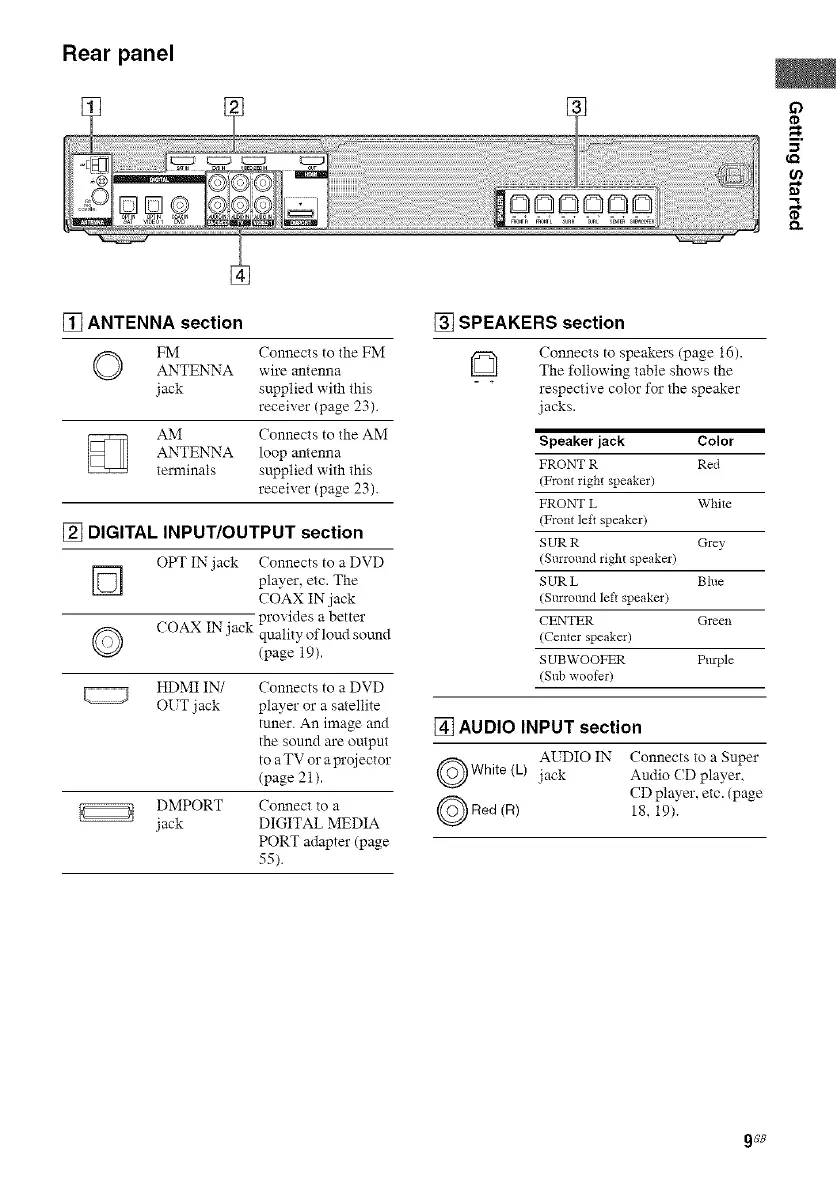
Rear panel
m.
tn
Q.
[] ANTENNA section
O FM Connects to the FM
ANTENNA wire antenna
jack supplied with this
receiver (page 23).
AM Connects to the AM
ANTENNA loop antenna
terminals supplied with this
receiver (page 23).
[] DIGITAL INPUT/OUTPUT section
OPT IN jack Connects to a DVD
D player, etc.
The
COAX IN jack
provides a better
O COAX IN jack quality of loud som_d
(page 19).
HDMI IN/
OUT jack
Connects to a DVD
player or a satellite
tuner. An image and
the sound are output
to aTV or aprojector
(page 21).
DMPORT Co_mect to a
jack DIGITAL MEDIA
PORT adapter (page
55).
[] SPEAKERS section
Q (onnects to speakers (page 16).
The following table shows the
respective color for the speaker
jacks.
Speakerjack Color
FRONT R Red
(Front right speaker)
FRONT L White
(Front left speaker)
SUR R (h'ey
(Surround right speaker)
SUR L Blue
(Surround left speaker)
CENTER Green
(Centerspeaker)
SUBWOOFER Pmple
(Subwoofer)
[] AUDIO INPUT section
AUDIO IN
White (L) jack
Red (R)
Connects to a Super
Audio (D player,
CD player, etc. (page
18, 19).
9GB



 To Next Page