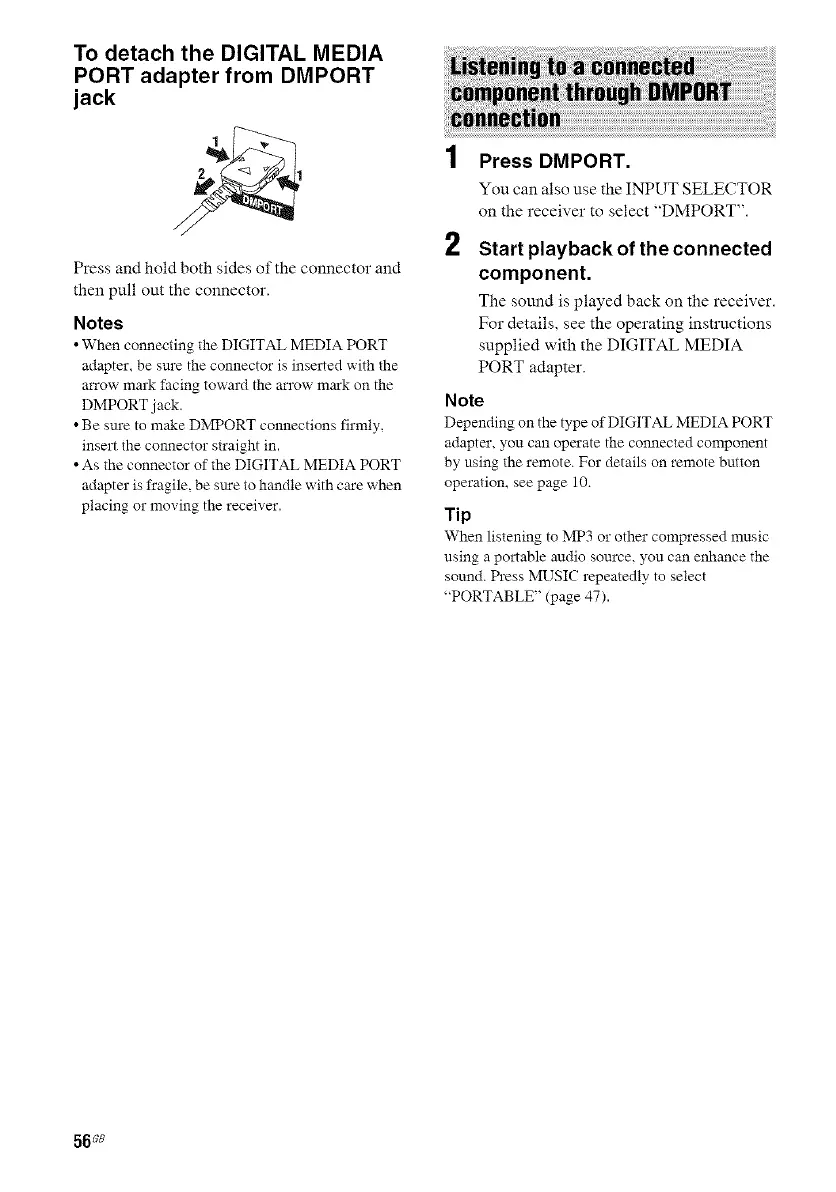
To detach the DIGITAL MEDIA
PORT adapter from DMPORT
jack
///
Press and hold both sides of the connector and
then pull out the connector.
Notes
• When connecting the DIGITAL MEDIA PORT
adapter, be sure the connector is inserted with the
ca'row mark facing toward the arrow mark on the
DMPORT jack.
• Be sure to make DMPORT connections firmly,
insert the connector straight in.
• As the connector of the DIGITAL MEDIA PORT
adapter is fragile, be sm'e to handle with care when
placing or moving the receive*'.
2
Press DMPORT.
You can also use the INPUT SELECTOR
on the receiver to select "DMPORT".
Start playback of the connected
component.
The sotmd is played back on the receiver.
For details, see the operating instructions
supplied with the DIGITAL MEDIA
PORT adapter.
Note
Depending on the type of DIGITAL MEDIA PORT
adapter, you can operate the connected component
by using the remote. For details on remote button
operation, see page 10.
Tip
When listening to MP3 or other compressed music
using a portable audio source, you can enhance the
sound. Press MUSIC repeatedly to select
"PORTABLE" (page 47).
56 s8



 To Next Page