Enjoyingthe DIGITAL
MEDIA PORT
(DMPORT)
The DIGITAL MEDIA PORT (DMPORT)
allows you to enjoy sound from a network
system such as a portable audio source or
computer.
By connecting a DIGITAL MEDIA PORT
adapter (not supplied), you can enjoy sound
from the connected component on the
receiver.
For details, see the operating instructions
supplied with the DIGITAL MEDIA PORT
adapter.
Notes
• Do not connect an adapter other than the DIGITAL
MEDIA PORT adapter.
• Do not connect or disconnect the DIGITAL
MEDIA PORT adapter while the receiver is tuxned
on.
• Depending on the DIGITAL MEDIA PORT
adapter, video output may not be possible.
• The DIGITAL MEDIA PORT adapters are
available for purchase depending on the m'ea.
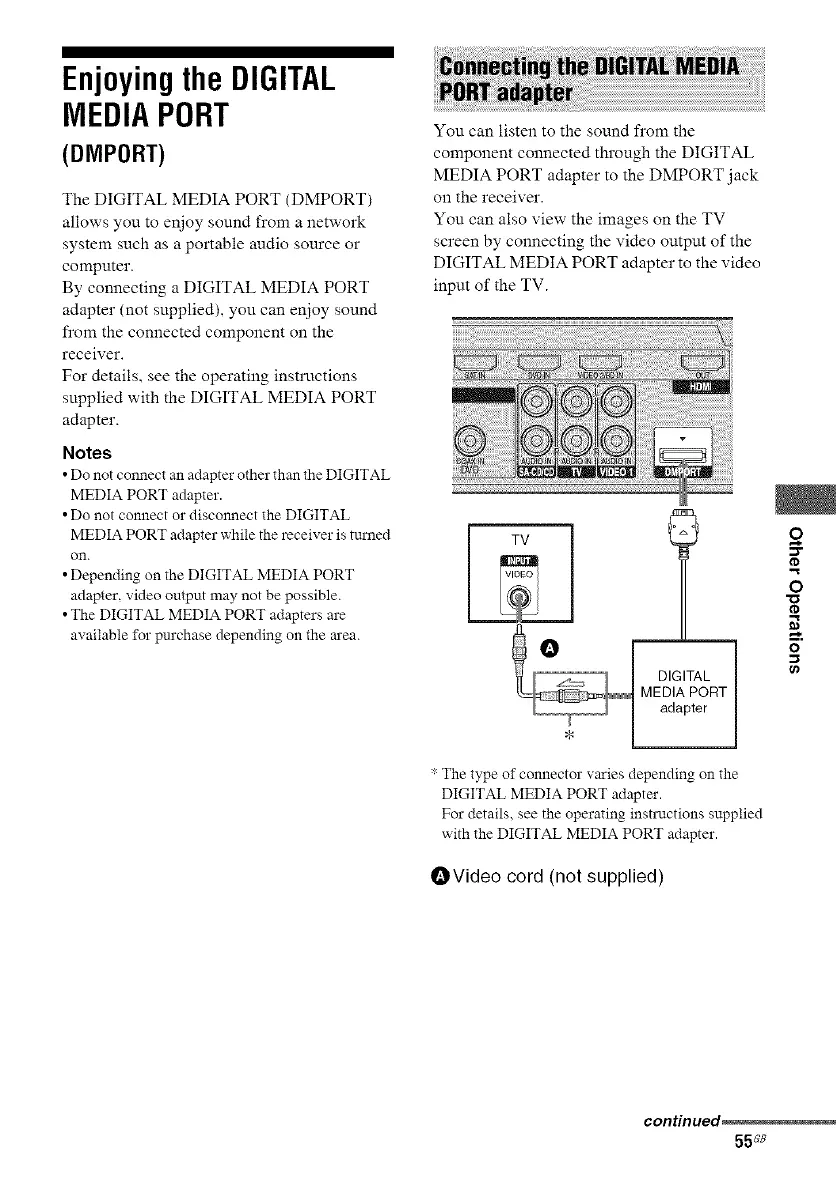
You can listen to the sound from the
component connected through the DIGITAL
MEDIA PORT adapter to the DMPORT jack
on the receiver.
You can also view the images on the TV
screen by connecting the video output of the
DIGITAL MEDIA PORT adapter to the video
input of the TV.
2
O
I'D
* The type of connector varies depending on the
DIGITAL MEDIA PORT adapter.
For details, see the operating instructions supplied
with the DIGITAL MEDIA PORT adapter.
OVideo cord (not supplied)
continued
55ss



 To Next Page