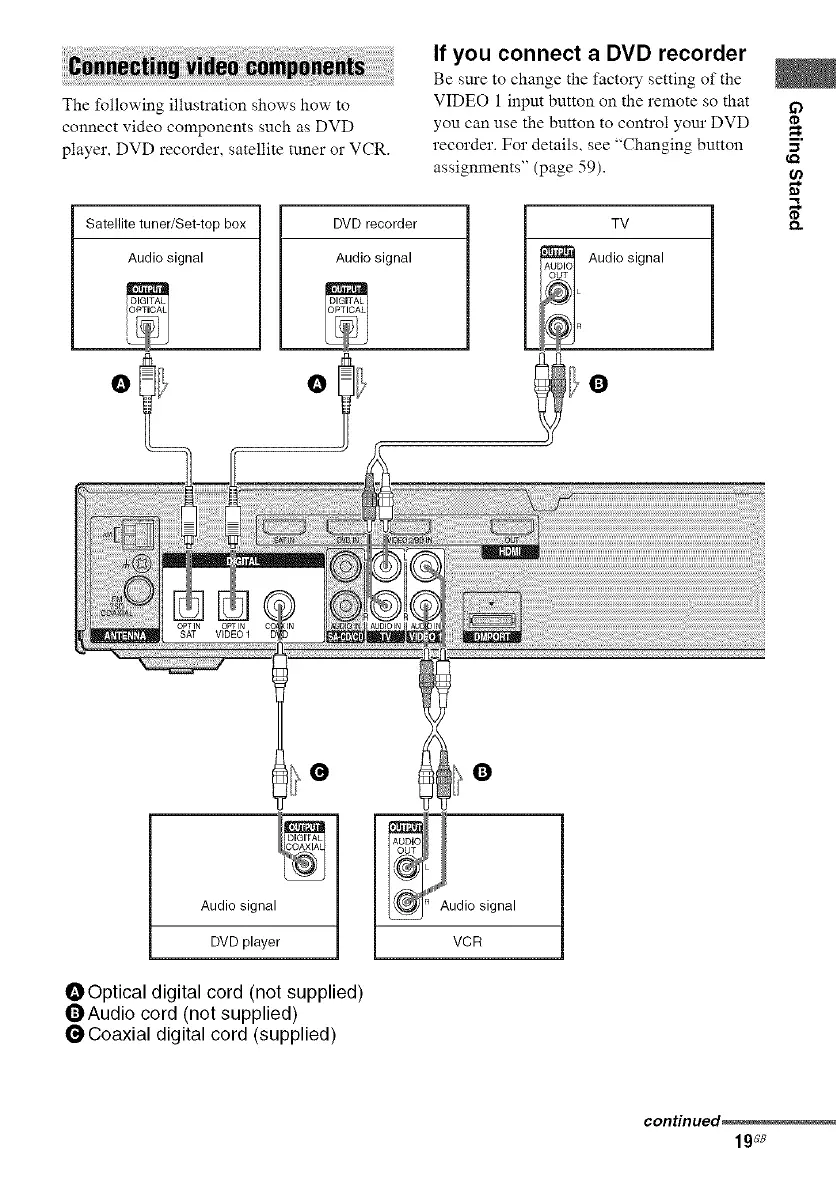
The following illustration shows how"to
connect video components such as DVD
player, DVD recorder, satellite tuner or VCR.
If you connect a DVD recorder
Be sure to change the factory setting of the
VIDEO 1 inpm button on the remote so that if)
you can use the button to control yore" DVD
recorder. For details, see "Changing button =,"
assignments" (page 59). '_
D.Satellite tuner/Set-top box
Audio signal
DVD recorder
Audio signal
TV
Audio signal
Q
_O
g
Audio signal
DVD player
OOptical digital cord (not supplied)
QAudio cord (not supplied)
O Coaxial digital cord (supplied)
L
udio signal
VCR
continued_
19_e



 To Next Page