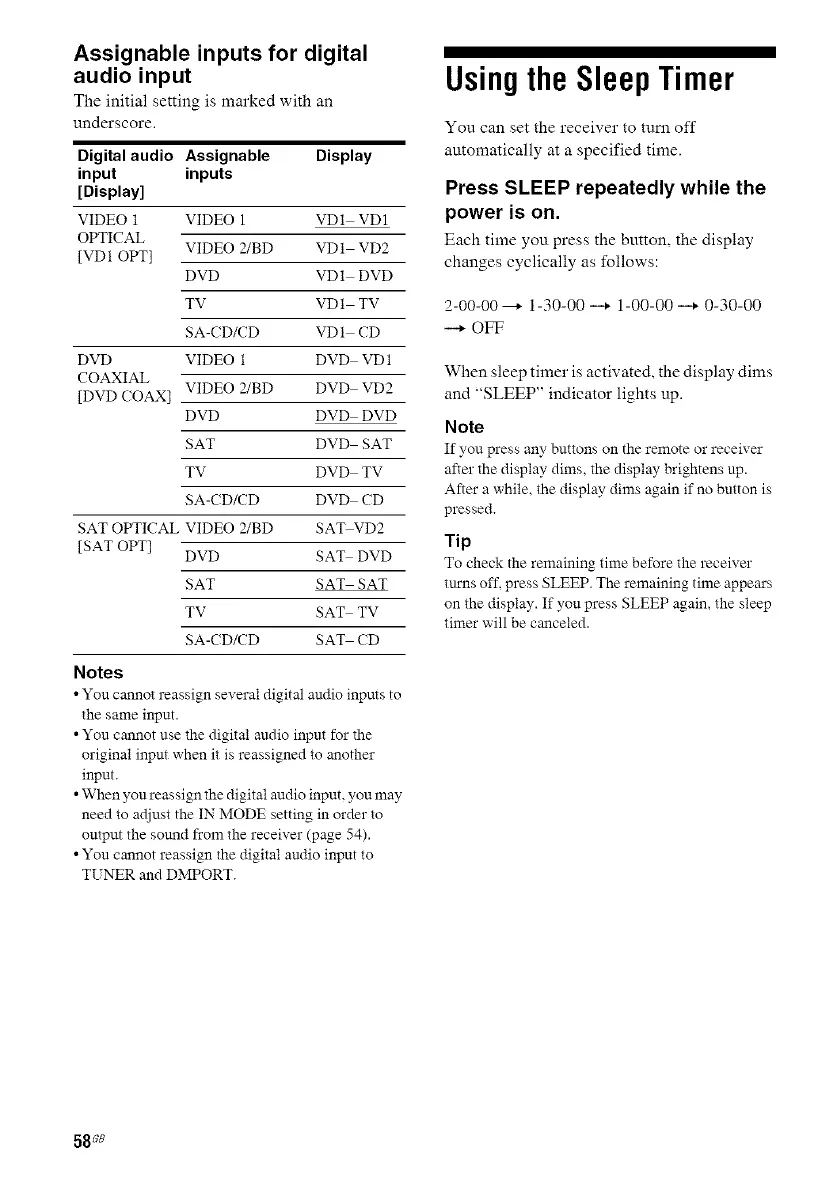
Assignable inputs for digital
audio input
The initial setting is marked with an
underscore.
Digital audio Assignable Display
input inputs
[Display]
VIDEO 1 VIDEO 1 VD1 VD1
OPTICAL
VIDEO 2/BD VD1 VD2
[VD1 OPT]
DVD VD1 DVD
TV VD1 TV
SA-C D/CD VD1 CD
DVD VIDEO 1 DVD VD1
COAXIAL
VIDEO 2/BD DVD VD2
[DVD COAX]
DVD DVD DVD
SAT DVD SAT
TV DVD TV
SA-C D/CD DVD CD
SAT OPTICAL VIDEO 2/BD SAT VD2
[SAT OPT]
DVD SAT DVD
SAT SAT SAT
TV SAT TV
SA-C D/CD SAT CD
Notes
• You cannot reassign several digital audio inputs to
the same input.
• You cannot use the digital audio input for the
original input when it is reassigned to another
input.
• When you reassign the digital audio input, you may
need to adjust the IN MODE setting in order to
output the sound from the receiver (page 54).
• You cannot reassign the digital audio input to
TUNER and DMPORT.
Usingthe SleepTimer
You can set the receiver to turn off
automatically at a specified time.
Press SLEEP repeatedly while the
power is on.
Each time you press the button, the display
changes cyclically as follows:
2-00-00 --+ 1-30-00 --+ 1-00-00 --+ 0-30-00
--+ OFF
When sleep timer is activated, the display dims
and "SLEEP" indicator lights up.
Note
If you press any buttons on the remote or receiver
after the display dims, the display brightens up.
After a while, the display dims again if no button is
pressed.
Tip
To check the remaining time before the receiver
turns off, press SLEEP. The remaining time appeea's
on the display. If you press SLEEP again, the sleep
timer will be canceled.
58 ;8



 To Next Page