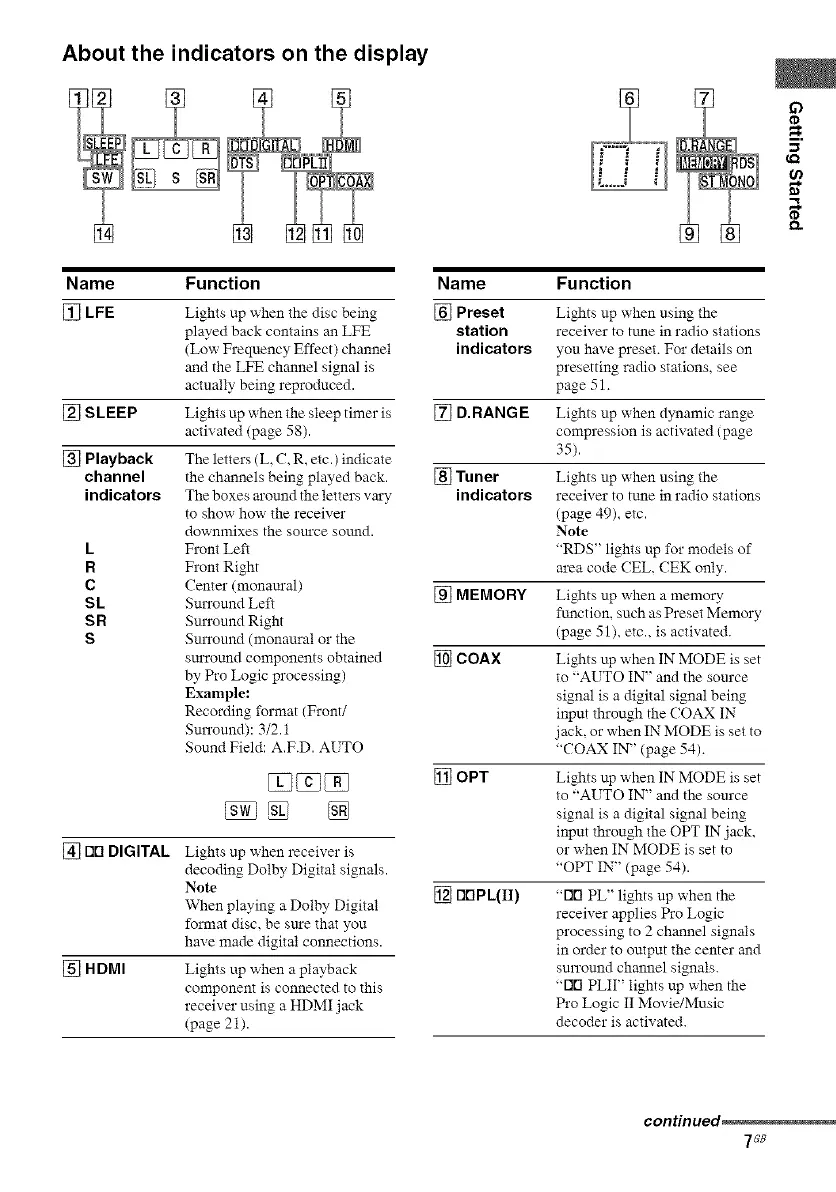
About the indicators on the display
Name Function
[_ LFE
[_ SLEEP
[_ Playback
channel
indicators
L
R
C
SL
SR
S
Lights up when the disc being
played back contains an LICE
(Low Frequency Effect) channel
and the LFE chmmel signal is
actuNly being reproduced.
Lights up when tile sleep timer is
actix'ated (page 5g).
The letters (L, C, R, etc.) indicate
the channels being played back.
The boxes m'ound tile letters vary
to show how tile receiver
downmixes the source sound.
Front Left
Front Right
Center (monam'al)
Smxound Left
Smxound Right
Smxound (monaural or the
sm'rotmd components obtained
by Pro Logic processing)
Example:
Recording format (Front/
Smxound): 3/2,1
Sound Field: A.F.D. AlTO
[] Nrl DIGITAL
% UPS1
Lights up when receiver is
decoding Dolby Digital signals.
Note
When playing a Dolby Digital
format disc, be sm'e that you
have made digital connections.
Lights up when a playback
component is connected to this
receiver using a HDMI jack
(page 21).
m.
Name Function
[_ Preset
station
indicators
[_ D.RANGE
% Tuner
indicators
MEMORY
_] COAX
OPT
riNPL(II)
Lights up when using the
receiver to tune in radio stations
you have preset. For details on
presetting radio stations, see
page 51.
Lights up when dynamic range
compression is activated (page
35).
Lights up when using the
receiver to tune in radio stations
(page 49), etc.
Note
"RDS" lights up for moods of
m'ea code (EL, (EK only.
Lights up when a memory
function, such as Preset Memory
(page 51), etc., is activated.
Lights up when IN MODE is set
to "AUTO IN" and the source
signal is a digital signal being
input through the COAX IN
jack, or when IN MODE is set to
"COAX IN" (page 54).
Lights up when IN MODE is set
to 'ALTO IN" and the source
signal is a digital signal being
input through the OPT 1N jack,
or when IN MODE is set to
"OPT IN" (page 54).
"rift PL" lights up when the
receiver applies Pro Logic
processing to 2 channel signals
in order to output the center and
surround charnel signals.
"rift PLII" lights up when tile
Pro Logic II Movie/Music
decoder is activated.
continued,
7c8



 To Next Page