Basic Operations
23
GB
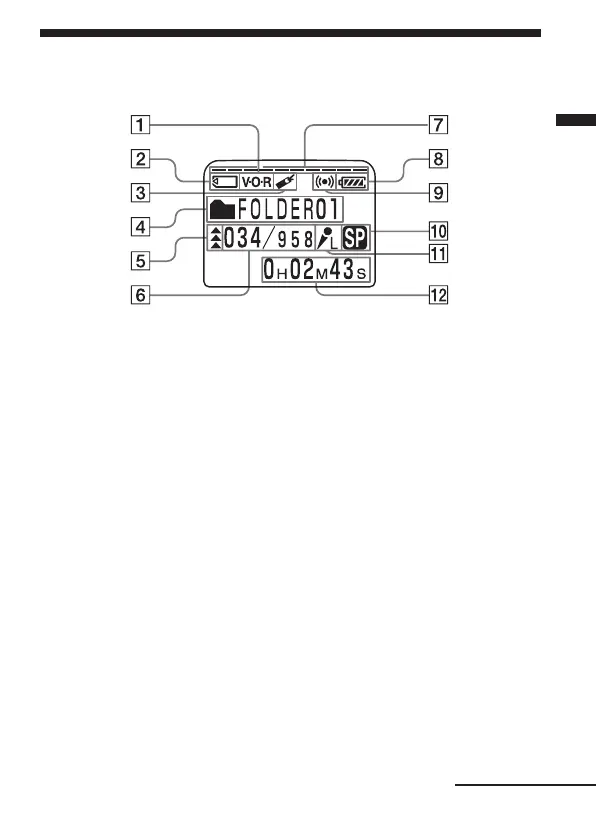
Using the Display Window
Parts in the display window
1
V•O•R (voice operated
recording) indicator (16, 58)
2
“Memory Stick” indicator
3 Bookmark indicator (29)
Appears when the bookmark
is set for a message.
4
Folder indication (
Menu
indication /Messages, etc.)
(13, 18)
5 Priority marks (42)
6 Selected message number
(18)/Mode indication of the
menu (ON, OFF, etc.) (57)
7 Remaining memory
indicator (17)
8 Remaining battery indicator
(7)
9 Alarm indicator (52)
Appears when the alarm is
set for a message.
0
Recording mode indication (59)
Displays the current
recording mode:
•SP: Standard Play mode
•LP: Long Play mode
qa MIC SENSE (microphone
sensitivity) indication
(58)
Displays the current
microphone sensitivity:
•H (high): To record at a
meeting or in a quiet/
spacious place.
•L (low): To record for
dictation or in a noisy
place.
qs Counter /Remaining time
indication /Recording date
and time indication /
Current time indication
(25)
The display selected with the
DISPLAY in the menu
appears.
Note
The effect of the back light of the
display window may be reduced
in a bright location.
Continued



 To Next Page