Editing Messages
37
GB
Message 3Message 2
Message 1
Message 1
Message 2
Message 3 Message 4
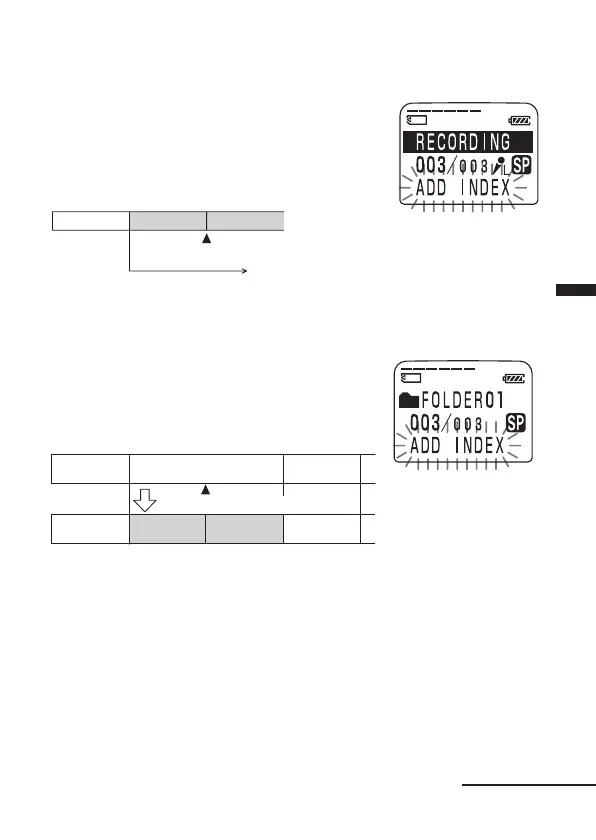
While recording or playing back a message, press INDEX/
BOOKMARK at the point you want to divide.
• When you press INDEX/BOOKMARK during recording:
The new message number is added at
the point you pressed the button, and
“ADD INDEX“ flashes for 3 seconds.
The message will be divided into two;
however, the messages will be
recorded without a break.
A message is divided.
Recording continues.
1 Tip
You can divide a message during recording pause.
• When you press INDEX/BOOKMARK during playback:
The message is divided into two at the
point you pressed the button, and
“ADD INDEX“ flashes for 3 seconds.
The message numbers of the following
messages will increase by one.
A message is divided.
The message
numbers increase.
To play the divided message
Press the jog lever up or down (>/.) to display the message number
as the divided messages have message numbers.
1 To play the divided messages continuously
Select “ON” for CONT. in the menu as described in “Changing the Settings” on
page 58.
Message 1 Message 3Message 2
Continued



 To Next Page