Help Guide
Interchangeable Lens Digital Camera
ILCE-9M3 α9III
Shoot. Timing Display (still image)
Sets whether or not to display marks (such as a frame) on the screen while shooting. This function is useful in situations
where it is difficult to determine the timing of shooting just by looking at the screen, such as when the shutter sound is
turned off.
Menu item details
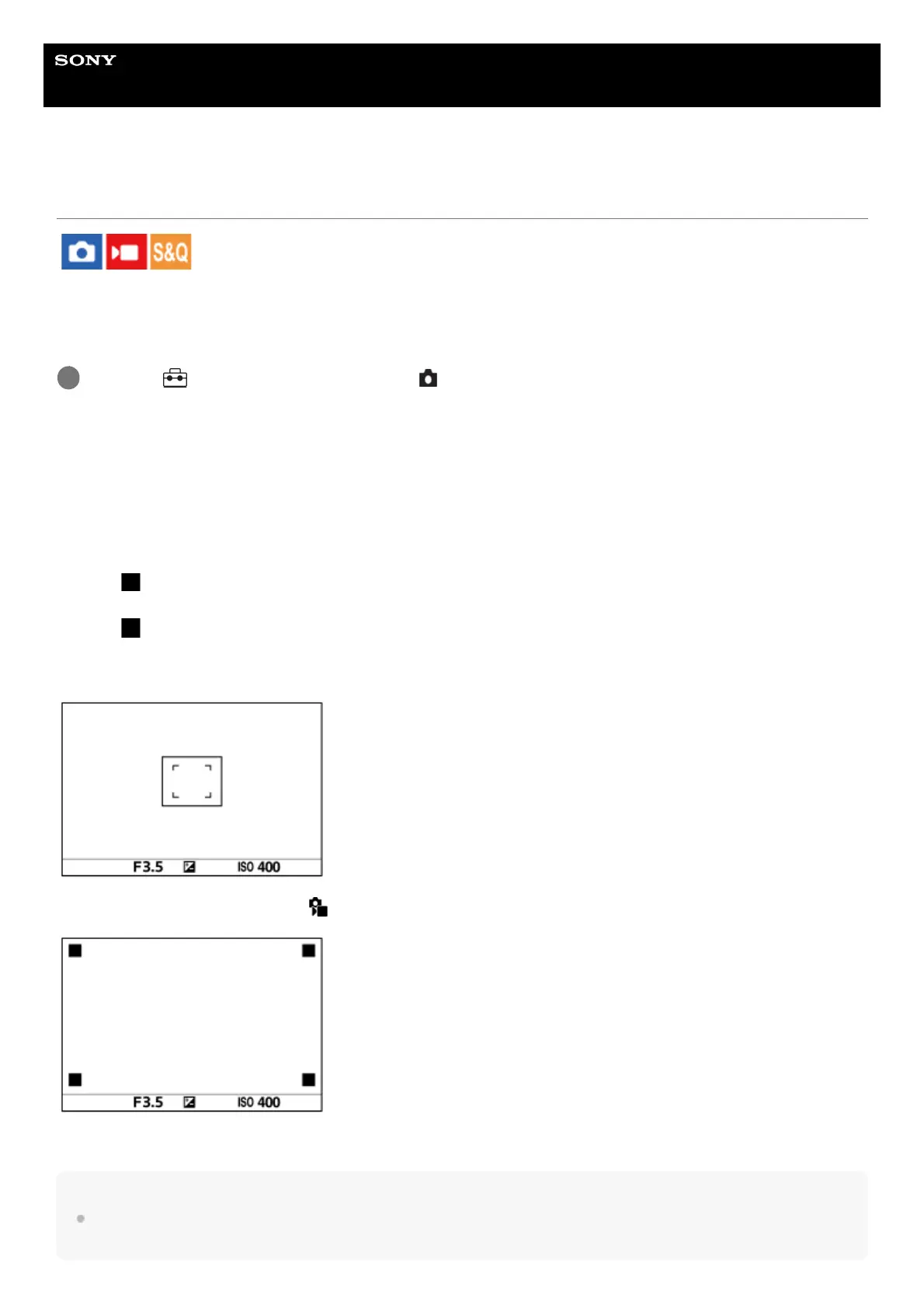
On: Type1:
Displays a frame (dark color) around the focusing frame.
On: Type2:
Displays a frame (light color) around the focusing frame.
On: Type3:
Displays (dark color) in the four corners of the screen.
On: Type4:
Displays (light color) in the four corners of the screen.
Off:
Does not display the shutter release timing during blackout-free shooting.
[On: Type1] / [On: Type2] (Example: [ Focus Area] is set to [Center Fix])
[On: Type3] / [On: Type4]
Hint
The marks are displayed in yellow when shooting continuously at a speed of [60 images/s].
The marks are displayed in magenta (bright purple) when shooting continuously at a speed of [120 images/s].
MENU → (Setup) → [Display Option] → [ Shoot. Timing Display] → desired setting.
1



 To Next Page