22
B Board
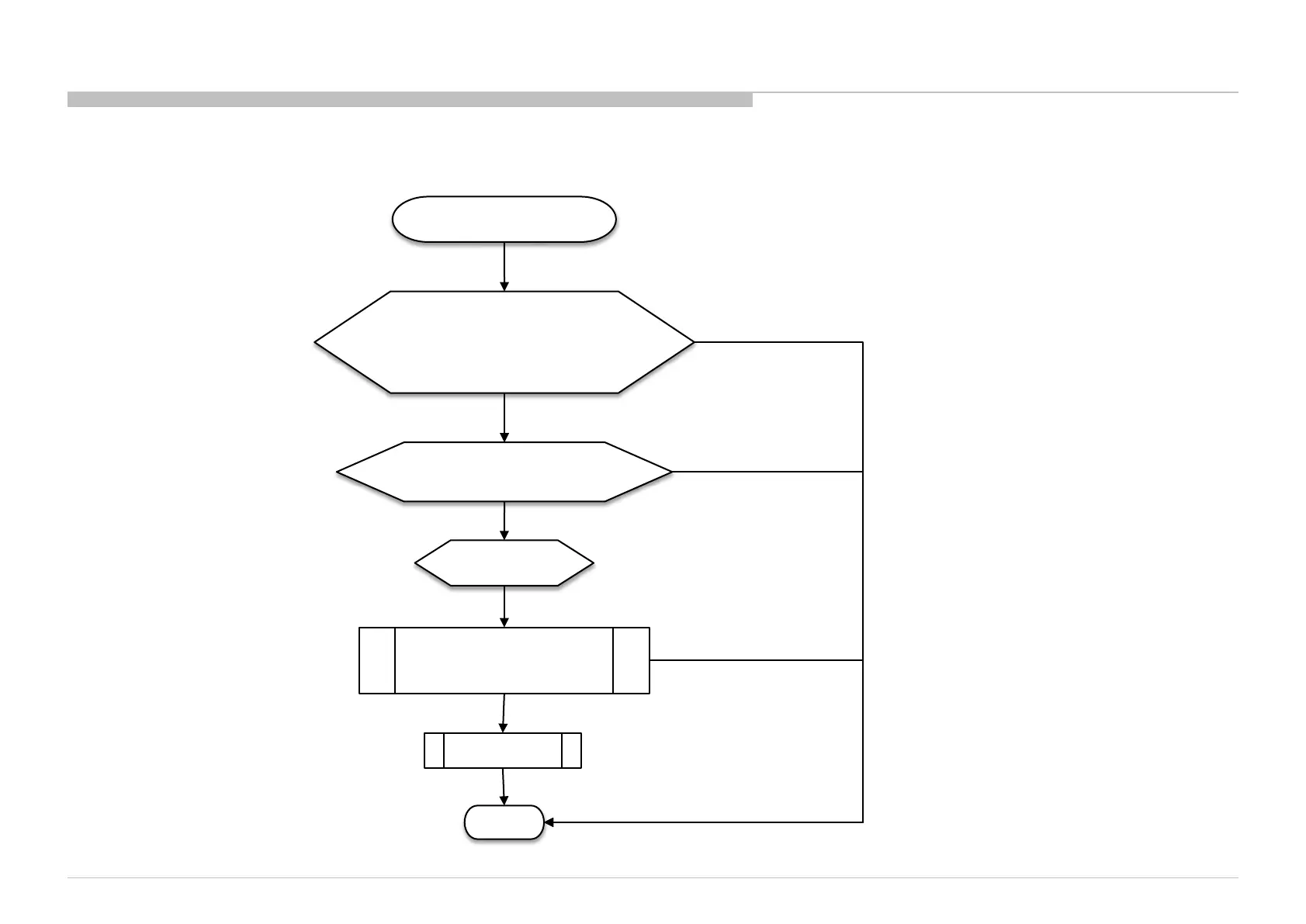
(#Audio IC (IC3101) problem)
IC3101 problem, Change
IC3101,
Enable back Error Detection
START
#Audio IC (IC3101) problem
DONE
3x blinking
No 3x blinking
3x blinking and F3101 OK
Disable Error Detection
Check have any burn mark on Audio IC,
If have burn mark, replace the NG Audio IC
Change B-
board
Main Speaker No Sound
Check Audio IC pins and surrounding part,
Replace the NG part if have any
(For example, fuse broken, e.capacitor blow,
c.capacitor short connection, zener diode open or short,
inductor open connection and etc
.)
3x blinking
3x blinking
Important Note :
TV must be power OFF condition before
plug or unplug any of the
FFC/FPC/wire/cable from the board. ->
This is to prevent possibility circuit
damage happen.
Remember enable back Error Detection if
previously have disable it.
No 3x blinking
No 3x blinking
2.2 : 3x Blinking – Audio Error
3.2 : 3x Blinking – Audio Error







 To Next Page