Connecting Your TV
11
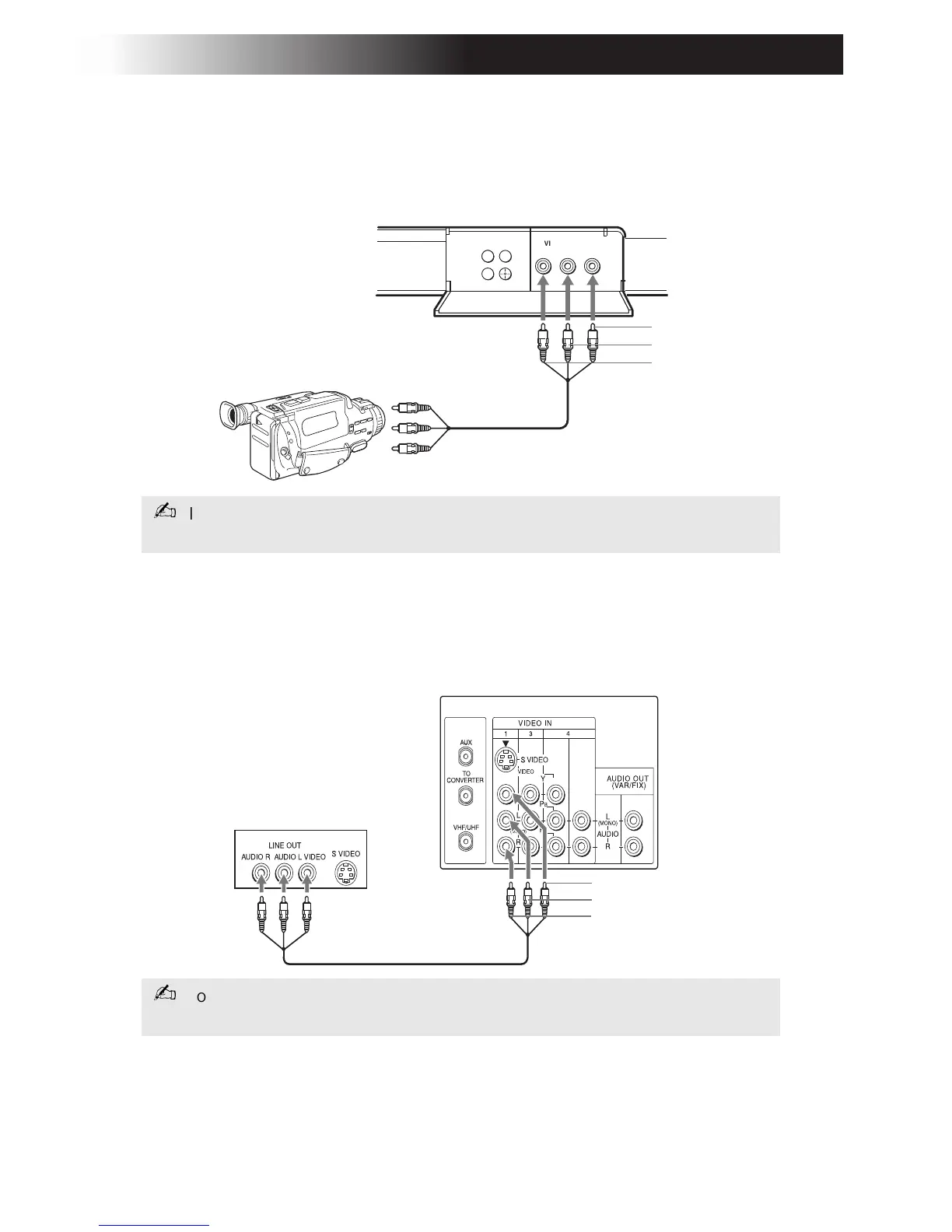
Connecting a Camcorder
Using Audio/Video cables (not supplied), connect AUDIO and VIDEO
OUT on your camcorder to AUDIO and VIDEO IN on your TV.
Connecting a DVD Player
Using Audio/Video cables (not supplied), connect AUDIO and VIDEO
OUT on your DVD player to AUDIO and VIDEO IN on your TV.
If you have an S VIDEO equipped camcorder, you can use an S VIDEO cable
for optimum picture quality.
For optimum picture quality, use S VIDEO instead of the yellow
Audio/ Video
cable. S VIDEO does not provide sound, the audio cables must still be connected.
VIDEO 2 INPUT
MENU
L(MONO)-A UDIO-RVIDEO
F
F
Front A/V Panel
A/V output
Video (yellow)
Audio L (white)
Audio R (red)
Rear of TV
Rear of DVD player
Video (yellow)
Audio L (white)
Audio R (red)









 To Next Page