20
Operating Instructions
Quick Start to the Menus
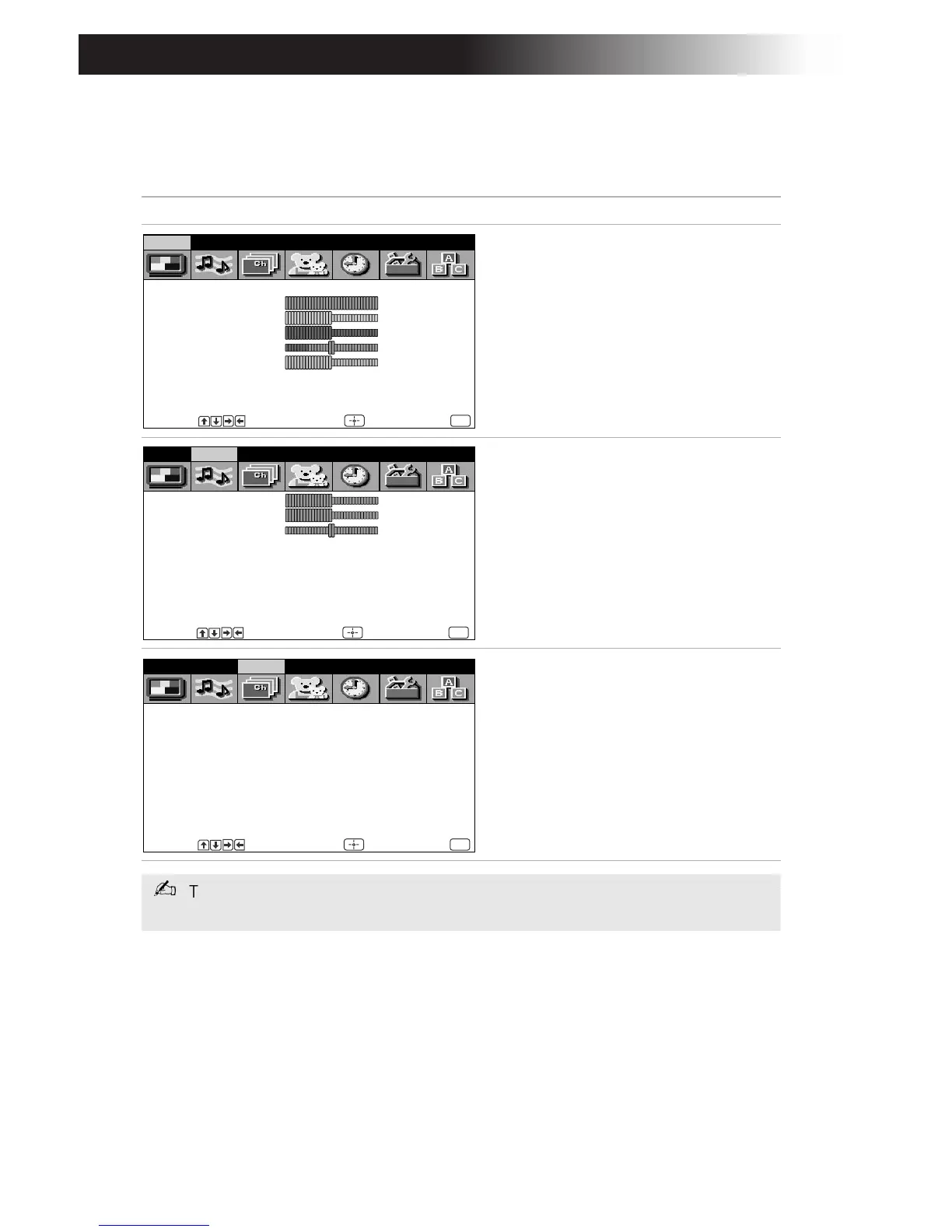
The following settings are available in your on-screen menus:
Menu Allows you to
Make adjustments to your picture
settings.
Change your audio settings.
Customize your channel settings.
Mode: Vivid
Picture
Brightness
Color
Hue
Sharpness
Color Temp: Cool
VM: High
Video Audio Channel Parent Timer Setup Basic
Move Select End
MENU
Treble
Bass
Balance
Steady Sound: OFF
Effect: OFF
MTS: Stereo
Speaker: ON
Audio Out: Variable
Video Audio Channel Parent Timer Setup Basic
Move Select End
MENU
Favorite Channel
Cable: ON
Channel Fix: OFF
Auto Program
Channel Skip/Add
Channel Label
Video Audio Channel Parent Timer Setup Basic
Move Select End
MENU
The menus illustrated in this manuals are for KV-27FV17. Your menus may not
look like those illustrated.









 To Next Page