Connecting Your TV
13
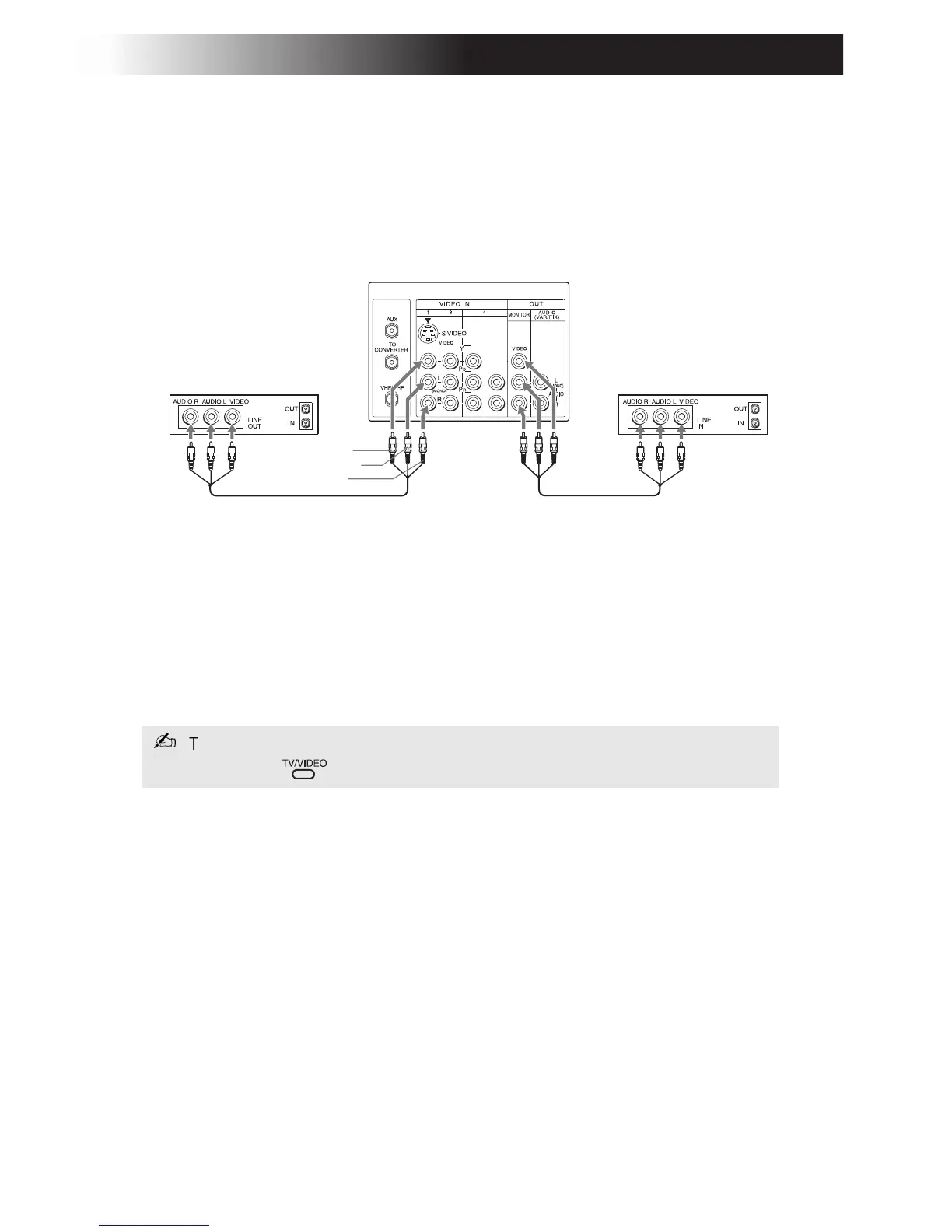
Connecting Two VCRs for Tape Editing
KV-27FV17 only
You can connect two VCRs togethers to edit video tapes. You can also
connect both VCRs to your TV to view the program being recorded.
1 Using an Audio/Video cable (not supplied), connect AUDIO and
VIDEO OUT on your first VCR to AUDIO and VIDEO IN on your
TV.
2 Using Audio/Video cable (not supplied), connect AUDIO and
VIDEO OUT on the second VCR to the MONITOR AUDIO and
VIDEO OUT on your TV.
To perform tape editing, set the TV to the video input intended for playback
by pressing
.
Rear of TV (KV-27FV17 only)
1
2
VCR (for playback) VCR (for recording)
Video (yellow)
Audio L (white)
Audio R (red)









 To Next Page