MHC-V5
20
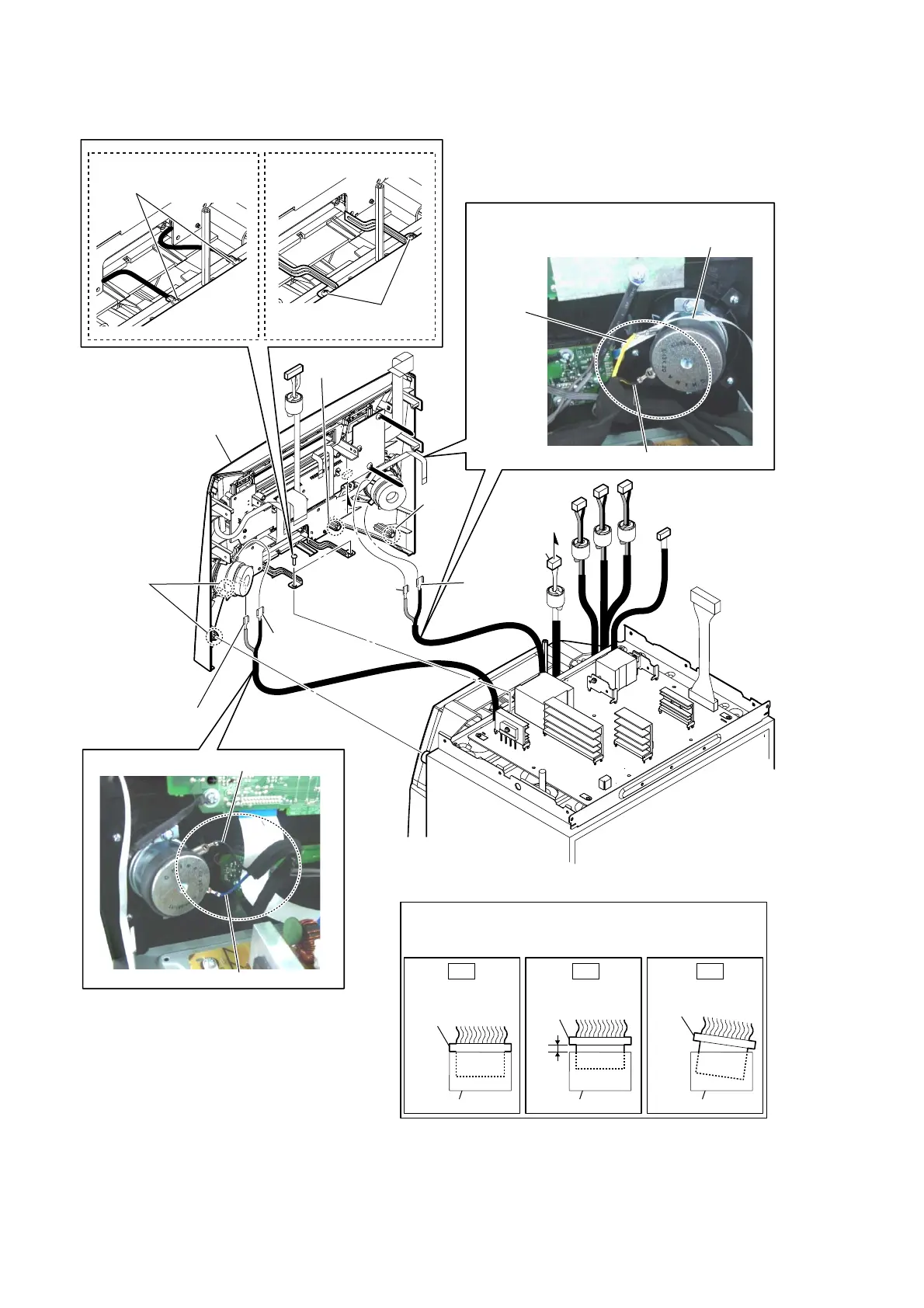
2-16. FRONT PANEL-2
Note 1:
Pass the wire (flat type) (4 core)
over the top of the loudspeaker.
– Top rear view –
6 front panel block
[yellow]
[black]
[blue]
[black]
:ire VeWWiQJ
:ire VeWWiQJ
1 terminal
(narrow side)
[blue]
5 two bosses
5 boss
5 boss
2 terminal
(narrow side)
[yellow]
1 terminal
(wide side)
[black]
2 terminal
(wide side)
[black]
3 connector
(CN2002)
Note 2:
When you install the connector, please install them correctly.
There is a possibility that this machine damages when not
correctly installing it.
Insert is shallow
Insert is straight
to the interior.
connector
Insert is incline
connector
connector
connector
connector connector
OK NG NG
C
C
4 two screws
(BVTP3 u 8)
4 two screws
(BVTP3 u 8)
(US) (E2, E51)
• Abbreviation
E2 : 120V AC area in E model
E51 : Chilean and Peruvian models



 To Next Page
 Loading...











