MHC-V5
9
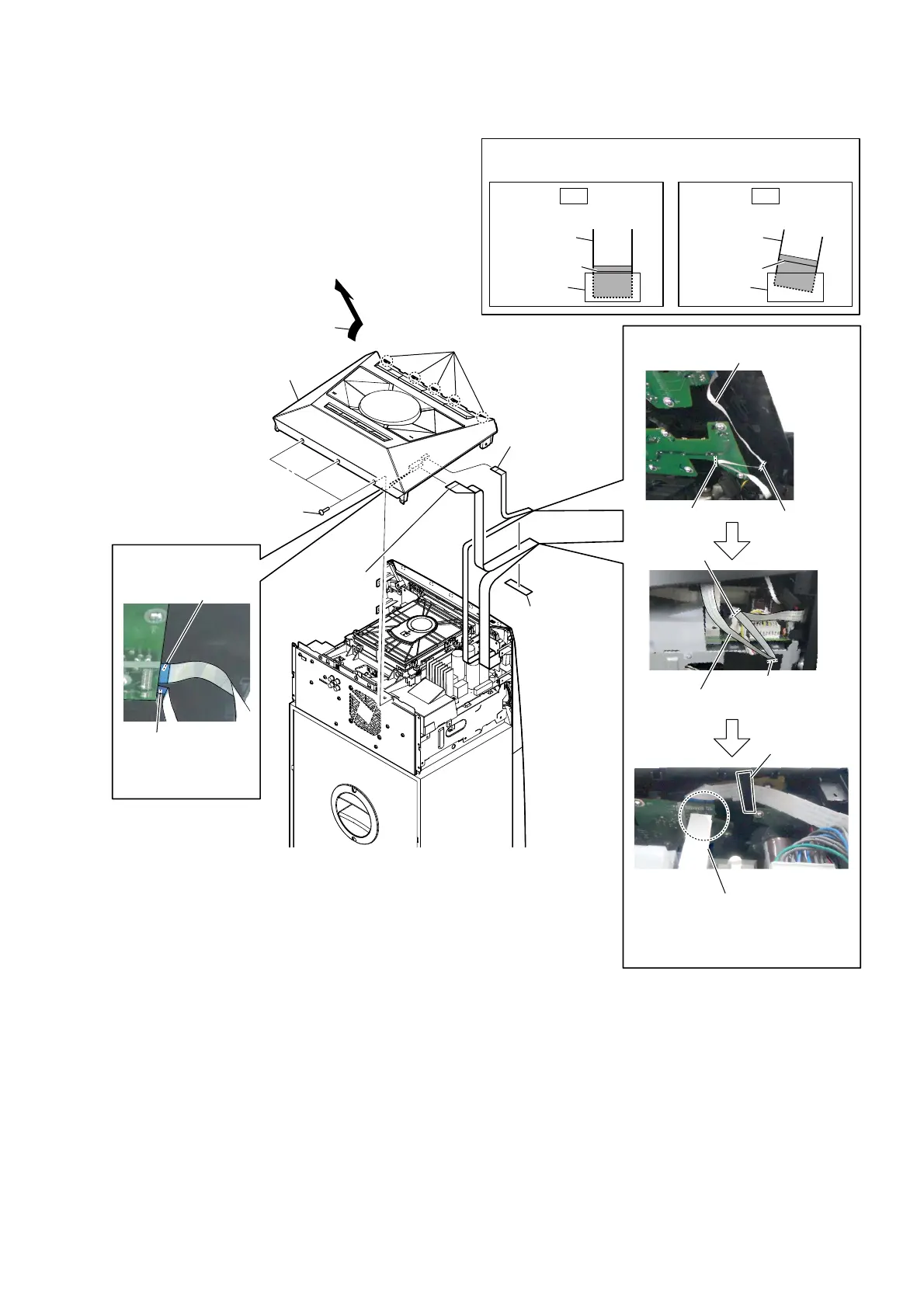
2-3. TOP PANEL BLOCK
1 three screws
(BVTP3 u 10)
4 cushion (H)
cushion (H)
heat sink
3 Remove the top panel block
in the direction of the arrow.
5 wire (flat type)
(4 core)
(CN2102)
2 five claws
7 top panel block
wire (flat type) (4 core)
6 wire (flat type)
(15 core)
(CN2100)
Terminal face is
below side.
WireVeWWiQJ
guide line
guide line
guide line
guide line
–7RSreDrYieZ–
Note 1:
Fix the cushion (H) so that
the wire (flat type) does not
come in contact with the heat sink.
wire (flat type)
(15 core)
Note 2:
When installing the wire (flat type),
ensure that
the colored line is not slanted after insertion.
colored line
colored line
Insert is straight to the interior. Insert is incline
wire (flat type)wire (flat type)
connectorconnector
OK NG
WireVeWWiQJ
Terminal face is
below side.
–7RSSDQeOEORFN
ERWWRPYieZ–



 To Next Page