33
GB
Other Recording Operations
Manual recording
When you set the REC LEVEL switch to
“MANUAL,” you can adjust the recording
level manually, according to the sound
source. If necessary, you can also utilize the
“LIMITER” (page 44) and “LCF(Low Cut
Filter)” (page 43) in the menu to reduce
sound distortion.
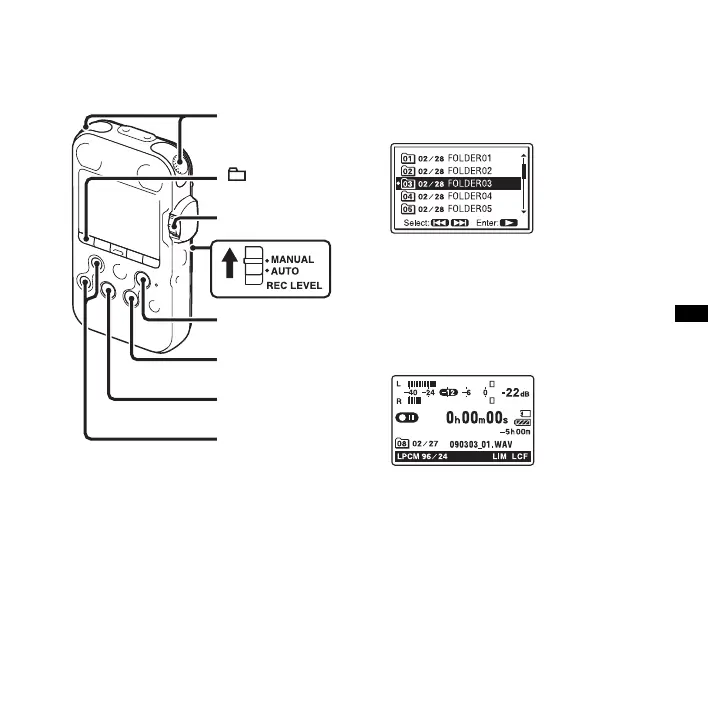
1 Set the REC LEVEL switch to
“MANUAL.”
2 Select a folder.
3 Press z REC.
The PCM recorder enters the recording
standby mode. When the microphones
pick up sound, the level meter in the
display window moves.
4 Adjust the recording level with the REC
LEVEL dial.
You can check the recording level with
both the peak meter of the display
window and the peak level lamps. Adjust
the level closer to –12 dB, into a range
that is appropriate for your sound source.
x STOP
z REC
N PLAY/ENTER
REC LEVEL
> FF/ v,
. FR/ V
Built-in
microphones



 To Next Page