50
GB
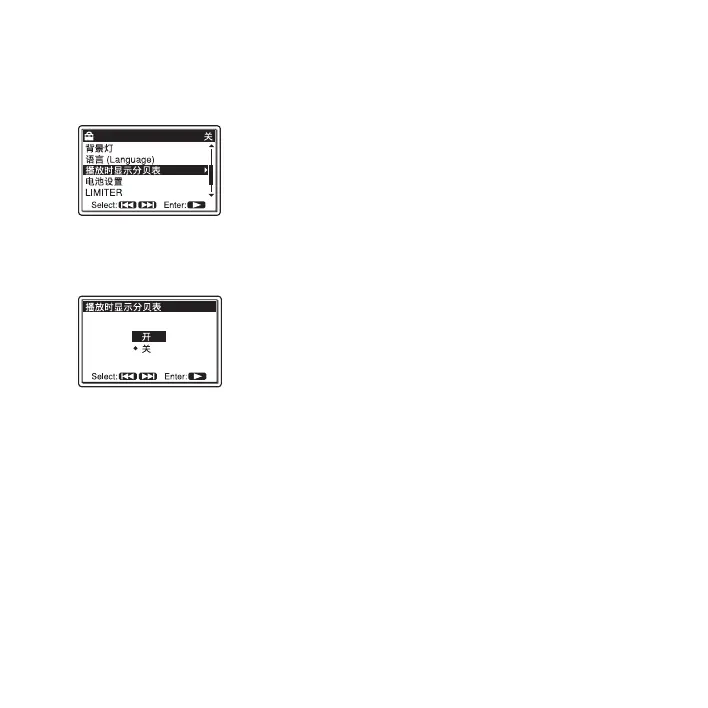
3 Press > FF/ v or . FR/ V to select
“ 播放时显示分贝表 ,” and then press
N PLAY/ENTER.
4 Press > FF/ v or . FR/ V to select
“ 开 ,” and then press
N PLAY/ENTER.
The 播放时显示分贝表 function is set
to “ 关 ” when you purchase the
PCM
recorder.
5 Press x STOP to exit the menu mode.
To display file information
Set “ 播放时显示分贝表 ” to “ 关 ” in step 3.
Listening the playback
sounds with the
headphones or external
speakers
• To listen with the headphones:
Connect stereo headphones (not supplied)
to the i/LINE OUT (headphone/line
output) jack. The built-in speaker will be
automatically disconnected. Adjust the
volume with the VOLUME +/– buttons.
• To listen from an external speaker:
Connect the speaker cord of the carrying
case speaker CKS-M10 (not supplied) to
the i/LINE OUT (headphone/line
output) jack of the PCM recorder. Adjust
the volume with the VOLUME +/–
buttons.
Or use a commercially-available audio
connecting cable (not supplied) to
connect the microphone or line input jack
of an external active or passive speaker
(not supplied) with the i/LINE OUT
(headphone/line output) jack of the PCM
recorder.
P Notes
• Set “Audio Out” in the menu to “ 耳机 ” to
use the i/LINE OUT (headphone/line
output) jack as a headphone jack.



 To Next Page