47
GB
Other Recording Operations
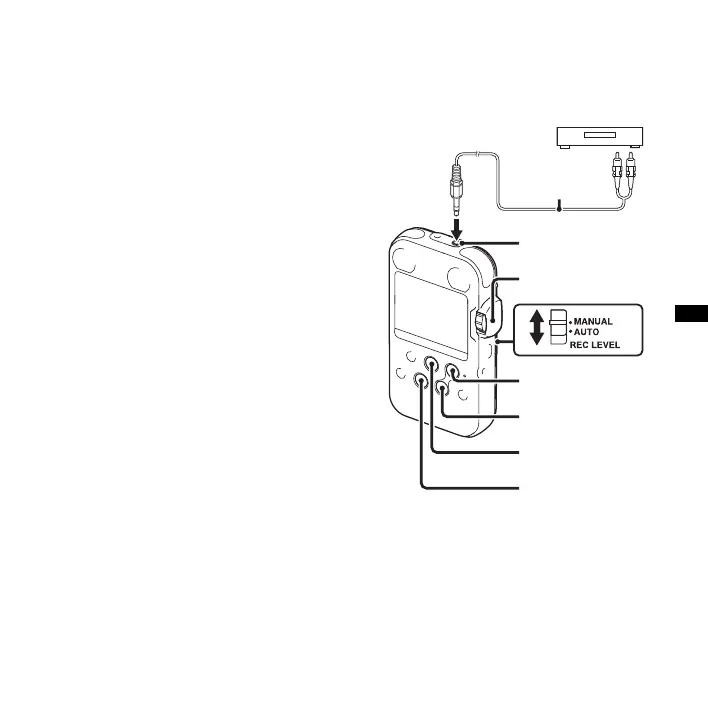
4 Set the REC LEVEL switch to “AUTO”
for automatic recording, or “MANUAL”
for manual recording.
5 Press z REC.
The PCM recorder enters the recording
standby mode. The built-in microphones
and input from the LINE IN are
automatically cut off.
You can adjust the microphone
sensitivity with the MIC SENS(ATT)
switch (page 42).
6 To start recording, press X PAUSE or
N PLAY/ENTER.
7 When “MANUAL” has been selected in
step 4, adjust the recording level with the
REC LEVEL dial.
8 To stop recording, press x STOP.
Recording from other
equipment
You can make music files without using the
computer by recording the sound from
other equipment connected to the PCM
recorder. When an external equipment is
connected, the built-in microphones
become disabled.
x STOP
z REC
N PLAY/ENTER
LINE IN
REC LEVEL
Audio
connecting
cable
X PAUSE
Tape recorder or CD
player



 To Next Page