44
GB
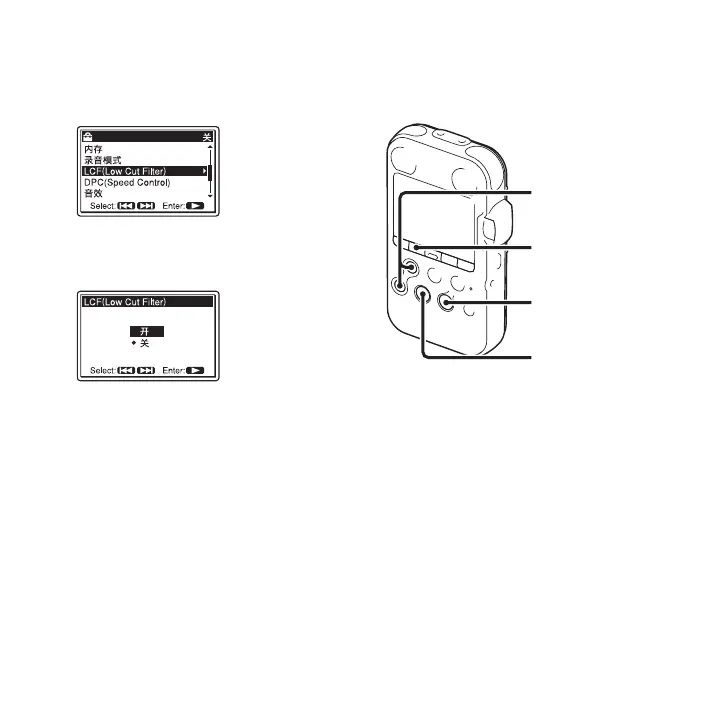
2 Press > FF/ v or . FR/ V to select
“LCF(Low Cut Filter),” and then press
N PLAY/ENTER.
3 Press > FF/ v or . FR/ V to select
“ 开 ,” and then press
N PLAY/ENTER.
The LCF function is set to “ 关 ” when
you purchase the PCM recorder.
4 Press x STOP to exit the menu mode.
To cancel the LCF function
Set “LCF(Low Cut Filter)” to “ 关 ” in step
3.
Preventing sound distortion–
the LIMITER function
During the stop or recording mode, you can
set the LIMITER function.
When the “LIMITER” is set to “ 开 ,” the
input sound that is too loud is adjusted
automatically to the maximum input level
to prevent sound distortion.
1 Press MENU to enter the menu mode.
The menu mode window will be
displayed.
MENU
x STOP
> FF/ v,
. FR/ V
N
PLAY/
ENTER



 To Next Page