45
GB
Other Recording Operations
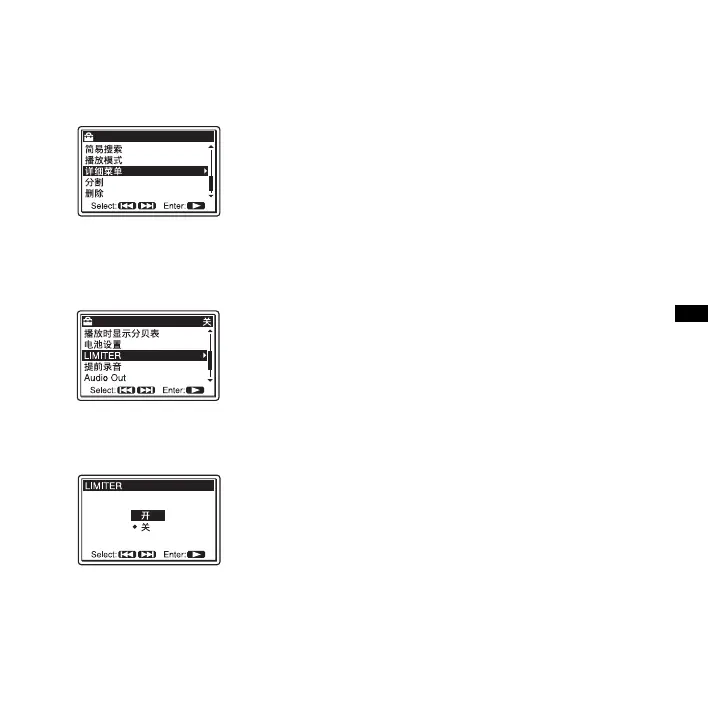
2 Press > FF/ v or . FR/ V to select
“ 详细菜单 ,” and then press
N PLAY/
ENTER.
3 Press > FF/ v or . FR/ V to select
“LIMITER,” and then press
N PLAY/
ENTER.
4 Press > FF/ v or . FR/ V to select
“ 开 ,” and then press
N PLAY/ENTER.
The LIMITER function is set to “ 关 ”
when you purchase the PCM recorder.
5 Press x STOP to exit the menu mode.
To cancel the LIMITER function
Set “LIMITER” to “ 关 ” in step 4.
P Notes
• When the REC LEVEL switch is set to
“AUTO,” the LIMITER function does not
work.
• When the “LIMITER” is set to “ 开 ,” the
limiter function of the PCM recorder covers
the input from the maximum input level to
+12 dB. If the input exceeds this limit,
sounds may be distorted.



 To Next Page