49
GB
Other Playback Operations
Other Playback Operations
Changing the Playback Method
Changing the display during
playback
You can change the display during
playback between the file information
display and the level meter display.
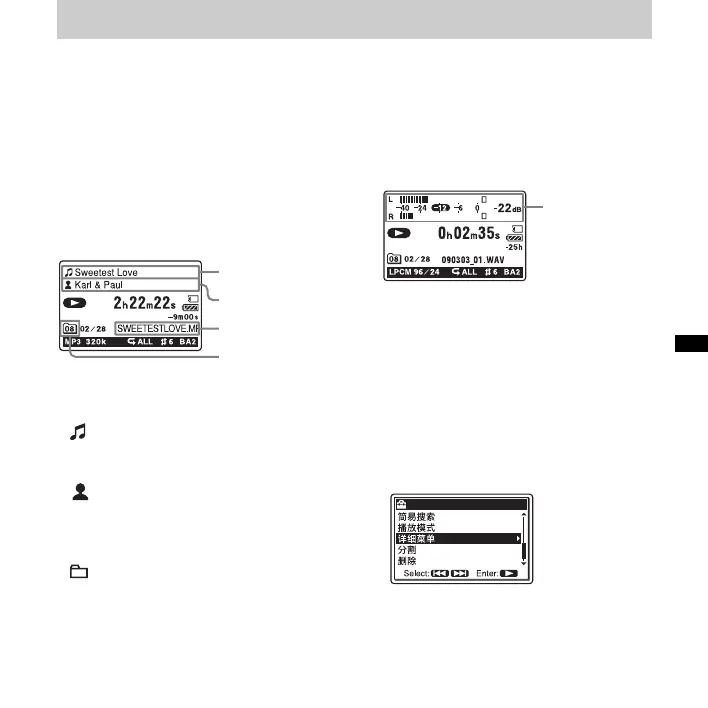
• File information display
A track recorded using the PCM recorder
is displayed as follows.
: Track title name: Date
(yymmdd)_file number (e.g.
090101_01)
: Artist name (e.g. My Recording)
File Name: Date (yymmdd)_file number
_file extension (e.g.
090101_01.wav)
: Current folder name: 01 (FOLDER
01) to 10 (FOLDER 10)
You can change the folder name, title,
artist name, and/or file name using your
computer.
• Level meter display
You can play back a track while checking
the recorded levels.
Selecting the level meter display
1 Press MENU to enter the menu mode.
The menu mode window will be
displayed.
2 Press > FF/ v or . FR/ V to select
“ 详细菜单 ,” and then press
N PLAY/
ENTER.
Title name
Artist name
File name
Current folder icon
level meter



 To Next Page