64
GB
Protecting a track
To prevent a track from being accidentally
deleted or edited, you can protect an
important track. A protected track is
marked with the (protect) indicator and
is regarded as a read-only file you cannot
delete or edit.
1 Display the track which you would like
to protect.
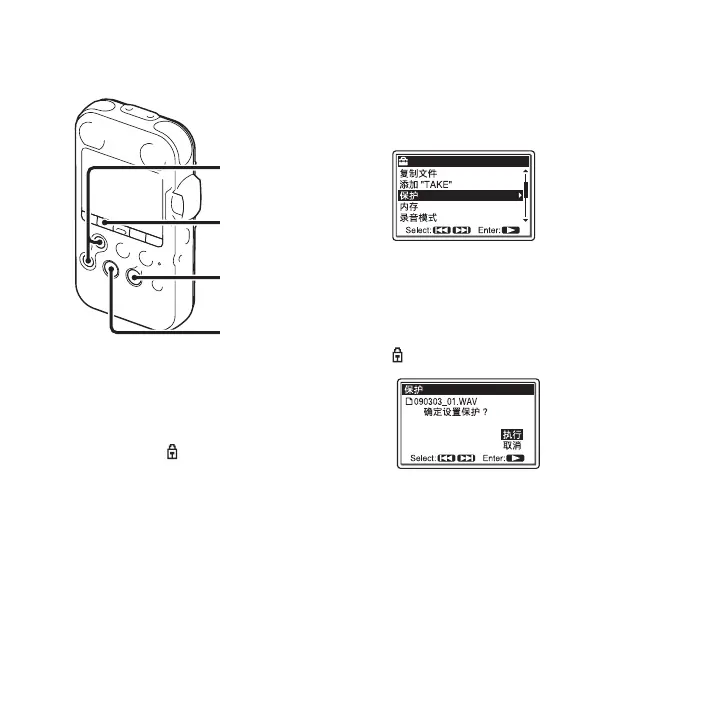
2 Press MENU to enter the menu mode.
The menu mode window will be
displayed.
3 Press > FF/ v or . FR/ V to select
“ 保护 ,” and then press
N PLAY/
ENTER.
A confirmation message is displayed.
4 Press > FF/ v or . FR/ V to select
“ 执行 ,” and then press
N PLAY/
ENTER.
The track is protected and added with a
(protect) indicator.
5 Press x STOP to exit the menu mode.
To release protection
Select the protected file, and then proceed
with the steps 1 through 5. The protection is
released.
MENU
x STOP
> FF/ v,
. FR/ V
N
PLAY/
ENTER



 To Next Page