Portable Headphone Amplifier
PHA-3
Listening to music with an amplifier or active speaker
You can listen to music from an audio device that is connected to the Xperia/WALKMAN/PC (USB AUDIO) port,
iPhone/iPad/iPod port or OPT IN port via an speaker by connecting an amplifier or an active speaker to the AUDIO
IN/LINE OUT jack.
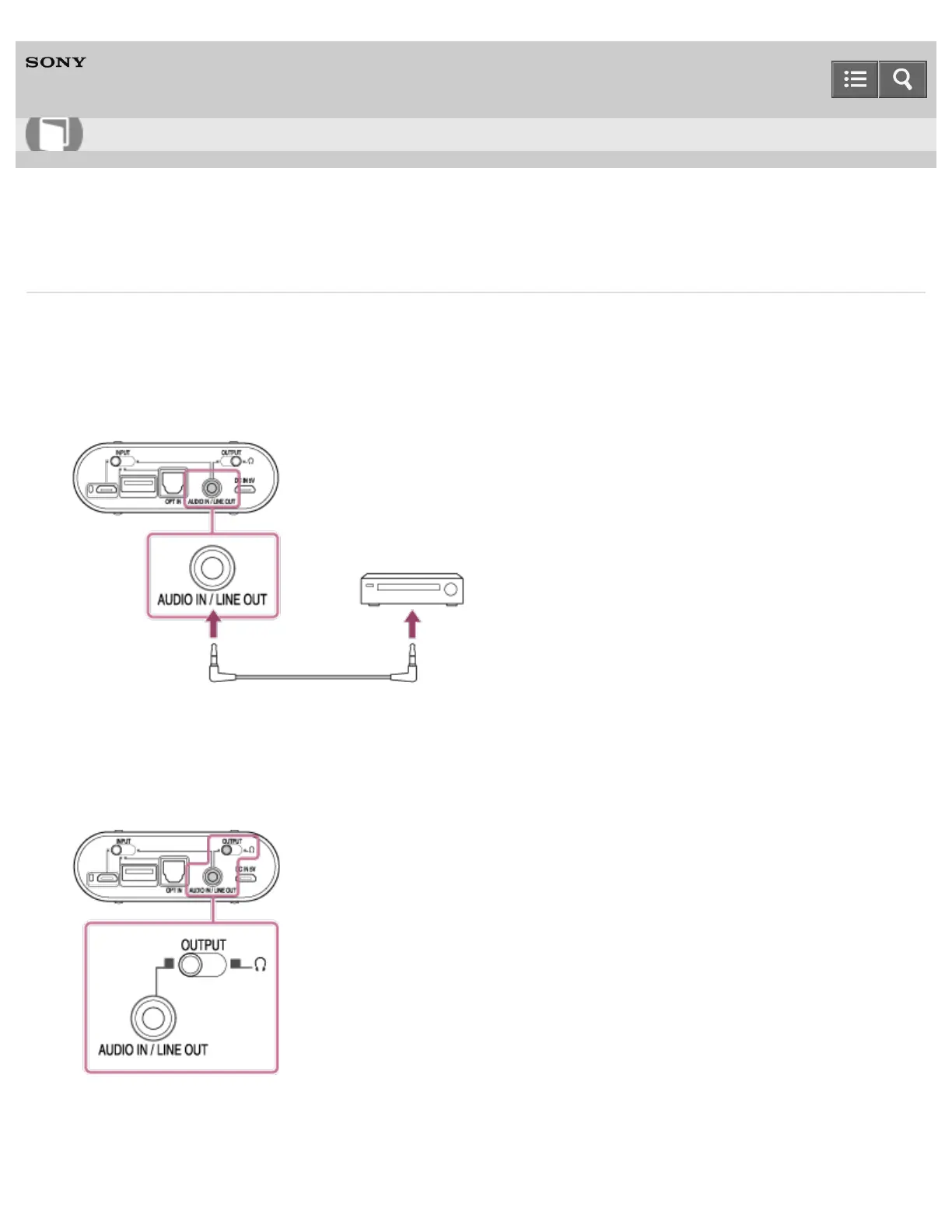
1. Connect an amplifier or active speaker to the AUDIO IN/LINE OUT jack of the headphone amplifier.
2. Connect an audio device to the headphone amplifier.
3. Set the INPUT select switch to the position where the port that your device is connecting to.
4. Set the OUTPUT select switch to the position of the AUDIO IN/LINE OUT jack (left edge position).
5. Rotate the power/volume knob clockwise to turn on the headphone amplifier.
The POWER/CHG indicator flashes in green and then lights up.
Help Guide
How to Use










 To Next Page