PRS-505.GB.3-277-508-11(1)
Reading/Playing/Viewing Content
Reading Books
Reading books transferred from your computer
Follow the steps below to read books transferred from your
computer.
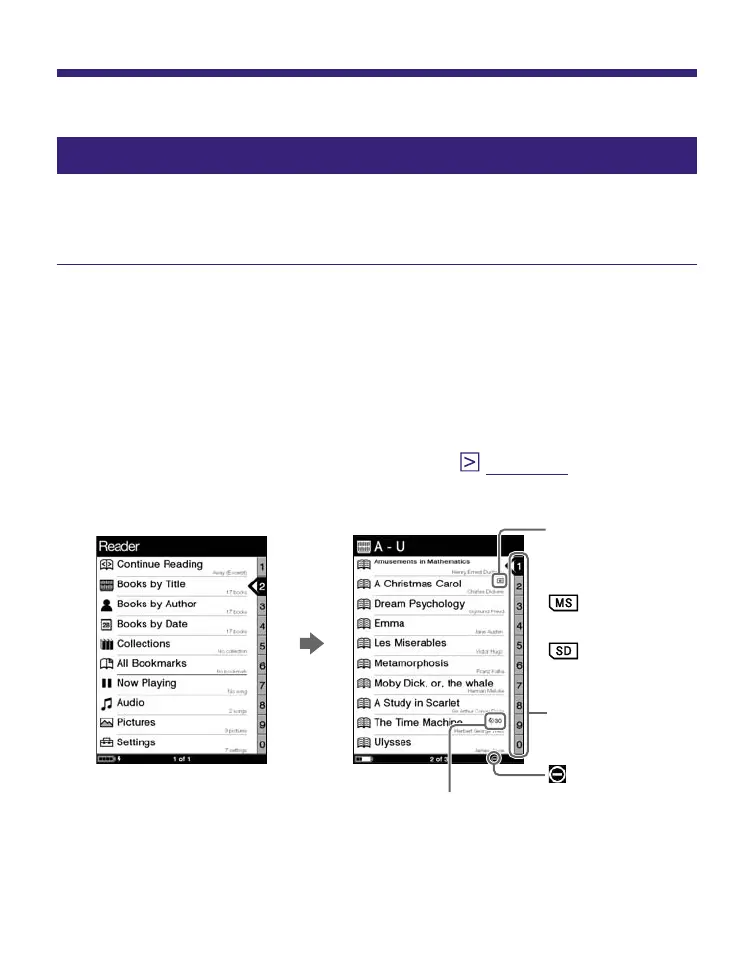
In the Home menu, press / to select “Books by
Title,” then press Enter.
The Book list appears.
If the contents of the book on the Reader and the
memory card exceed 30 items, the Index menu appears.
The Book list can be further sorted by selecting the
category item in the Index menu. (
page 46
)
Indicates that
content is
stored on a
memory card.
: “Memory
Stick Duo”
: SD Memory
Card
Number tabs
indicator
Indicates the number of days remaining before
the expiration date of the book. If the book has
already expired, “Expired” is displayed in place of
the days.
Continued
36




 To Next Page