PRS-505.GB.3-277-508-11(1)
Viewing Pictures
Viewing pictures transferred from your computer
BMP/JPEG/GIF/PNG files can be viewed on the Reader.
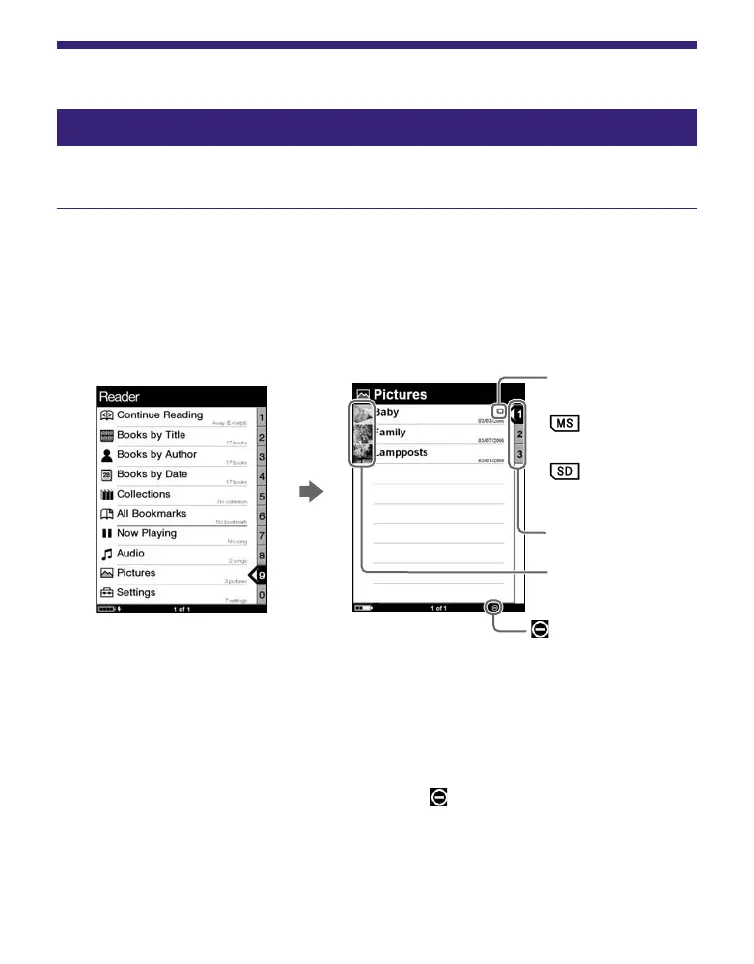
In the Home menu, press / to select “Pictures,”
then press Enter.
The Picture list appears.
Indicates that
content is stored
on a memory
card.
: “Memory
Stick Duo”
: SD Memory
Card
Thumbnails
Number tabs
indicator
Hints
• The content on the memory card also appears in the Picture list.
• In addition to /, you can also select an item by pressing the
same number button as indicated on the number tab.
• To display the rest of the list, press > (repeatedly).
• If an invalid operation is performed, appears at the bottom of
the screen.
Continued
59




 To Next Page