96
Guide to Parts and Controls
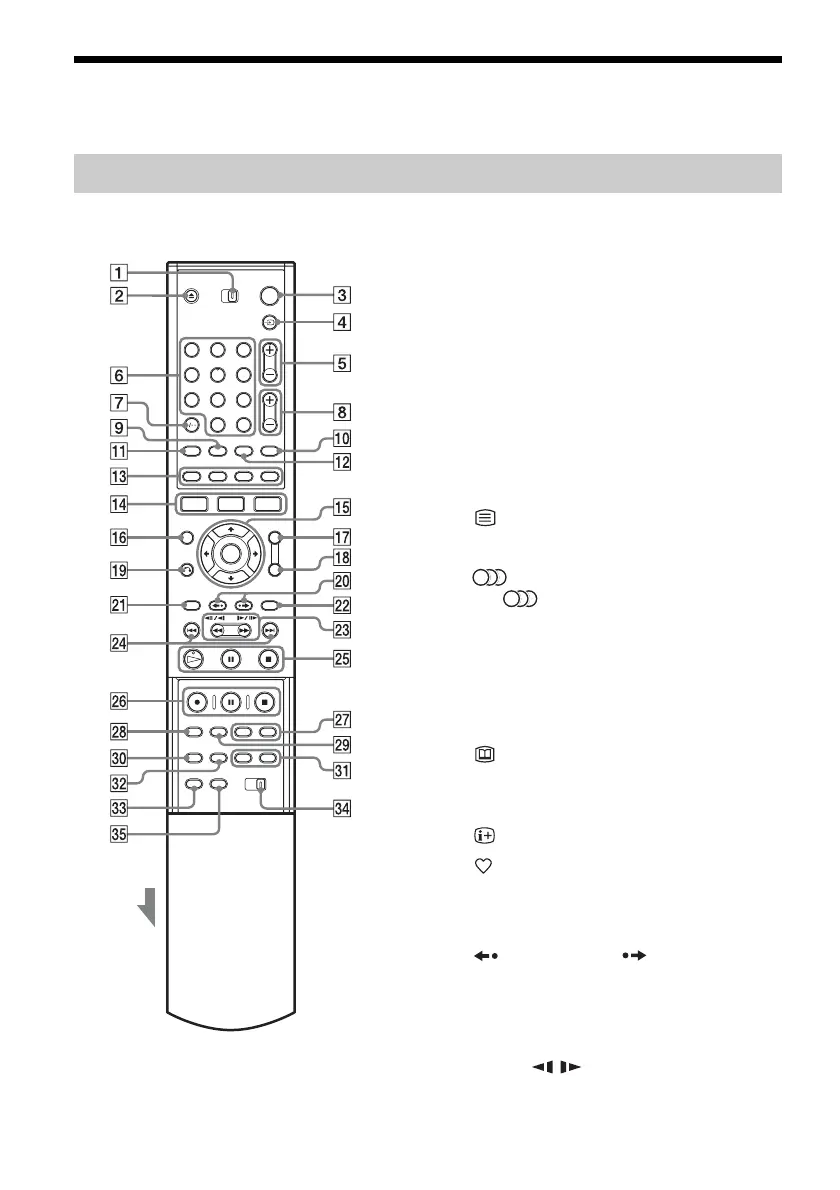
For more information, see the pages in parentheses.
Buttons with an orange dot next to them can be used with
your TV when the TV/DVD switch is set to TV.
A TV/DVD switch (19)
B Z (open/close) button (26)
C [/1 (on/standby) button (22)
D t TV/VIDEO, TV/DVD button (19)
E PROG (programme) +/– buttons (28)
The + button has a tactile dot*.
F Number buttons (48, 62)
SET button (48)
The number 5 button has a tactile dot*.
G CLEAR/-/-- (ten digit) button (48)
H 2 (volume) +/– buttons (19)
I Text button (42)
J TV/RADIO button (42)
K (audio) button (58)
The button has a tactile dot*.
L [TIMER] button (46)
M Coloured multimedia applications &
interactive services control buttons (38)
N SYSTEM MENU button (21, 74)
TITLE LIST button (29, 56, 63, 68)
GUIDE (Electronic Programme Guide)
button (38, 48)
O </M/m/,/ENTER button (22)
P INFO button (40)
Q Favourite button (43)
R TOOLS button (26)
S O RETURN button (52)
T (instant replay)/ (instant advance)
buttons (29, 63)
U TOP MENU button (56)
V MENU button (56)
W mc / CM (search) buttons
(58)
X ./> (previous/next) buttons (58)
Remote
1 2 3
4 5 6
7 8 9
0



 To Next Page