98
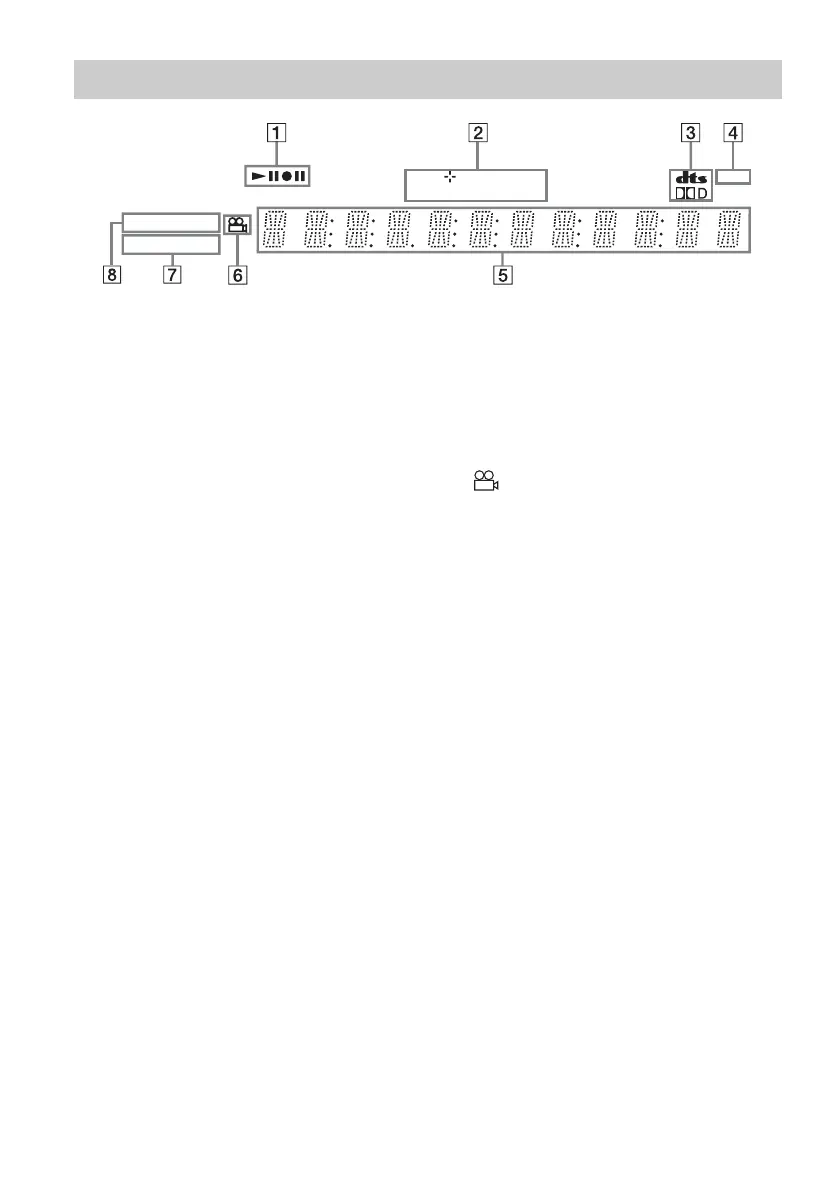
A Playing/recording status
B Disc type*/recording format
C Audio signal indicators (31)
D TV indicator (28)
E Displays the following (32):
• Playing time/remaining time
• Current title/chapter/track/index number
• Recording time/recording mode
•Clock
• Programme position
• TV Direct Rec indication
(28): “TV”
appears in the right most two digits.
F (angle) indicator (58)
G SMARTLINK indicator (15)
H PROGRESSIVE indicator (16)
* Displays DATA CDs as “CD.”
z Hint
You can turn off the front panel display when the recorder is turned off by setting “Dimmer” to “Power Save” in
“Options” setup (page 85).
Front panel display
DVD RW VCD
TV
VR
PROGRESSIVE
SMARTLINK



 To Next Page