119
Additional Information
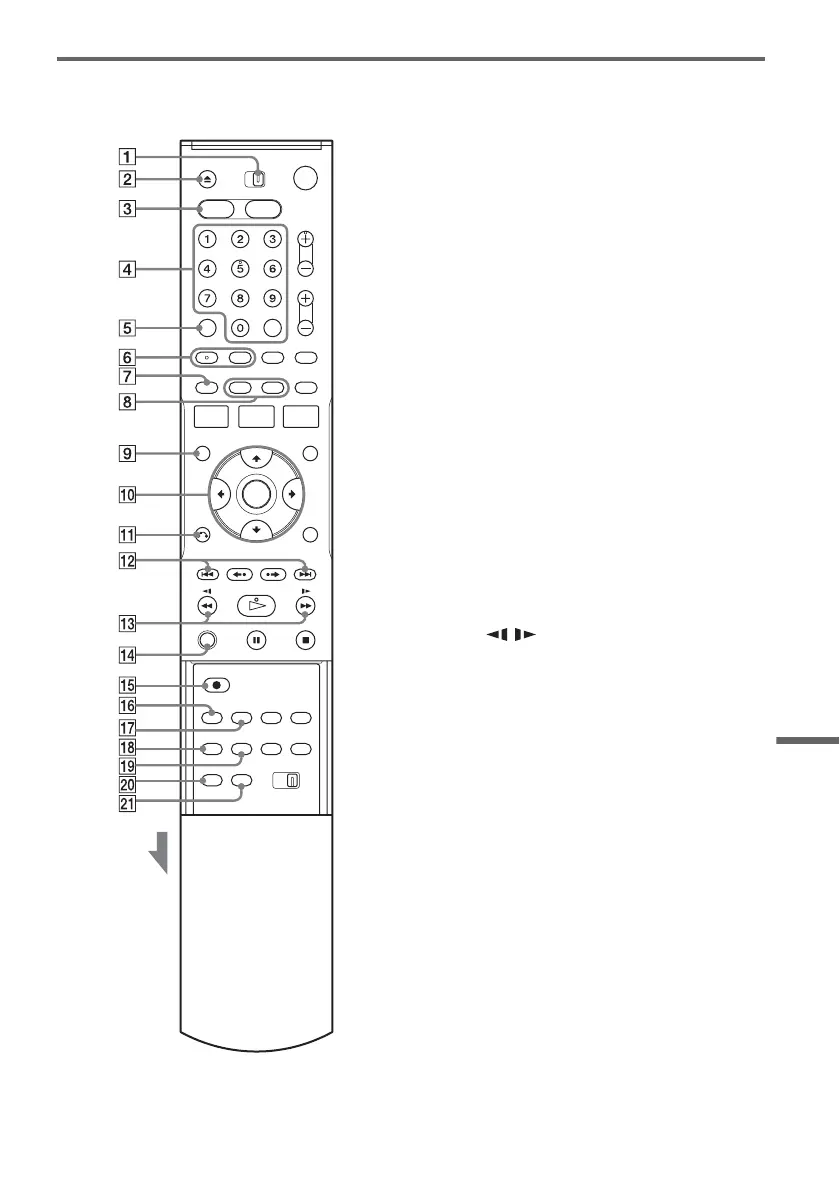
Remote
For DVD functions
Buttons with an orange dot next to them can be
used with your TV when the TV/DVD·VIDEO
switch is set to TV.
A TV/DVD·VIDEO switch (21)
B Z OPEN/CLOSE button (35, 49, 94)
C DVD button (35, 49)
D Number buttons* (21, 36)
SET button (21)
E CLEAR button (42)
F AUDIO button* (36)
SUBTITLE button (36)
G ORIGINAL/PLAYLIST button (40, 59)
H DISPLAY button (46)
TIME/TEXT button (47)
I TOP MENU button (35)
J M/m/</,/ENTER button (23)
K O RETURN button (23)
L . PREV (previous)/> NEXT
buttons (36)
M m / M (search) buttons (36)
N ZOOM button (36)
O z REC (record) button (49)
P REC MODE button (49, 94)
Q SYNCHRO REC button (53)
R ANGLE button (36)
S REPEAT button (36)
T MARKER button (42)
U SEARCH button (42)
* Number 5 and AUDIO buttons have a tactile dot. Use
the tactile dot as a reference.
Slide the cover
,continued














 To Next Page