1-4
DVP-NS47P/NS57P/NS508P/NS64P/NS67P/NS608P
15
Hookups
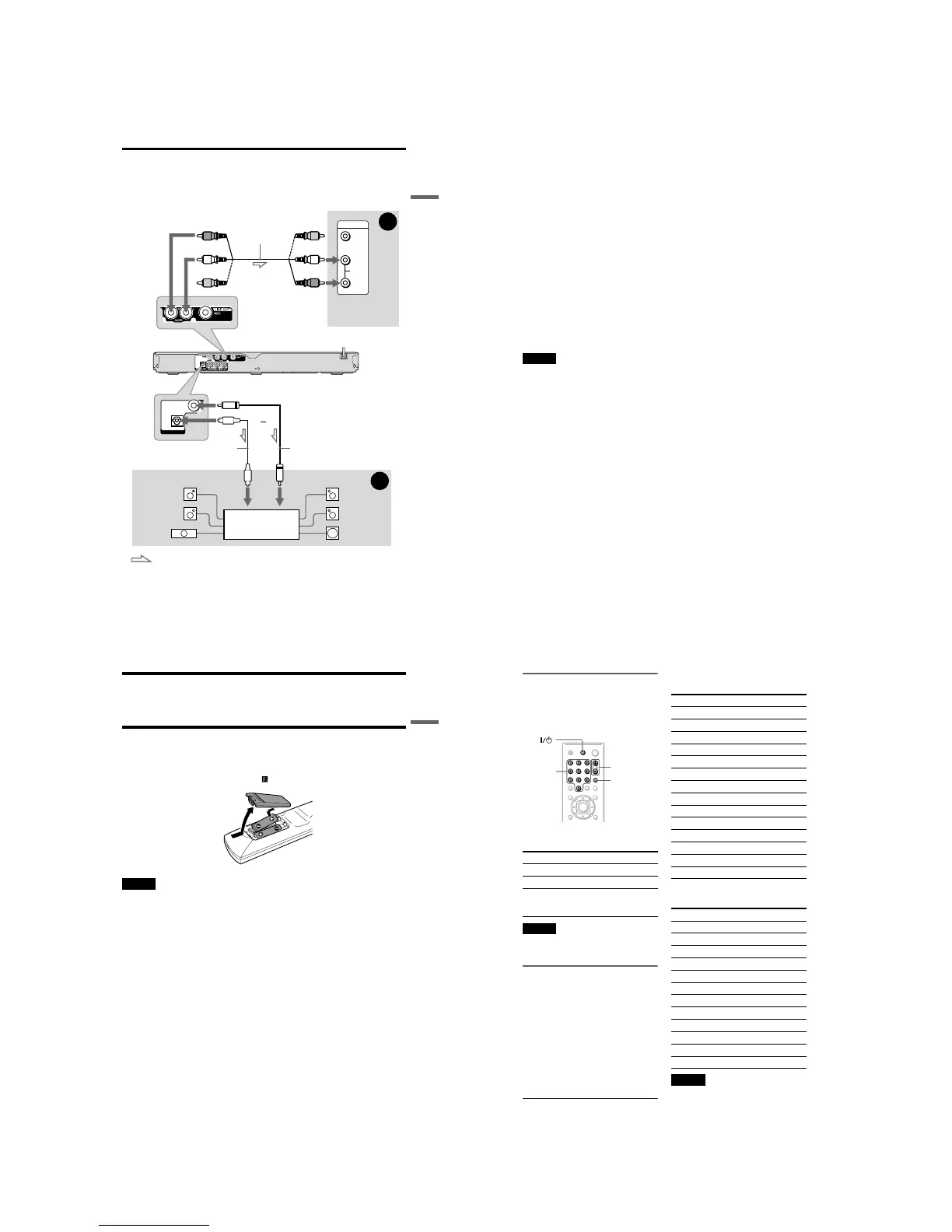
Step 3: Connecting the Audio Cords
Select one of the following patterns A or B, according to the input jack on your TV monitor,
projector, or audio component such as an AV amplifier (receiver).
This will enable you to listen to sound.
z Hint
For correct speaker location, see the operating instructions supplied with the connected components.
VIDEO
AUDIO
INPUT
L
R
B
A
COAXIAL
OPTICAL
DIGITAL OUT
Audio component
with a decoder
(red)
TV, projector, or
audio component
Audio/video
cord (supplied)
: Signal flow
Coaxial digital cord
(not supplied)
to DIGITAL OUT
(COAXIAL or OPTICAL)
to LINE OUT L/R (AUDIO)
Rear (L)
CD/DVD player
(white)
(yellow)*
(yellow)*
(white)
(red)
[Speakers]
Front (L)
[Speakers]
to coaxial
digital input
Rear (R)
Front (R)
Subwoofer
Centre
* The yellow plug is used for video signals (page 14).
Optical digital cord
(not supplied)
to optical
digital input
or
,continued
16
A Audio L/R input jacks
This connection will use your TV’s or audio
component’s two speakers for sound.
B Digital audio input jack
If your audio component has a Dolby*
1
Digital, DTS*
2
, or MPEG audio decoder and
a digital input jack, use this connection. You
can enjoy Dolby Digital (5.1ch), DTS
(5.1ch), and MPEG audio (5.1ch) surround
effect.
*1
Manufactured under license from Dolby
Laboratories.
Dolby, Pro Logic, and the double-D symbol are
trademarks of Dolby Laboratories.
*2
Manufactured under license under U.S. Patent #:
5,451,942 & other U.S. and worldwide patents
issued & pending. DTS and DTS Digital Out are
registered trademarks and the DTS logos and
Symbol are trademarks of DTS, Inc. © 1996-
2007 DTS, Inc. All Rights Reserved.
Notes
• After you have completed the connection, make
the appropriate settings in Quick Setup (page 19).
If your audio component has an MPEG audio
decoder function, set “MPEG” to “MPEG” in
AUDIO SETUP (page 54). Otherwise, no sound
or a loud noise will come from your speakers.
• The TVS effects of this player cannot be used
with this connection.
• In order to listen to DTS sound tracks, you must
use this connection. DTS sound tracks are not
output through the LINE OUT L/R (AUDIO)
jacks, even if you set “DTS” to “ON” in Quick
Setup (page 19).
17
Hookups
Step 4: Connecting the Mains Lead
Plug the player and TV mains lead (power cord) into a mains.
Step 5: Preparing the Remote
You can control the player using the supplied remote. Insert two R6 (size AA) batteries by
matching the 3 and # ends on the batteries to the markings inside the compartment. When
using the remote, point it at the remote sensor on the player.
Notes
• Do not leave the remote in an extremely hot or humid place.
• Do not drop any foreign object into the remote casing, particularly when replacing the batteries.
• Do not expose the remote sensor to direct light from the sun or a lighting apparatus. Doing so may cause a
malfunction.
• If you do not use the remote for an extended period of time, remove the batteries to avoid possible damage
from battery leakage and corrosion.
,continued
18
Controlling Your TV with the
Supplied Remote
You can control the sound level, input source,
and power switch of your Sony TV with the
supplied remote.
You can control your TV using the buttons
below.
Note
Depending on the connected unit, you may not be
able to control your TV using all or some of the
buttons on the supplied remote.
Controlling other TVs with the
remote
You can control the sound level, input source,
and power switch of non-Sony TVs as well.
If your TV is listed in the table below, set the
appropriate manufacturer’s code.
1 While holding down TV [/1, press the
number buttons to select your TV’s
manufacturer’s code (see the table
below).
2 Release TV [/1.
Code numbers of controllable TVs
If more than one code number is listed, try
entering them one at a time until you find the
one that works with your TV.
◆For RMT-D175P/RMT-D185P remote
commander only
◆For RMT-D175A/RMT-D185A remote
commander only
Notes
• When you replace the batteries of the remote, the
code number you have set may be reset to the
default setting. Set the appropriate code number
again.
• Depending on the connected unit, you may not be
able to control your TV using all or some of the
buttons on the supplied remote.
By pressing You can
TV [/1 Turn the TV on or off
2/VOL +/– Adjust the volume of the TV
t/TV/VIDEO Switch the TV’s input source
between the TV and other
input sources
TV
2/VOL +/–
t/TV/VIDEO
Number
buttons
Manufacturer Code number
Sony 01 (default)
Aiwa 01 (default)
Grundig 11
Hitachi 24
JVC 33
LG 06
Loewe 06
Panasonic 17, 49
Philips 06, 08
Samsung 06, 71
Sanyo 25
Sharp 29
Thomson 43
Toshiba 38
Manufacturer Code number
Sony 01 (default)
Daewoo 04, 22
Hitachi 02, 04
JVC 09
LG/Goldstar 04
MGA/Mitsubishi 04, 13
Panasonic 19
Philips 21
RCA 04, 10
Samsung 04, 20
Sharp 18
Toshiba 07, 18



 To Next Page