HT-CT780
13
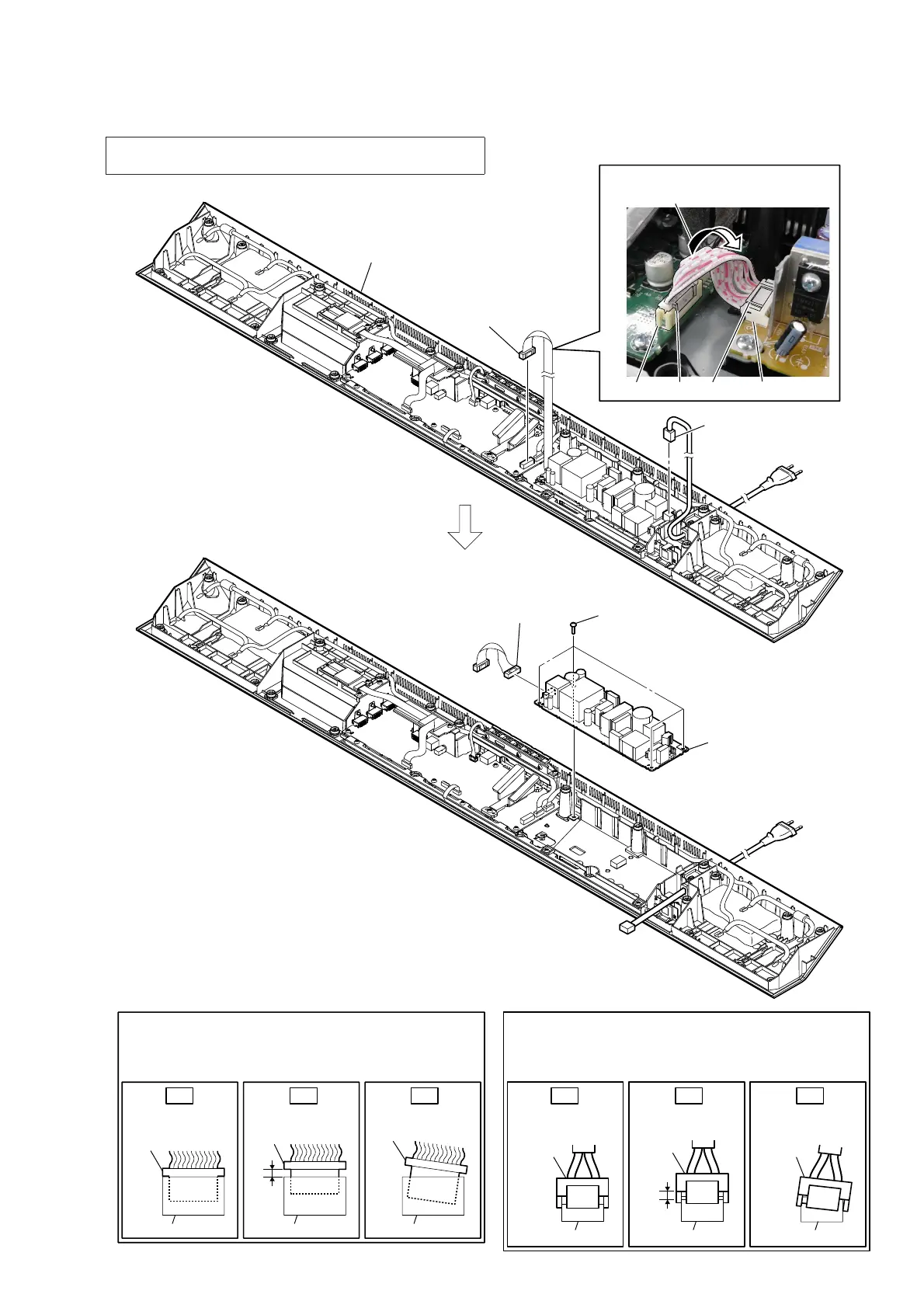
2-7. POWER BOARD
Insert only part way.Insert straight into
the interior.
connector
connector
Insert at a slant.
connector connector
connector
connector
OK NG NG
How to install the power cord connector
Insert the connector straight into the interior.
There is a possibility that using this unit without
the connector correctly installed will damage it.
Insert only part way.Insert straight into
the interior.
connector
Insert at a slant.
connector
connector
connector
connector connector
OK NG NG
How to install the connector
Insert the connector straight into the interior.
There is a possibility that using this unit without
the connector correctly installed will damage it.
2 power cord connector
(CN901)
4 connector
(CN902)
1 connector
(CN601)
5 POWER board
3 four screws
(BV3)
Wire setting
bottom block
boss
CN601
Twist the wire.
CN902boss
Note: When the complete POWER board is replaced, refer to “BOND
FIXATION OF ELECTRIC PARTS” on page 6.



 To Next Page