HT-CT780
18
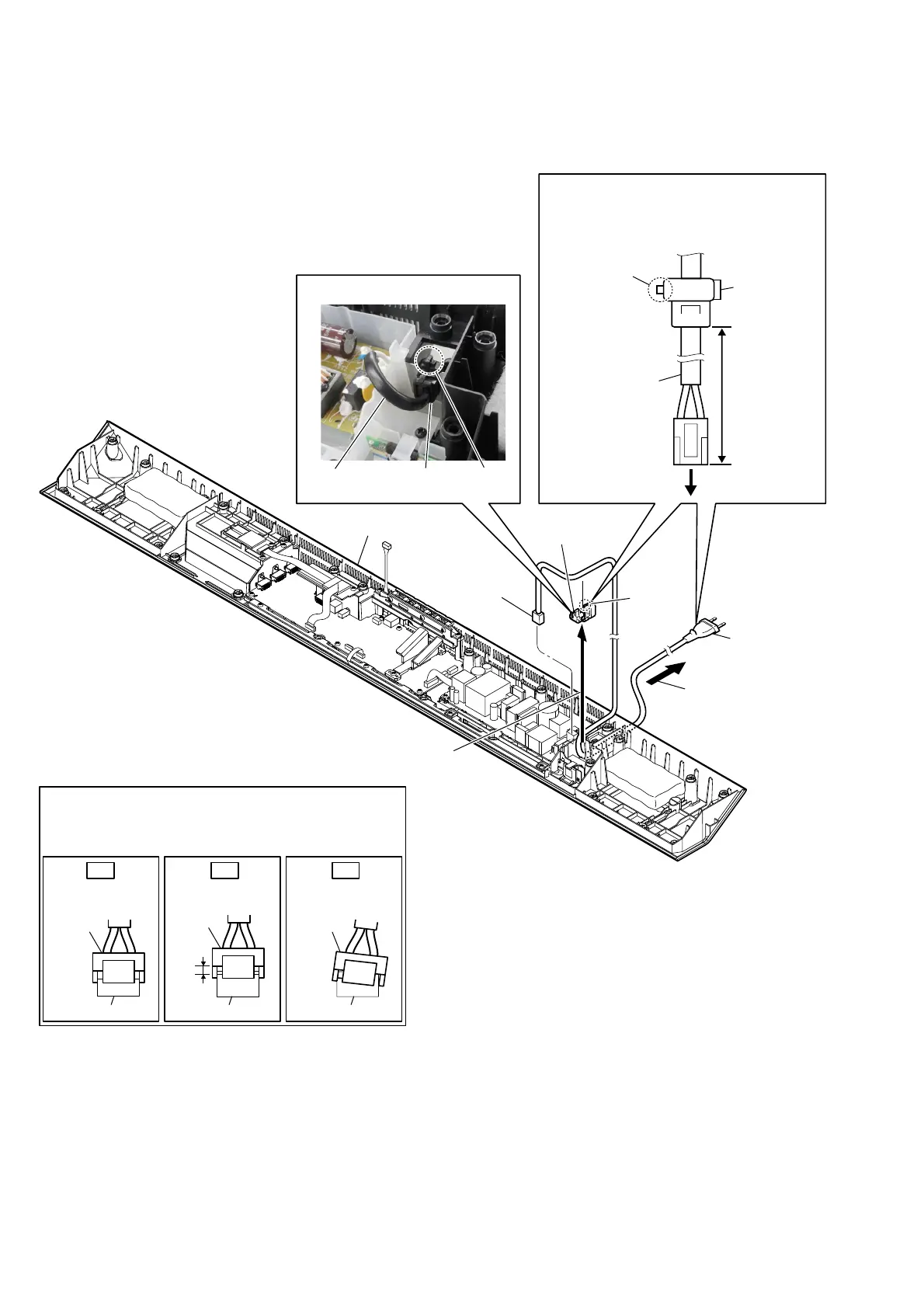
2-12. POWER CORD (AC1)
&RUGEXVKLQJ)%6VHWWLQJ
Insert only part way.Insert straight into
the interior.
connector
connector
Insert at a slant.
connector connector
connector
connector
OK NG NG
+RZWRLQVWDOOWKHSRZHUFRUGFRQQHFWRU
Insert the connector straight into the interior.
There is a possibility that using this unit without
the connector correctly installed will damage it.
1 connector
(CN901)
3 Draw out the power
cord from the hole.
6 power cord
(AC1)
2 Remove the cord bushing (FBS001)
in the direction of the arrow.
5 cord bushing
(FBS001)
4 claw
3RZHUFRUGVHWWLQJ
power cord
(AC1)
cord bushing
(FBS001)
claw
80 +5, -0 mm
to POWER board
Note:
When installing the power cord (AC1),
check the direction of claw of cord bushing
(FBS001) and install correctly.
bottom block
claw
power cord
cord bushing
(FBS001)



 To Next Page