HT-CT780
23
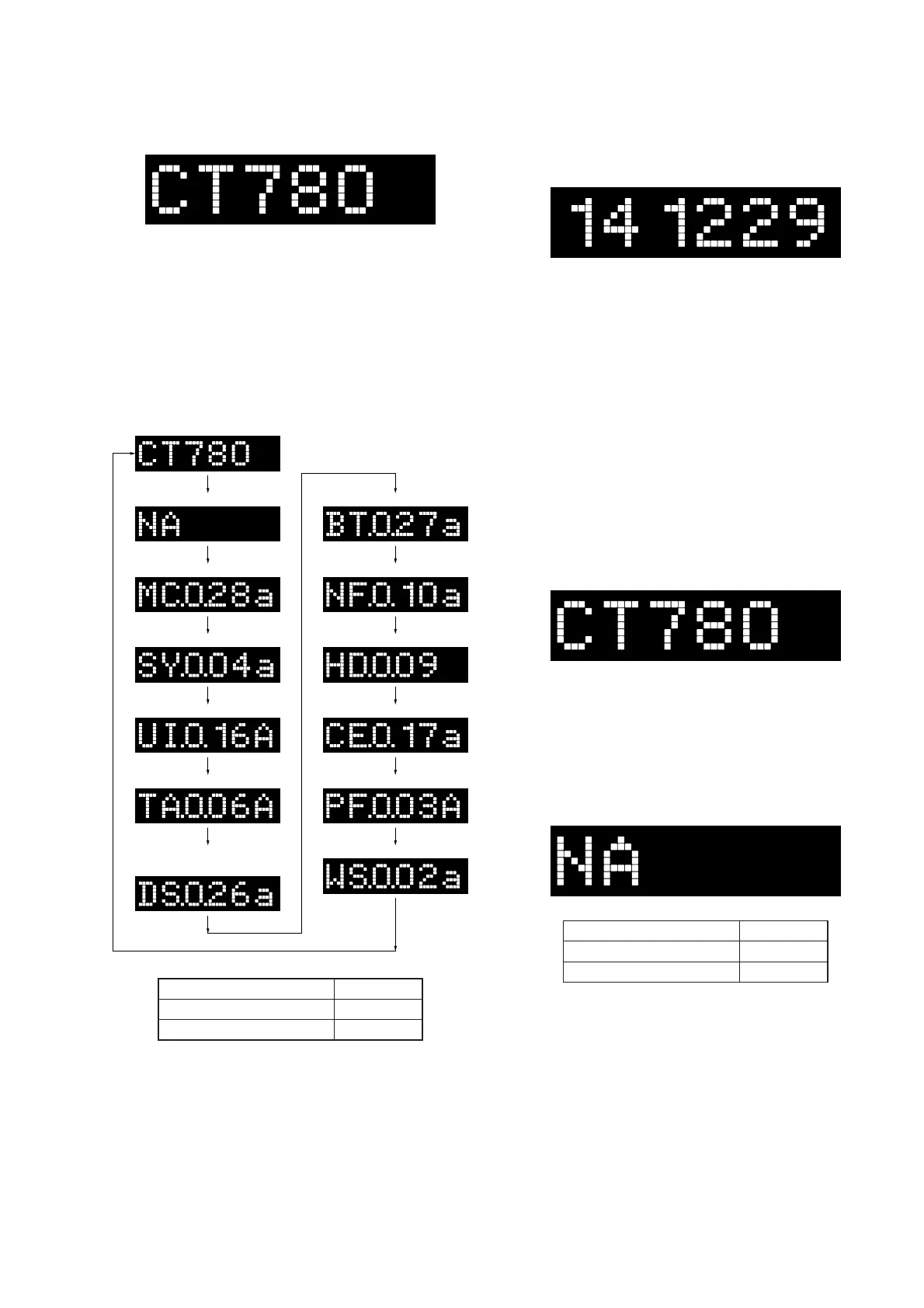
6. In the state of step 4, press the [INPUT] button and model
name “CT780” is displayed on the fl uorescent indicator tube.
Each time the [VOLUME +] button is pressed, the display
changes from destination → MC (-com) version → SY (sys-
tem) version → UI version → TA (AMP) version → DS (DSP)
version (Not used for the servicing) → BT (Bluetooth) version
→ NF (NFC) version → HD (HDMI) version, → CE (CEC)
version → PF (platform) version → WS (wireless sound) ver-
sion in this order, and returns to the model name display.
Note: Refer to the “2-5. Serial Flash Version Display Mode” and “2-6.
DSP Sound Number Display Mode” for the DS (DSP) version
on page 24.
NF version
CE version
Model name
Destination
MC version
SY version
PF version
UI version
TA version
DS version
(Not used for the servicing)
HD version
BT version
WS version
(Displayed characters/values in the above fi gure are example)
Destination Display
Except AEP and UK models
NA
AEP and UK models
CE2
7. When [INPUT] button is pressed while the each version is dis-
played on the fl uorescent indicator tube, year, month and day
of the software creation is displayed on the fl uorescent indica-
tor tube.
(Displayed values in the above fi gure are example)
When [INPUT] button is pressed again, the display returns to
the each version display.
Releasing method:
Press the [
?/1
] button to release the test mode menu.
(When the “K 0” to “K 4” is displayed on the fl uorescent indicator
tube, press the [
?/1
] button on the remote commander to release
the test mode menu)
2-2. Model Name Display Mode
It can display the model name.
Procedure:
1. Enter the test mode menu.
(Refer to “Setting method of the test mode menu” on page 22)
2. Press the [VOLUME +]/[VOLUME –] buttons to select the
model name “CT780”.
2-3. Destination Display Mode
It can display the destination.
Procedure:
1. Enter the test mode menu.
(Refer to “Setting method of the test mode menu” on page 22)
2. Press the [VOLUME +]/[VOLUME –] buttons to select the
destination.
(Displayed characters in the above fi gure are example)
Destination Display
Except AEP and UK models
NA
AEP and UK models
CE2
Ver. 1.1



 To Next Page