13
Connecting the AC adaptor and AC power cord
Warning
• The socket-outlet shall be installed near the equipment and shall be easily
accessible.
• Do not plug the AC power cord for the console into the electrical outlet
until you have made all other connections.
1
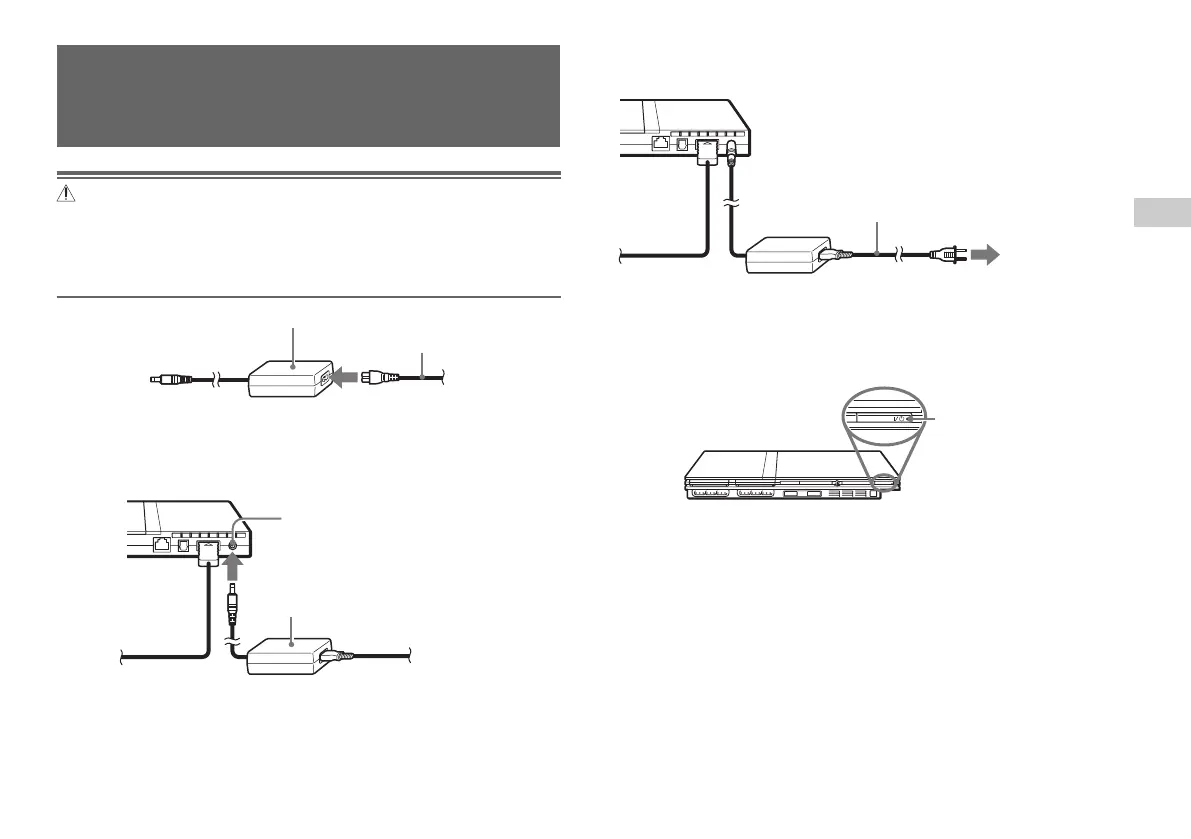
Connect the AC power cord to the AC adaptor.
2
Plug the connector of the AC adaptor into the
!
DC IN 8.5V
connector on the console rear.
Connecting the AC adaptor and
AC power cord
3
Plug the AC power cord into the electrical outlet.
The =/1 (on/standby) indicator on the console front will light up in
red to indicate that the console is in standby mode.
GB
Preparation
Console rear
AC adaptor
! DC IN 8.5V connector
Console rear
AC power cord
To the electrical outlet
Some regions and countries may
use a different electrical outlet
plug from the one illustrated.
Console front
]/1 indicator













 To Next Page