4
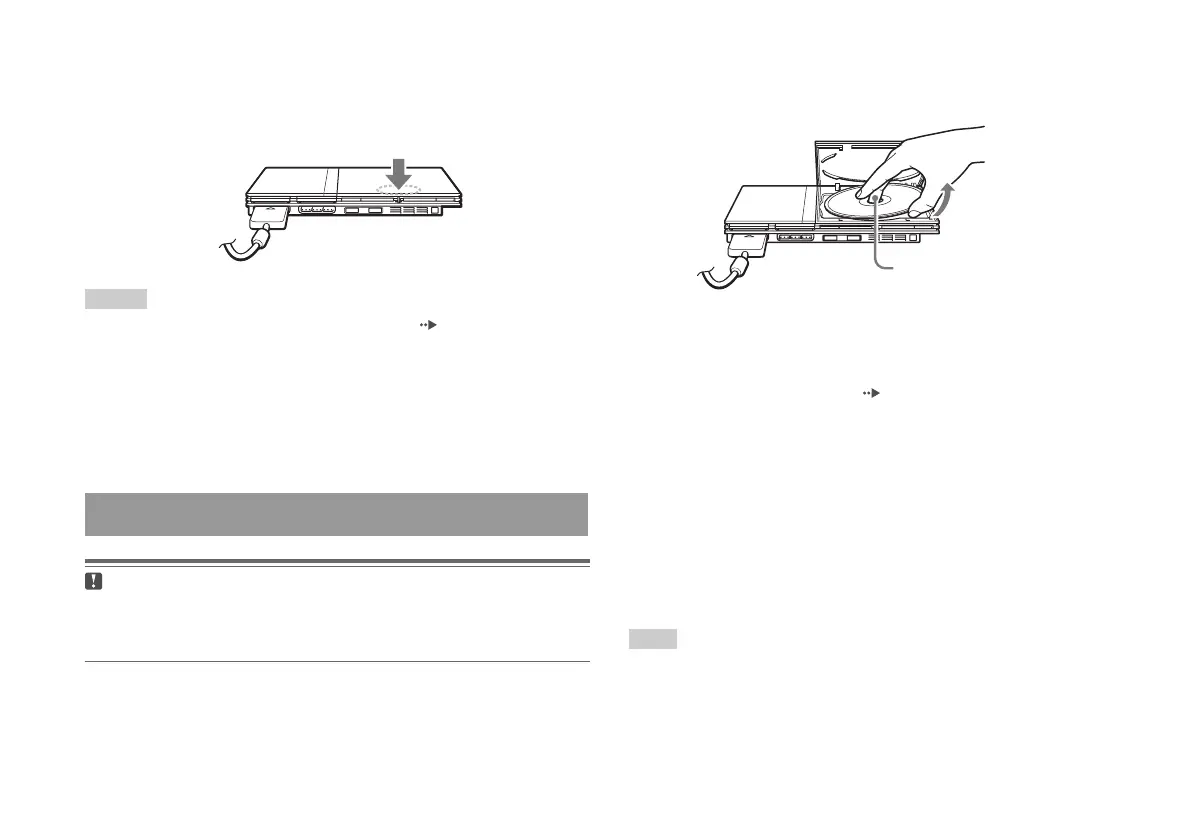
Close the disc cover.
Push the middle of the disc cover. After the disc cover is closed, the
game will start.
Notes
• You can also start a game from the Browser screen ( page 35).
• If you turn on the console after inserting a disc, the game will start
automatically.
To reset a game
Press the \/1 (on/standby)/RESET button on the console front. Do not
accidentally press the
@/1/RESET button while playing a game, as
doing so will cause the game to reset.
Caution
When removing a disc, check that the disc has stopped completely. Do not
touch the disc if it is spinning, as doing so may cause injury, damage to the
disc or console malfunction.
1
Press the
A
button on the console front.
Ending a game
Push the middle of the disc cover.
2
Remove the disc.
Hold down the black centre part of the console, and then lift the
disc by the edges.
3
Close the disc cover.
4
Press the
=/1
/RESET button.
The main menu is displayed ( page 35).
Changing game discs
1
Open the disc cover and remove the disc.
When removing a disc, hold down the black centre part of the disc
holder and then lift the disc by the edges.
2
Insert a disc.
3
Close the disc cover and reset the console.
The new game will start.
Note
You do not need to turn off the console when changing games.
16
Playing a game
Press the black centre part
of the disc holder.













 To Next Page