23
Watching a DVD
GB
DVDs
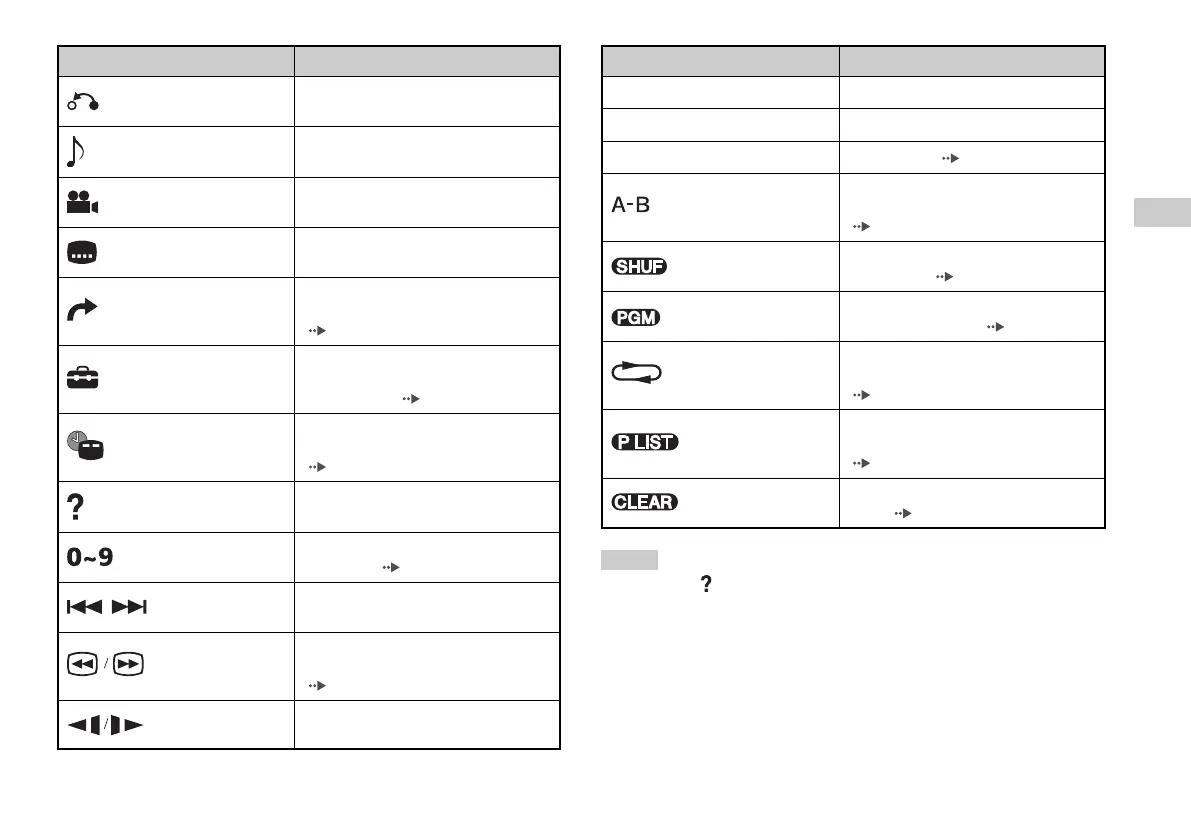
Icon Function
Return
Returns to the previously selected screen
within the DVD’s menu
Audio Options
Displays and changes audio options on
DVDs with multiple audio tracks
Angle Options
Displays and changes viewing angles on
DVDs recorded with multi-angle options
Subtitle Options
Displays and changes subtitle options on
DVDs with subtitle options
Skips to the selected title, chapter or the
Go To specified time, and starts playback
( page 24)
Displays and changes options for
Setup language, picture quality, Parental Control
level, audio, etc. ( page 28)
Displays the current title or chapter
Time Display number, the elapsed time, etc.
( page 25)
Help
Displays the direct button functions of the
Analog Controller (DUALSHOCK®2)
Go to Chapt
er
Used to enter the number of a chapter you
want to play ( page 24)
Previous/Next
Returns/skips to the beginning of the
current, previous or next chapter
Fast reverses/forwards playback on the
Search screen to help you find a particular scene
( page 25)
Slow
Changes to playback/reverse playback in
slow-motion
Icon Function
N
Play Starts playback
X
Pause Pauses playback
x
Stop Stops playback ( page 24)
Specifies a scene for playback, and starts
A-B Repeat playback of the scene that has been set
( page 27)
Shuffle Play
Begins playback of titles or chapters in a
random order ( page 27)
Program Play
Begins playback of titles or chapters in a
programmed sequence ( page 26)
Selects repeated playback of all the titles
Repeat Play on the disc, or one title or one chapter
( page 27)
For DVD-RW discs (VR mode), selects
Original/Play List Original or Play List content to play
( page 26)
Clear
Clear
s selected numbers or playback
modes ( page 28)
Notes
• You can use “ “ to check the options that can be accessed directly using the
buttons of the Analog Controller. To access the options directly using the
controller, you must clear the Control Panel from the screen.
• Depending on the playback mode, some options may not be available or
cannot be adjusted.













 To Next Page