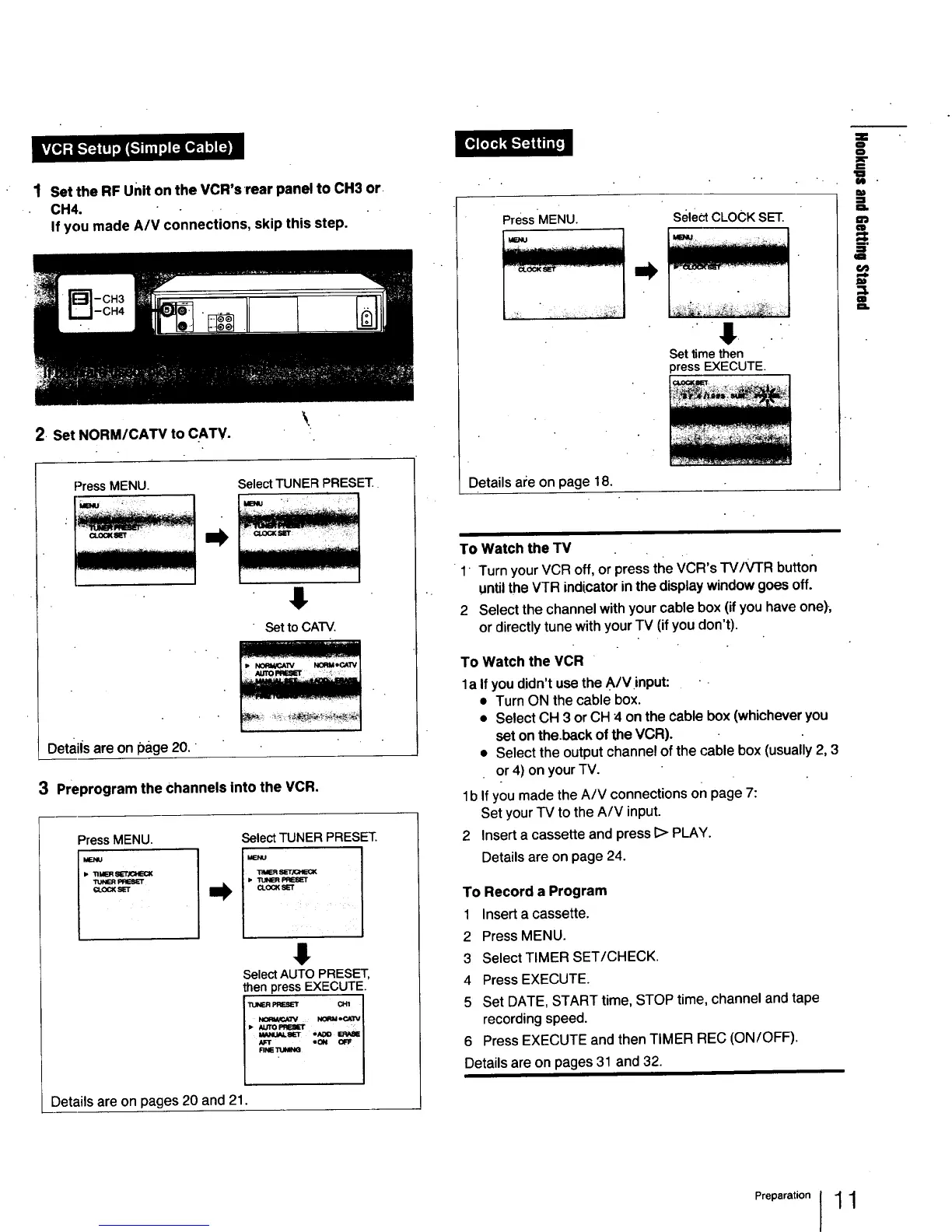
1 Set the RF unit on the VCR's •rear panel to CH3 or
CH4.
If you made A/V connections, skip this step.
2 Set NORM/CATV to CATV.
Press MENU. SelectTUNER PRESET.
MB_J
$
Set to CATV.
Detaiis are on page 20,
3 Preprogram the channels into the VCR.
PressMENU.
Select TUNER PRESET
I-I J
"I1MERSk"r/GH_CK
I,
!
SelectAUTO PRESET,
then press EXECUTE.
PRESEI" CHI I
N_qM_,_3V I
J- _€,'TOPI_IEI"t :: i
M_u_._r ,Aoo _ I
J
Details are on pages 20 and 21.
Press 'MENU. select CLOCK SET.
" " ! " " "
Settime then
press EXECUTE.
Details are on page 18.
To Watch the TV
1' Turn your VCR off, or press the VCR's TV/VTR button
untilthe VTR indicator in the display window goes off.
2 Select the channel with your cable box (if you have one).,
or directly tune with your TV (if you don't).
To Watch the VCR
la If you didn't use the A/V input:
• Turn ON the cable box.
• Select CH 3 or CH 4 on the cable box (whichever you
set on the.back of the VCR).
• Select the output channel of the cable box (usually 2, 3
or 4) on your TV.
lb If you made the A/V connections on page 7-
Set your TV to the A/V input.
2 Insert a cassette and press I> PLAY.
Details are on page 24.
To Record a Program
1 Insert a cassette.
2 Press MENU.
3 Select TIMER SET/CHECK.
4 Press EXECUTE.
5 Set DATE, START time, STOP time, channel and tape
recording speed.
6 Press EXECUTE and then TIMER REC (ON/OFF).
Details are on pages 31 and 32.
==
a
==
!i_
.=
=3.
Pre a,at n11



 To Next Page