EasyManua.ls Logo

Sony SLV-400 - Setting the VCR Clock and Date; Time and Date Setting Procedure

Sony SLV-400
56 pages
Print Icon
To Next Page IconTo Next Page
To Previous Page IconTo Previous Page
Loading...
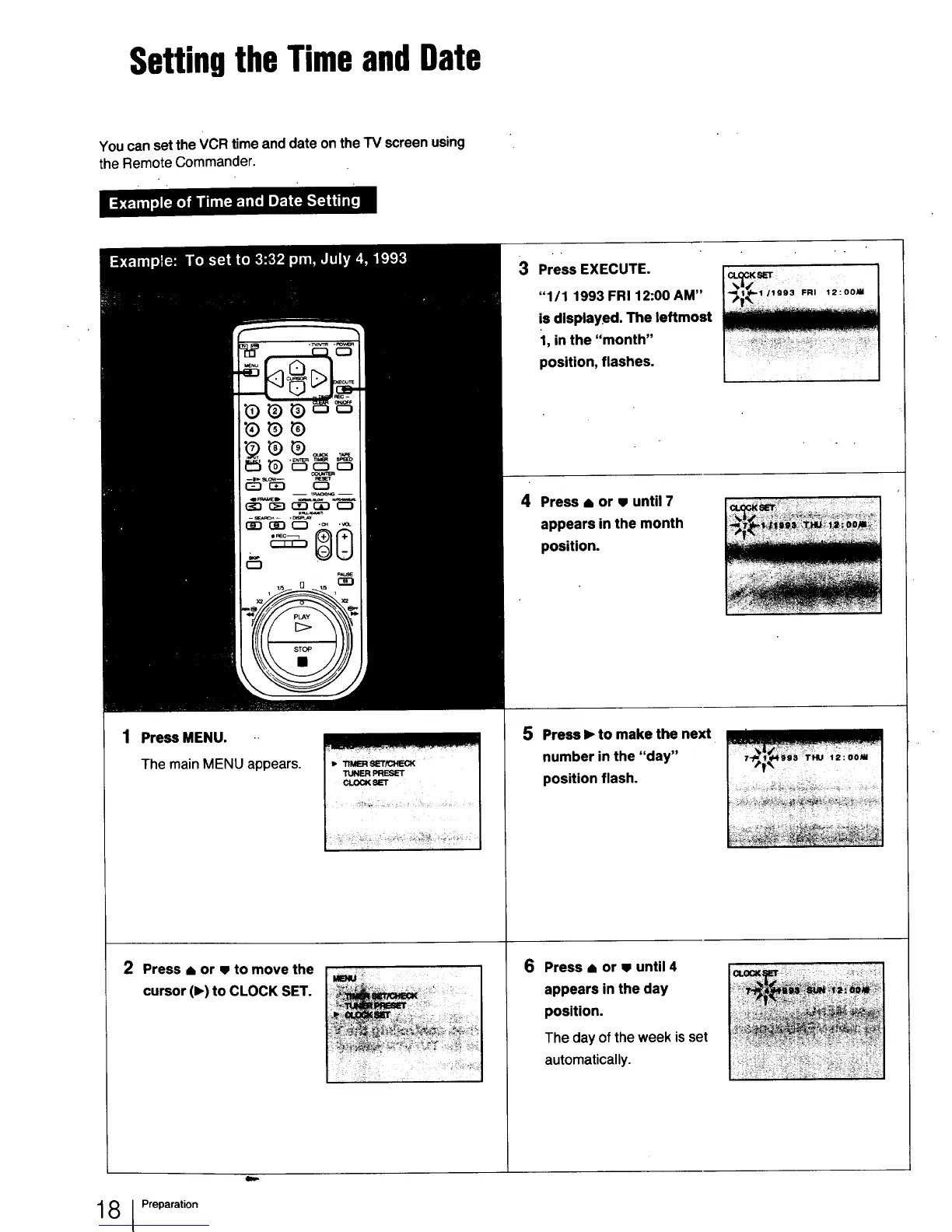
SettingtheTimeandDate
YoucansettheVCRtime anddate ontheTV screenusing
theRemoteCommander.
1 PressMENU.
The main MENUappears.
2 Press or to move the
cursor (1_)to CLOCK SET.
_. "rIMERSET/CHECK
TUNER PRESET
CLOCK SET
3 Press EXECUTE.
"1/1 1993 FR112:00 AM"
is displayed. The leftmost
1, in the "month"
position, flashes.
4 Press i or until 7
appears in the month
position.
5 Press I_ to make the next
number in the "day"
position flash.
;ili!iii!ii i! 7_!!!_
6 Press I or until 4
appears in the day
position.
The day of the week is set
automatically.
1 8 I Preparation

Other manuals for Sony SLV-400

Related product manuals