TimerRecording
The timerrecordingfunction letsyoupreset yourVCR to
recorduptoeightprogramswithina one-monthperiod.
You'lldothisprocedurefrom the TIMER SET/CHECK
displayonyourTV.
Asa First Step
Beforesettingthetimer,makesurethat: 8
• The time anddateclockisset correctly.
t.
Ifyouintendto putthe VCR intotimer-activatedrecording =_"
modewithouthavingpresetthetimeand date,theVCR
willenterclocksettingmodeautomatically. ,_
(See "Setting the Time and Date" onpage 18).
• The cassetteislongenoughto recordall the programs.
• The safetytab onthe cassetteisintact.If youinserta
cassettewithno safetytaband pressTIMER REC
(ON/OFF), thecassetteautomaticallyejects from the
VCR.
• The VCR andTV are bothturnedon.
\
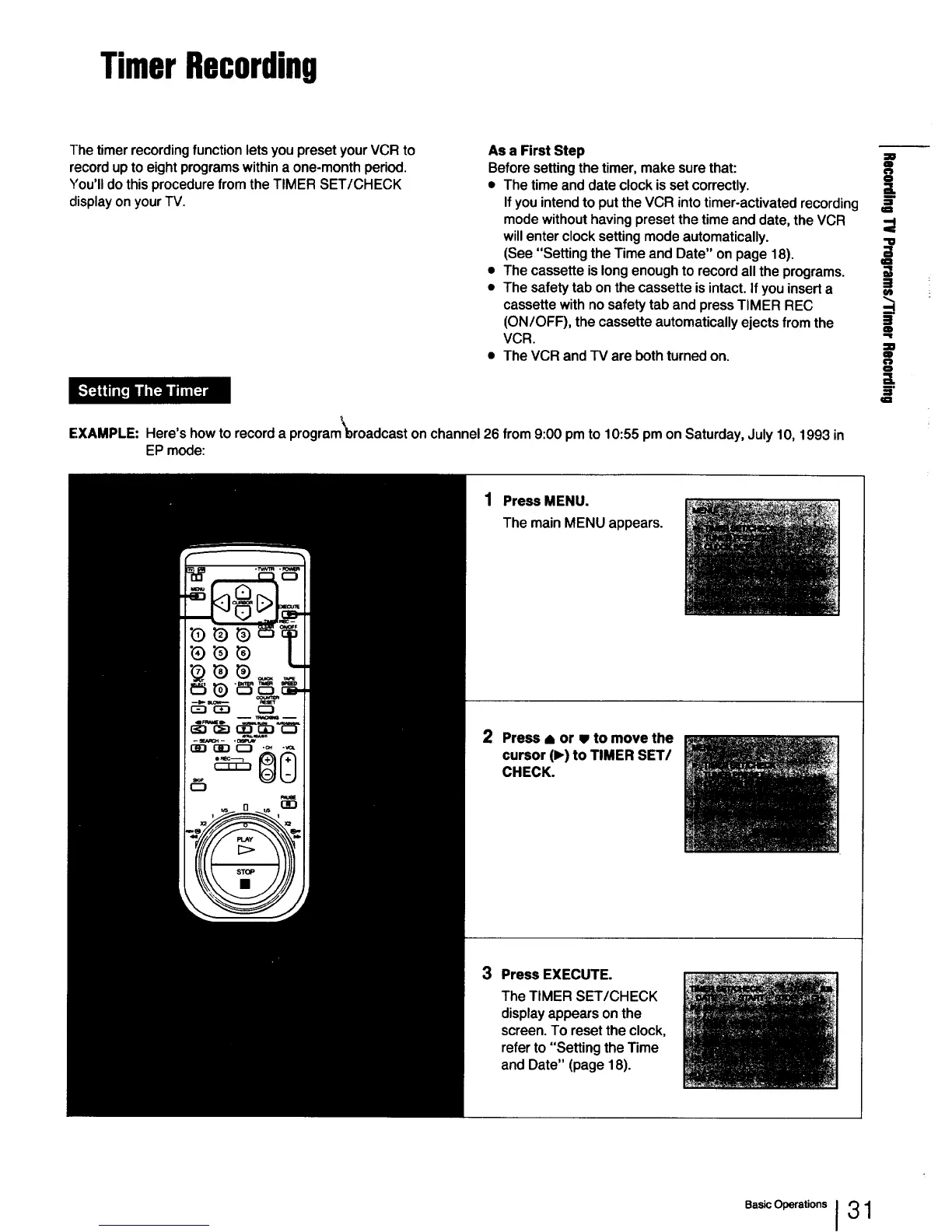
EXAMPLE: Here'showto recorda programbroadcastonchannel26 from 9:00 pm to 10:55pmonSaturday,July10, 1993 in
EPmode:
m
=l
O
0
IIR
1 Press MENU.
The main MENU appears.
2 Press _ or • to move the
cursor (1_)to TIMER SET/
CHECK.
3 Press EXECUTE.
The TIMER SET/CHECK
display appears on the
screen. To reset the clock,
refer to "Setting the Time
and Date" (page 18).
Basic Operations J 3 1



 To Next Page