Identifyingthe Parts andControls
Refer to the pages indicated for details.
'5 0 Additional Information
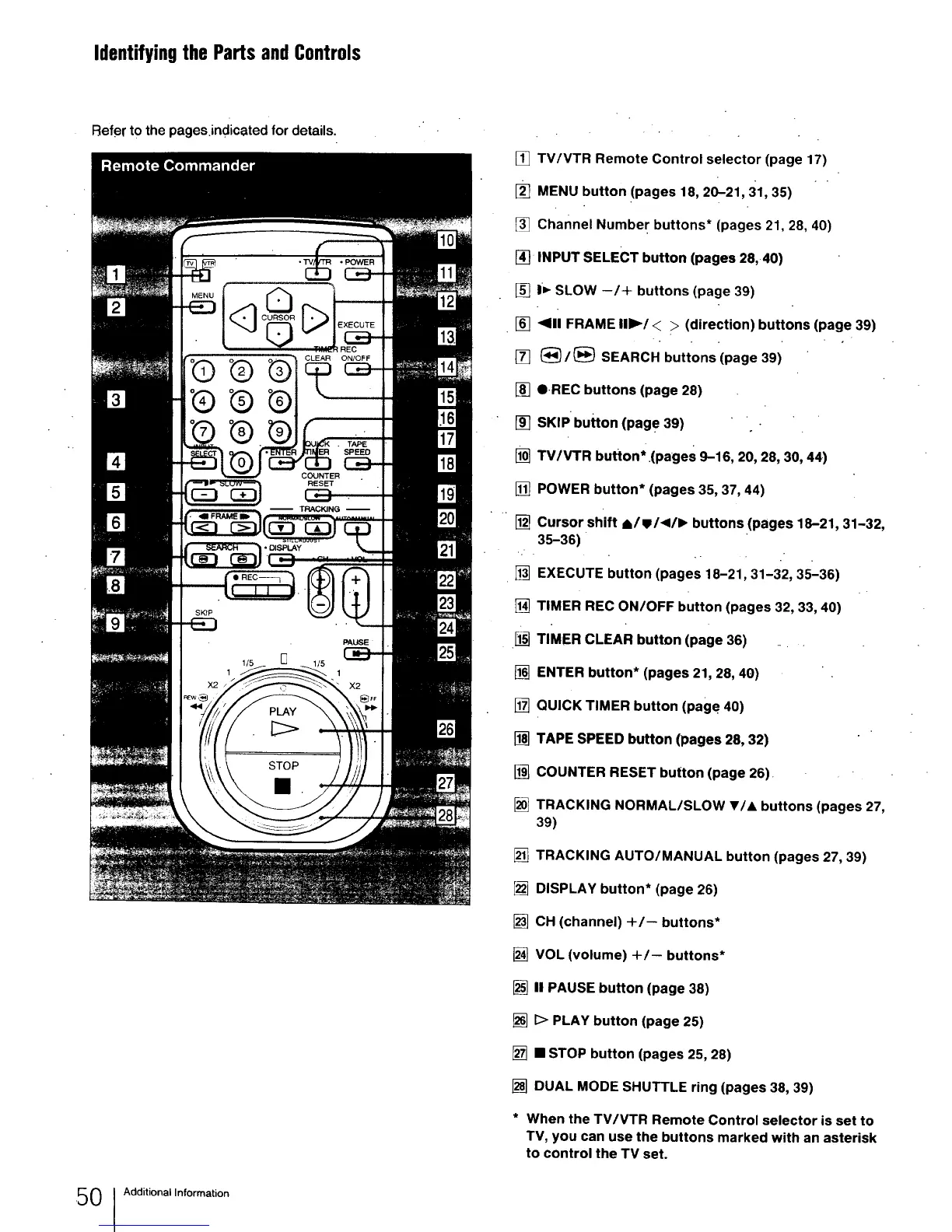
[] TV/VTR Remote Control selector (page 17)
[] MENU button (pages 18, 20-21, 31, 35) " "
[] channel Number buttons* (pages 21, 28, 40)
[_ INPUT SELECT button (pages 28,40)
[] I_- SLOW --/+ buttons (page 39)
[] _111FRAME II1_/< > (direction) buttons (page 39)
[] (_/(_ SEARCH buttons (page 39)
[] O.REC buttons (page 28)
[] SKIP button (pag e 39)
[] TV/VTR button* (pages 9-16, 20, 28, 30, 44)
[] POWER button* (pages 35, 37, 44)
[] Cursor shift *,Iw1411_ buttons (pages 18-21, 31-32,
35-36)
[] EXECUTE button (pages 18-21, 31-32, 35-36)
[] TIMER REC ON/OFF button (pages 32, 33, 40)
I_] TIMER CLEAR button (page 36) ...
[] ENTER button* (pages 21, 28, 40)
[] QUICK TIMER button (page 40)
[] TAPE SPEED button (pages 28, 32)
[] COUNTER RESET button (page 26)
[] TRACKING NORMAL/SLOW V/A buttons (pages 27,
39)
[] TRACKING AUTO/MANUAL button (pages 27, 39)
[] DISPLAY button* (page 26)
[] CH (channel) -I-/-- buttons*
[] VOL (volume) +/-- buttons*
[] II PAUSE button (page 38)
[] D PLAY button (page 25)
[] • STOP button (pages 25, 28)
[] DUAL MODE SHUTTLE ring (pages 38, 39)
* When the TV/VTR Remote Control selector is set to
TV, you can use the buttons marked with an asterisk
to control the TV set.



 To Next Page