EasyManua.ls Logo

Sony SLV-SE730 - User Manual

Sony SLV-SE730
70 pages
Print Icon
To Next Page IconTo Next Page
Loading...
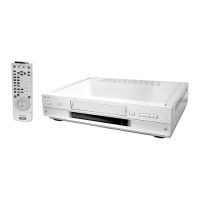
Photo: SLV-SE830N
RMT-V407A
— Continued on next page —
AEP Model
SLV-SE230B/SE230D/SE430K/SE630B/SE630D/SE630E/SE630N/
SE730B/SE730D/SE730E/SE730N/SE737E/SE830B/SE830D/
SE830E/SE830N/SX730D/SX730E/SX730N/SX737D
UK Model
SLV-SE230G/SE230I/SE730G/SE730I/SE830G
SERVICE MANUAL
VIDEO CASSETTE RECORDER
TS-10 MECHANISM
Refer to the SERVICE MANUAL of VHS MECHANI-
CAL ADJUSTMENT MANUAL VII for MECHANICAL
ADJUSTMENTS. (9-921-790-11)
SPECIFICATIONS
SLV-SE230/SE430/SE630/SE730/SE737/
SE830/SX730/SX737
RMT-V405/V405A/V406/V406A/V406B/V407A/V407B/V407C
System
Colour system
SE230B/SE630B/SE730B/SE830B:
SECAM (L)
VHF F2 to F10
UHF F21 to F69
CATV B to Q
HYPER S21 to S41
PAL (B/G)
VHF E2 to E12
VHF italian channels A to H
UHF E21 to E69
CATV S01 to S05, S1 to S20
HYPER S21 to S41
SE230D/SE630D/SE630E/SE730D/SE730E/
SE737E/SE830D/SE830E/SX730D/SX730E/
SX737D:
PAL (B/G)
VHF E2 to E12
VHF italian channels A to H
UHF E21 to E69
CATV S01 to S05, S1 to S20
HYPER S21 to S41
SE230G/SE730G/SE830G:
PAL (I)
UHF B21 to B69
SE230I/SE730I:
PAL (I)
VHF IA to IJ, SA10 to SA13
UHF B21 to B69
CATV S01 to S05, S1 to S20
HYPER S21 to S41
SE430K/SE630N/SE730N/SE830N/SX730N:
PAL (B/G, D/K)
VHF E2 to E12, R1 to R12
UHF E21 to E69, R21 to R69
CATV S1 to S41, S01 to S05
RF output signal
SE230D/SE230G/SE230I/SE430K/SE630D/
SE630E/SE630N/SE730D/SE730E/SE730G/
SE730I/SE730N/SE737E/SE830D/SE830E/
SE830G/SE830N/SX730D/SX730E/SX730N/
SX737D:
UHF channels 21 to 69
Aerial out
75-ohm asymmetrical aerial socket
Tape speed
SE230B:
SP: PAL 23.39 mm/s (recording/playback)
NTSC 33.35 mm/s (playback only)
SECAM
23.39 mm/s (recording/playback)
MESECAM
23.39 mm/s (playback only)
LP: NTSC 16.67 mm/s (playback only)
SECAM
11.70 mm/s (recording/playback)
MESECAM
11.70 mm/s (playback only)
SE230D:
SP: PAL 23.39 mm/s (recording/playback)
NTSC 33.35 mm/s (playback only)
LP: NTSC 16.67 mm/s (playback only)
SE230G/SE230I/SE630D/SE630E/SE730D/
SE730E/SE730G/SE730I/SE737E/SE830D/
SE830E/SE830G/SX730D/SX730E/SX737D:
SP: PAL 23.39 mm/s (recording/playback)
NTSC 33.35 mm/s (playback only)
LP: PAL 11.70 mm/s (recording/playback)
NTSC 16.67 mm/s (playback only)
EP: NTSC 11.12 mm/s (playback only)


Table of Contents

Questions and Answers

  • S
    Sandra TaylorSep 12, 2025
    Why is a Canal Plus programme always recorded scrambled on my Sony VCR?
    • L
      Lisa WilliamsSep 12, 2025
      If a Canal Plus program is always recorded scrambled on your Sony VCR, make sure the Canal Plus Scart cable is securely plugged in. Also, check that DEC is set to ON for this channel in the TV STATION TABLE menu.
  • M
    Matthew RogersSep 10, 2025
    Why doesn't the VPS/PDC function operate properly on my Sony VCR?
    • J
      johnstonmelissaSep 10, 2025
      If the VPS/PDC function isn't operating correctly on your Sony VCR: * Check that the clock and date are set accurately. * Verify the VPS/PDC time you set is correct. Note that if the broadcast you wanted to record didn't send the correct VPS/PDC information, the VCR won't start recording. Poor reception can also alter the VPS/PDC signal, preventing the VCR from starting the recording.
  • G
    ghardySep 9, 2025
    Why don't the SHOWVIEW or TIMER PROGRAMMING menus appear on my Sony SLV-SE730 VCR?
    • C
      Cheryl StricklandSep 9, 2025
      If the SHOWVIEW menu or the TIMER PROGRAMMING menu does not appear on your Sony VCR, check that TIMER METHOD in the EASY OPERATION menu is set correctly.
  • C
    Christian FreemanSep 8, 2025
    What to do if the picture rolls vertically during picture search on my Sony VCR?
    • K
      Karen ButlerSep 8, 2025
      If the picture rolls vertically during picture search on your Sony VCR, adjust the vertical hold control on the TV or monitor.
  • D
    Daniel AriasAug 23, 2025
    What to do if the timer does not operate on my Sony VCR?
    • M
      margaret31Aug 23, 2025
      If the timer on your Sony VCR isn't working, verify these points: * Ensure the clock is properly set. * Confirm a tape is inserted. * Check that the safety tab on the tape hasn't been removed. * Make sure the tape isn't at its end. * Verify a program has been set for timer recording and that your timer settings are past the current time. * Check that the decoder and satellite tuner are turned on. Note that the clock will stop if the VCR is disconnected from the mains, requiring you to reset the clock and timer. As a last resort, turn the power off and unplug the mains lead.
  • T
    Travis MillerSep 6, 2025
    What to do if my Sony SLV-SE730 VCR power is on but it does not operate?
    • R
      Rachel FoxSep 6, 2025
      If the power is on but your Sony VCR doesn't operate, moisture condensation may have occurred. Turn the power off, unplug the mains lead, and allow the VCR to dry for over three hours.
  • L
    Lisa SullivanSep 4, 2025
    Why doesn't the on/standby switch function on my Sony VCR?
    • K
      Kathleen WilliamsSep 4, 2025
      If the on/standby switch on your Sony VCR isn't functioning, ensure the mains lead is securely connected to the mains.
  • L
    lisa85Sep 3, 2025
    What does it mean if the clock has stopped and '– –:– –' appears in the display window of my Sony SLV-SE730?
    • S
      Stanley RichSep 4, 2025
      If the clock has stopped and “– –:– –” appears in the display window of your Sony VCR, the VCR has likely been disconnected from the mains. Reset the clock and timer.
  • L
    lhickmanSep 2, 2025
    What to do if nothing happens when I press REC on my Sony SLV-SE730 VCR?
    • J
      Jody JenkinsSep 3, 2025
      If nothing happens when you press REC on your Sony VCR, ensure that the tape is not at its end.
  • R
    rdavisSep 1, 2025
    What to do if the tape is ejected when I press REC on my Sony SLV-SE730?
    • A
      alvarezgeorgeSep 2, 2025
      If the tape is ejected when you press REC on your Sony VCR, it's likely that the safety tab has been removed. To record on this tape, cover the tab hole.

Summary

Service Manual Introduction and Safety

Specifications Overview

Technical specifications for the SLV-SE series VCRs.

Safety Check-out Procedures

Critical safety checks after repair before unit release.

General Information and Basic Operations

Important Service Guide

Key guidance for servicing the VCR.

Getting Started

Initial setup, front panel, and remote commander overview.

Basic Operations

Procedures for playing, recording, and using core VCR functions.

Technical Procedures and Diagrams

Disassembly Instructions

Step-by-step disassembly for mono and Hi-Fi models.

Printed Circuit Boards (PCBs)

Identification and layout of main printed circuit boards.

Schematic Diagrams

Detailed circuit diagrams for VCR functional blocks.

Alignment and Adjustment

Procedures for head switching, tracking, and NVRAM settings.

Repair Parts, Editing, and Troubleshooting

Repair Parts List

Exploded views and electrical component lists for repair.

Editing Functions

Connecting VCRs, basic editing, and audio dubbing.

Troubleshooting Guide

Common problems and their solutions for the VCR.

Sony SLV-SE730 Specifications

General IconGeneral
BrandSony
ModelSLV-SE730
CategoryVCR
LanguageEnglish

Related product manuals