SNC-EP520/EP521/EP550/EP580/ER520/ER521/ER550/ER580/ER585/ER585H/ZP550/ZR550
Operating the Camera
Using the System Utility
23
Using the System Utility
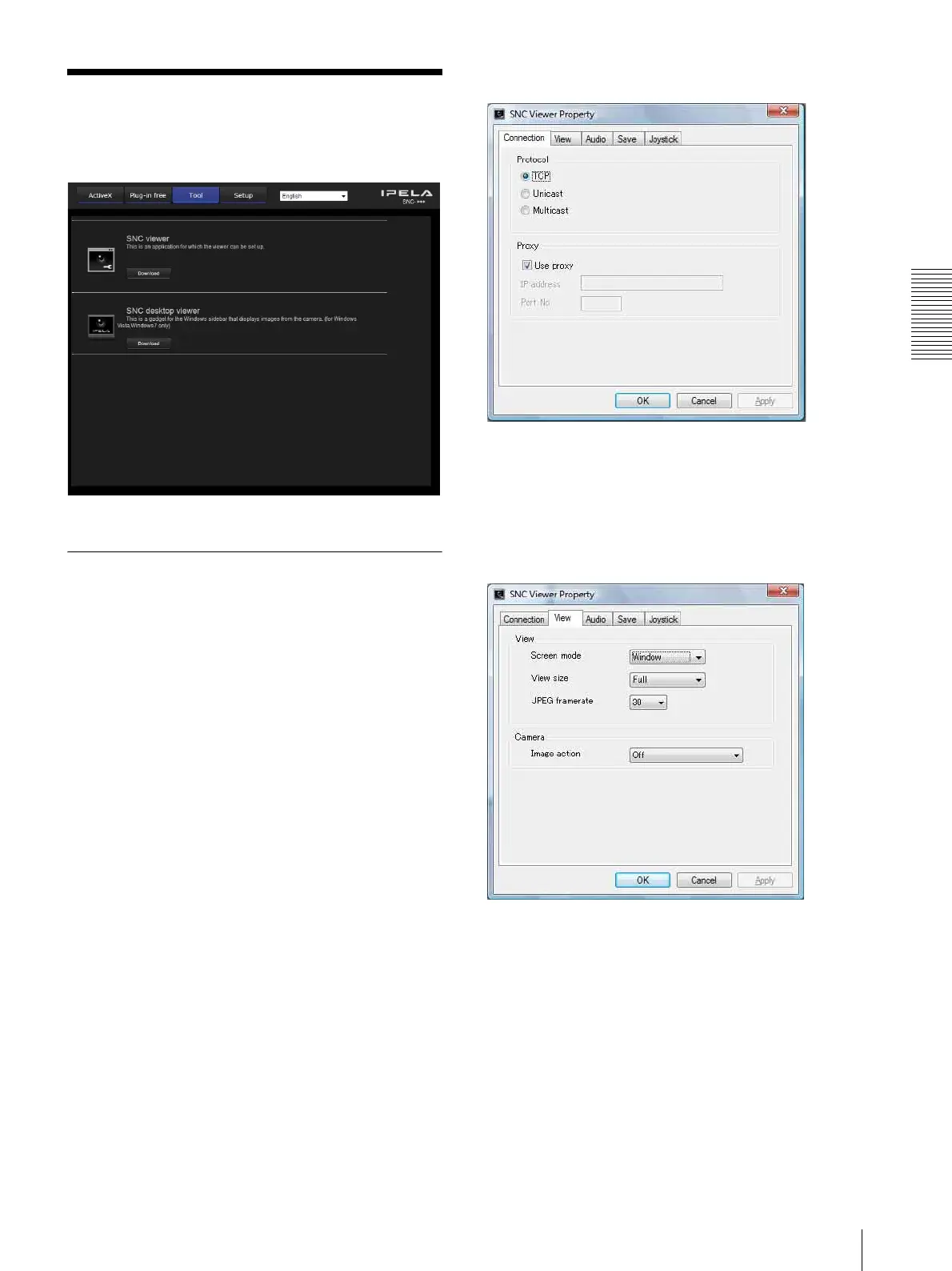
You can download system utility from the tools tab on
the main menu.
To use the utility, click Download to begin download.
SNC viewer
SNC viewer is an application which allows you to set the
initial state of the viewer.
Installing the SNC viewer
1
Execute the downloaded SNCViewer.msi file.
2
Install the SNC viewer following the instructions
on the wizard.
When the license agreement policies are displayed,
agree after reading them carefully and install the
SNC viewer.
Using the SNC viewer
Click SNC viewer in the control panel.
Connection tab
You can set the connection method.
Select the start-up connection from: TCP, Unicast, and
Multicast.
If TCP connection is selected, you can configure proxy
settings by selecting Use proxy.
View tab
Screen mode
You can select Window or Fullscreen.
View size
You can select the view size.
JPEG framerate
You can set the frame rate for JPEG.
Image action
Select from the image operation modes Area zoom,
Vector dragging and Off.



 To Next Page